Phone: 1-803.358.3600 • Fax: 1-803.358.3636
100 Innovation Place • Lexington SC 29072 USA
avtecinc.com • sales@avtecinc.com
Windows Configuration
Avtec recommends unchecking the power management feature checkbox for each USB NENAJack Box that displays in
the Windows Device Manager. Perform the following to disable power management:
1.
In the Windows Control Panel, select Device Manager.
The Device Manager window displays.
2. Expand the Human Interface Devices group.
3. Configure power management for each Avtec USBperipheral.
a.
Right-click the peripheral and select Properties.
b.
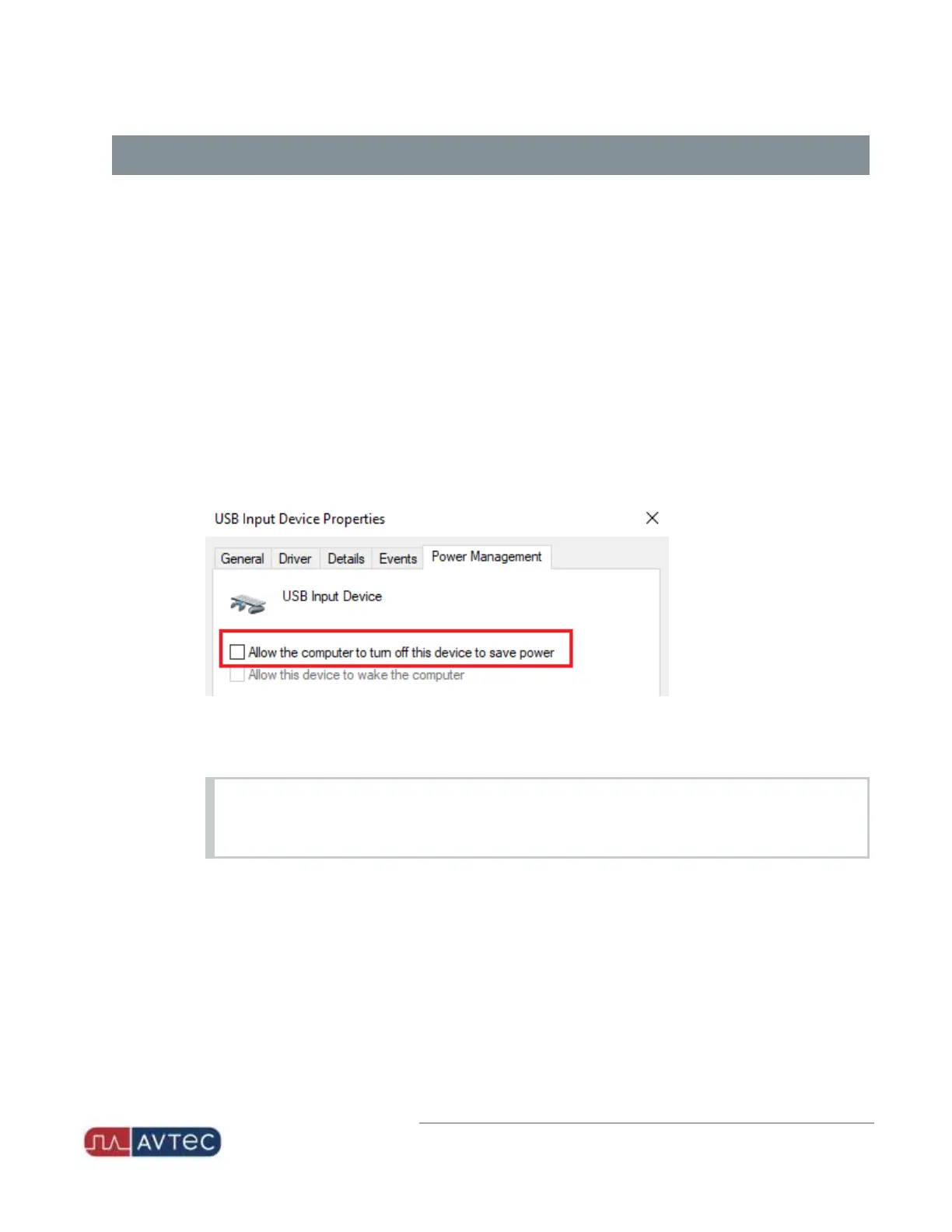
From the Power Management tab, deselect all power saving features.
The feature label may display as Allow the computer to turn off this device to save power, or it may
break out into two sections with Wake-On-LAN optionsand Power Save options. Disable ALL power
saving options.
c.
Click OK.
d.
Repeat for each Avtec USBperipheral.
NOTE
Power Management settings may not display in some versions of Windows 10. However, when the
settings do display, they should be disabled.
4.
Expand the Universal Serial Bus controllers group.
5.
Configure power management for every device in the group.
a. Right-click the device and select Properties.
b. From the Power Management tab, deselect the Allow the computer to turn off this device to save
power checkbox.
3
Avtec USB NENA Jack Box Configuration Guide | October 2021 | Revision 9



 To Next Page