Phone: 1-803.358.3600 • Fax: 1-803.358.3636
100 Innovation Place • Lexington SC 29072 USA
avtecinc.com • sales@avtecinc.com
USB NENAJACK BOX CONFIGURATION
GUIDE
Introduction
NOTE
This guide is for the Avtec USBNENAJack Box operating on the Software Media Workstation. For information
regarding the Hardware Media Workstation, see the NENA/Deskset for Hardware Media Workstation
Configuration Guide.
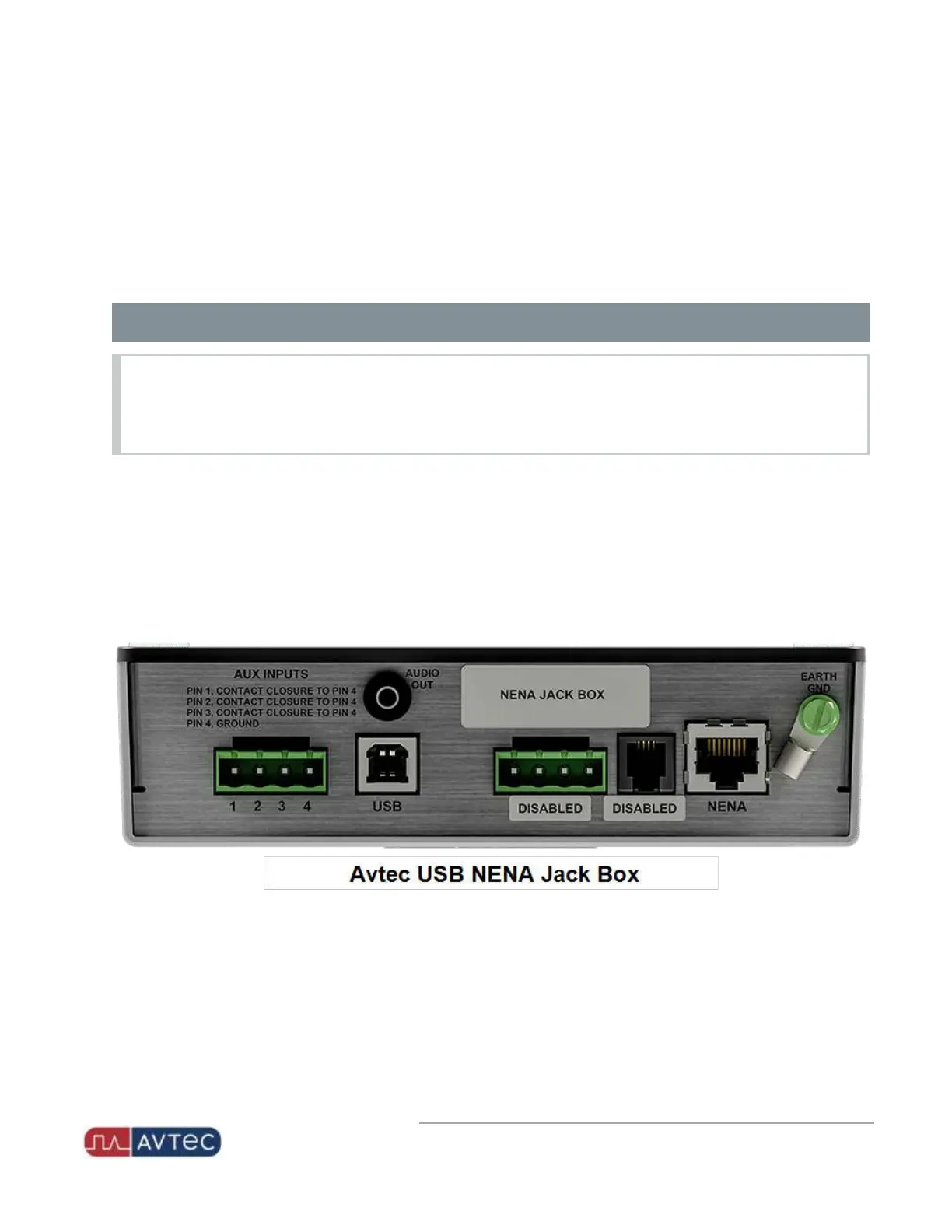
This document explains the setup, configuration, and use of the USB NENA Jack Box.
For Scout consoles running the Software Media Workstation, Avtec USBjack boxes provide a means of interfacing
peripheral accessories, such as headsets and handsets, to Scout consoles. Administrators can adjust audio levels,
external audio interfaces, and other settings to optimize dispatcher audio.
Up to four USB jack boxes and one external audio interface (EAI) can connect to a Scout console, which allows
supervisors to join a dispatcher's call, to accommodate multiple dispatcher trainees, or to provide redundancy in the
event of jack box failure.
1
Avtec USB NENA Jack Box Configuration Guide | October 2021 | Revision 9


 To Next Page