Phone: 1-803.358.3600 • Fax: 1-803.358.3636
100 Innovation Place • Lexington SC 29072 USA
avtecinc.com • sales@avtecinc.com
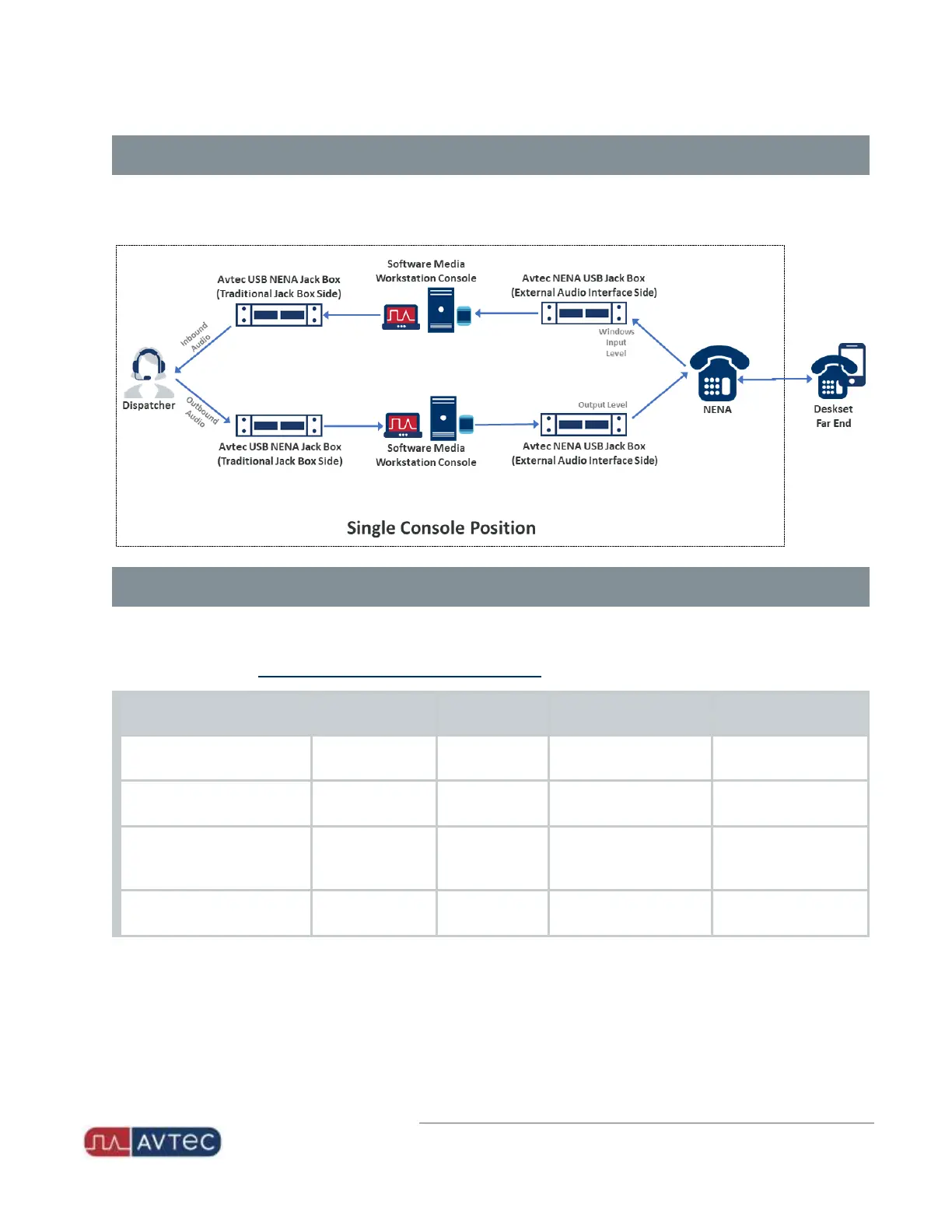
Appendix E: NENAJack Box Audio Flow
The following diagram illustrates how audio flows using a USB NENAJack Box at a single Scout console position. The
bottom flow represents dispatcher outbound audio, while the top flow represents dispatcher inbound audio:
Troubleshooting
The following table provides troubleshooting suggestions. Use the table as a guide to correct common audio issues that
may arise when interfacing with the Avtec USBNENA Jack Box. You can make audio adjustments either to the physical
NENA device or on the Avtec USB External Audio Interface webpage.
Issue
Dispatcher
Devices
Field Device Location Solution
Dispatcher Outbound Audio is
Low at the Far End
N/A Low
Avtec USB External Audio
Interface webpage
Increase Output Level
(%).
Dispatcher Outbound Audio is
High at the Far End
N/A High
Avtec USB External Audio
Interface webpage
Decrease Output Level
(%).
Dispatcher Inbound Audio is
Low from the Far End for All
Calls
Low N/A
Avtec USB External Audio
Interface webpage
Increase Windows Input
Level (%).
Dispatcher Inbound Audio is
High from the Far End
High N/A
Avtec USB External Audio
Interface webpage
Decrease Windows Input
Level (%).
21
Avtec USB NENA Jack Box Configuration Guide | October 2021 | Revision 9


 To Previous Page