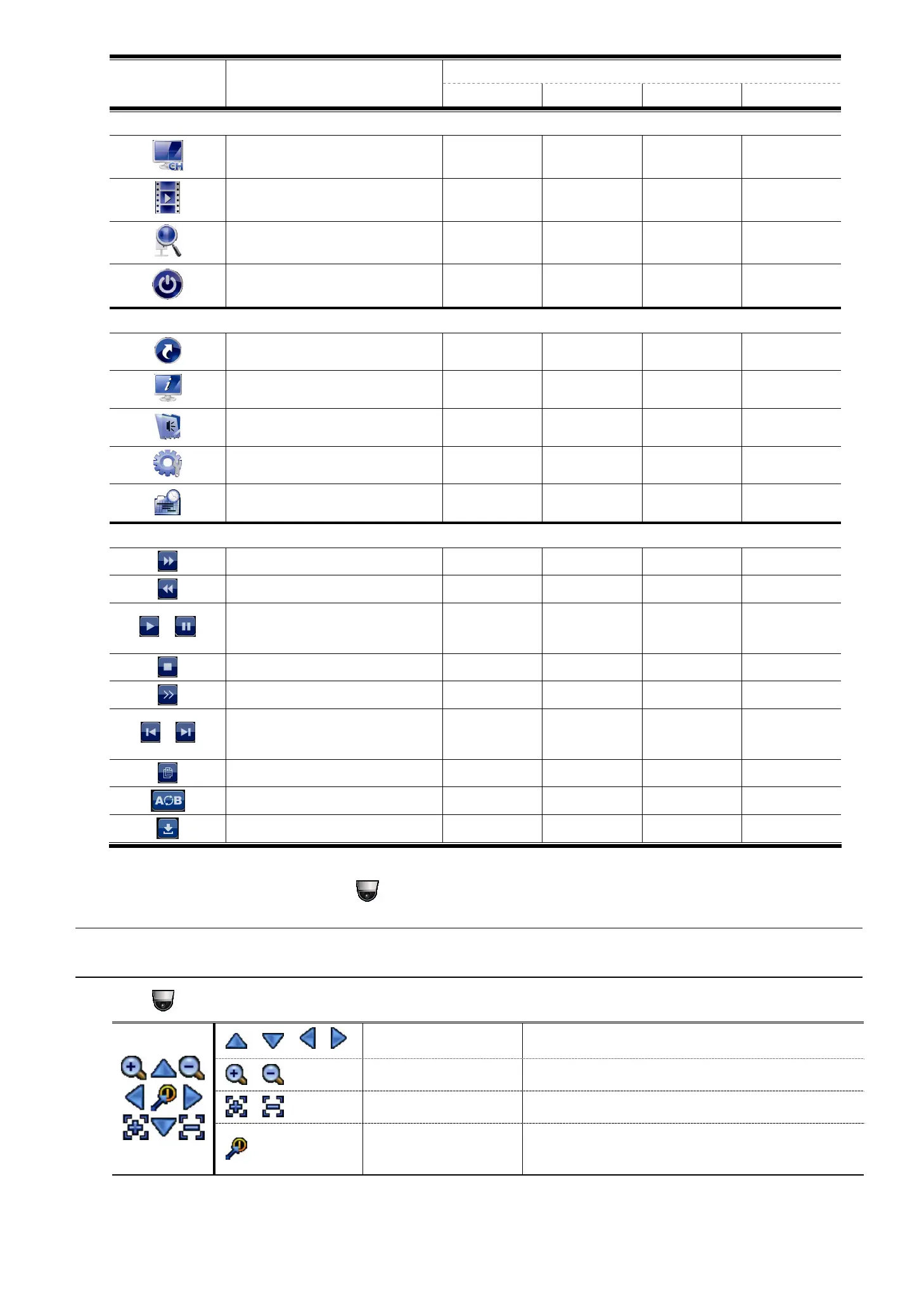
FREQUENTLY-USED FUNCTIONS
10
Function User Level
SUPERVISOR POWER NORMAL GUEST
Quick operation
Channel Switch
Playback
IP Search
Power
Main menu
Quick Start
System
Event Information
Advanced Config.
Schedule Setting
Playback control
Fast Forward
Fast Rewind
/
Play / Pause
Stop
Slow Playback
/
Previous / Next Hour
Quick Search
Repeat
Backup
4.4 PTZ Control (1CH mode)
Note: This function is available only for “SUPERVISOR” and “POWER USER”. To know more details,
please refer to “4.3 User Level Creation” at page 9.
Click on the channel status bar to display the panel as follows:
/ / /
Up / Down / Left / Right
Click to move your selection up / down / left / right, or
change settings.
/
Digital zoom in / out
Click to zoom in / out the camera image digitally.
/
Focus near / far
Click to adjust the focus of the image.
Preset point
Click to display the preset point panel for preset point
viewing or setting. For details, please refer to the section
below.


 To Next Page