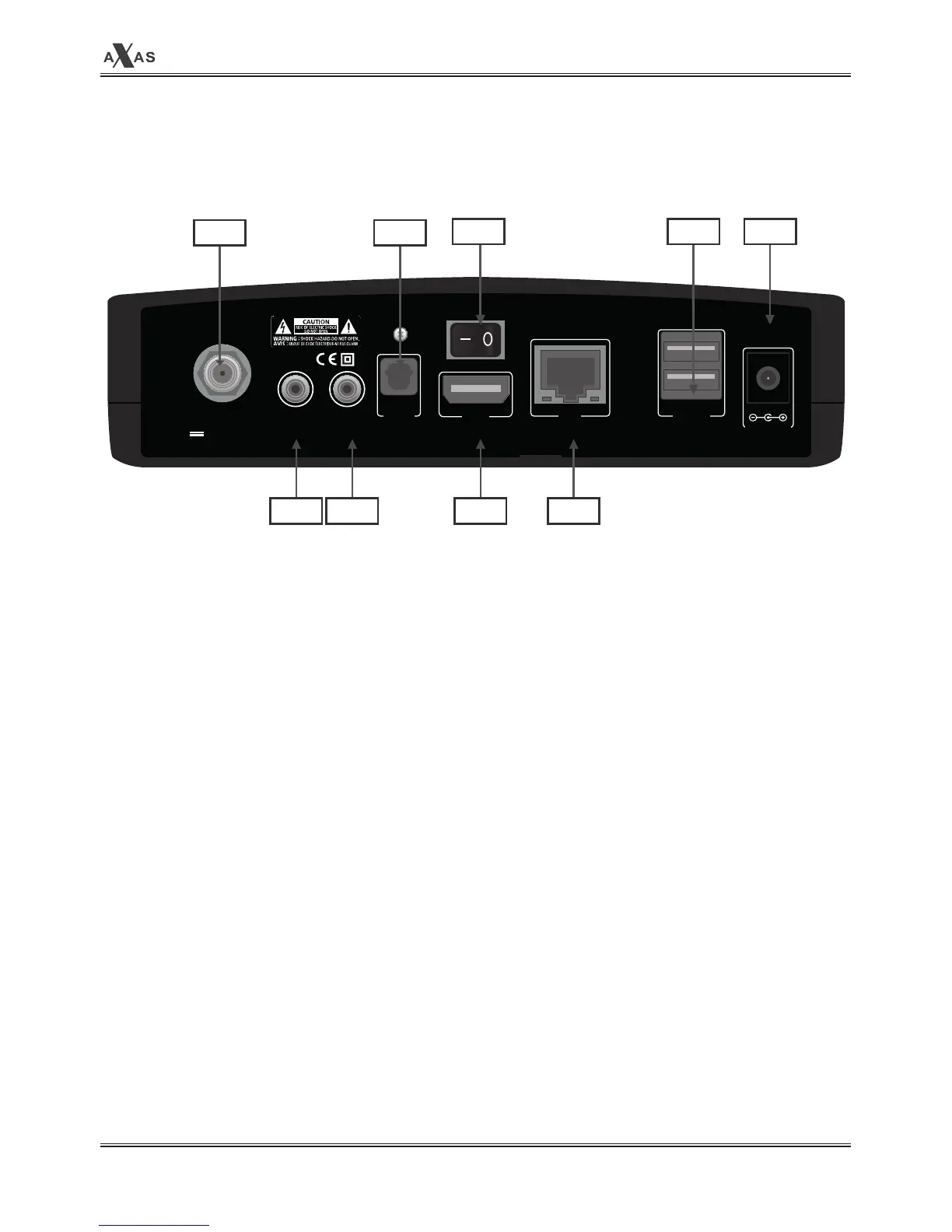
▣ Rear Panel
R1: LNB IN
Connect the IF cable from your LNB on your dish to this connector.
R2: COMPONENT
Connects to RCA cable.
R3: Video/Audio output
Connects to TV using RCA cable.(composite YPbPr).
R4: S/PDIF
Connects to a digital audio system using S/PDIF cable.
R5: On/Off Switch
Powers on/off.
R6: HDMI
Connects to TV using a HDMI cable for both audio and video signals.
R7: LAN
Connects the PC or another set top box of the receiver.
R8: USB
Connects the USB Memory Stick or external HDD.
COMPONENT VIDEO/
AUDIO
ON/OFF
LNB IN
13/18V, 22KHZ
Max 400mA
HDMI LAN USB x 2S/PDIF
DC 12V,3A
R1 R4
R3R2 R6 R7
R9R5 R8


 To Next Page