
 Need help?
Do you have a question about the AXE I/O ONE and is the answer not in the manual?
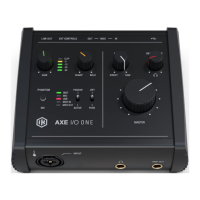
Explains the controls and indicators on the top panel.
Details the input/output jacks and controls on the front panel.
Describes the ports and features on the rear panel.
Steps for downloading and installing the AXE I/O ONE drivers and control software.
How to connect the hardware and configure basic settings for use.
Using the AMP OUT for re-amping guitar signals and tone processing.
Selecting between JFET and PURE preamp topologies for the instrument input.
Using the pickup selector to optimize for passive or active guitar pickups.
Adjusting input impedance for creative tone shaping and character.
Connecting and configuring external pedals for MIDI control.
Guidance on integrating the AXE I/O ONE with your Digital Audio Workstation (DAW) and audio software.
Specific guidance for connecting condenser, dynamic, and ribbon microphones.
How to connect guitars, basses, and other mono instruments.
Connecting speakers and headphones for monitoring audio.
Understanding and utilizing the zero-latency direct monitoring feature.
Navigating the main interface screen of the control software.
Setting up external controllers and MIDI assignments within the software.
General specifications and detailed parameters for the microphone input section.
Technical details for the instrument input and main monitor outputs.
Specifications for the Amp Output and headphone monitoring features.
Information on how to access the complete warranty policy.
Links and contact information for customer support and additional product resources.
The official FCC compliance statement for the device.
 General
| Type | Audio Interface |
|---|---|
| Connectivity | USB |
| Phantom Power | Yes |
| MIDI In/Out | No |
| Resolution | 24-bit |
| Channels | 2 |
| USB | 1 x Type B |
| OS Requirements - PC | Windows 10 or later |
| Input Channels | 2 |
| Output Channels | 2 |
| Bit Depth | 24-bit |
| Compatibility | Mac, PC |
| Analog Outputs | 2 x 1/4" TRS |
| Software | AmpliTube 5 SE |
| Power | USB bus power |
| Software Included | AmpliTube 5 SE |
| Analog Inputs | 1 x XLR-1/4" combo (mic/line/instrument) |
| Sample Rate | 44.1 kHz to 192 kHz |

 To Next Page