English
6
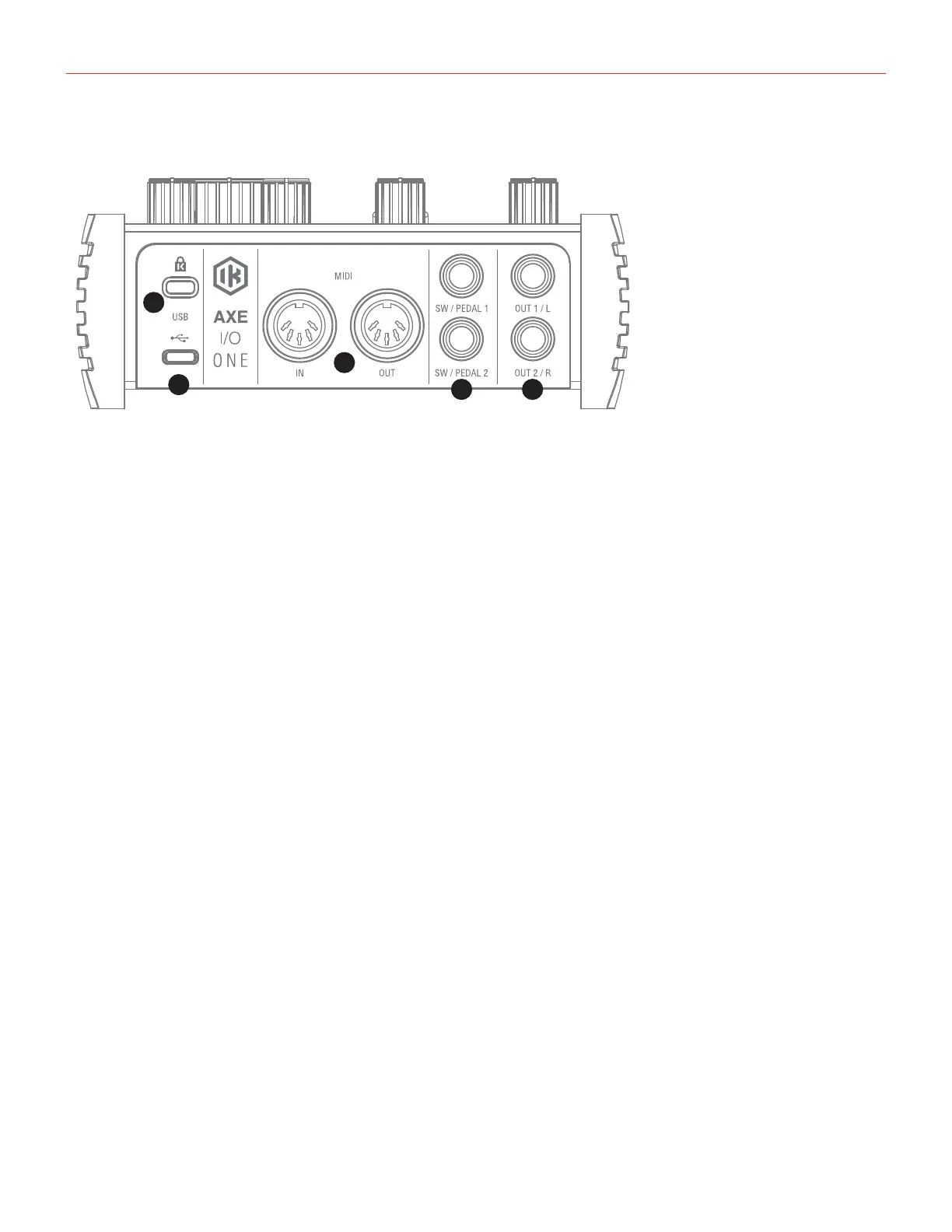
1.3 Rear panel
2
3
4 5
1
1. USB port - Type C connector - connect the AXE I/O ONE to your computer with the supplied cable
2. Kensington security lock - secure your AXE I/O ONE to a suitable structure if desired.
3. MIDI IN/OUT - standard 5-pin DIN sockets for connection to external MIDI equipment.
4. EXTERNAL CONTROL-usethese1/4”(6.35mm)jackstoconnectexternalcontrollerpedals(singleor
dual switches, continuous expression pedals). MIDI messages sent are freely assignable from the “Control
Software”.
5. LINE OUTPUTS1/Land2/R-Outputs1/Land2/Rarebalancedandfloatinganaloguelineoutputson1⁄4”
(6.35 mm) jack sockets; use TRS jacks for a balanced connection. Outputs 1/L and 2/R will normally be
used to drive the primary monitoring system.


 To Next Page