English
5
8. MONITOR - the Monitor knob allows you to blend your input signals with the playback streams from your
computer. This allows you to monitor your input signal with zero latency. If the knob is positioned at 12
o’clock, the input signal and the playback stream will be equally balanced. Turning the knob to the left will
increase the level of the direct signal; turning to the right will increase the level of the playback stream from
the DAW. This control works both for Outputs 1-2 and Headphones.
9. HEADPHONES - allows you to control the headphone volume.
10. MASTER - main output level control – this control adjusts the level at Outputs 1 and 2 on the rear panel.
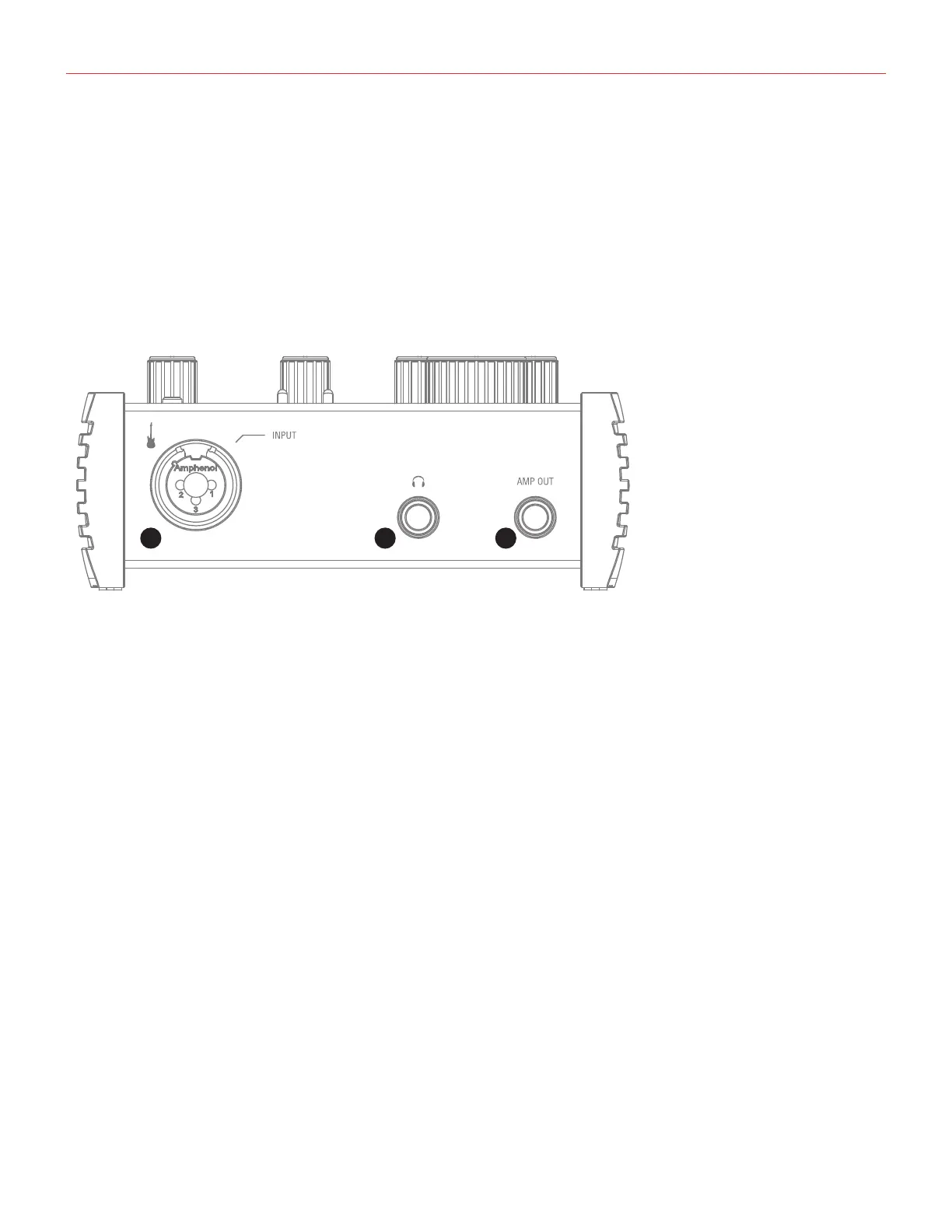
1.2 Front panel
3
2
1
1. MIC/INST IN - XLR Combo type input socket - connect microphone or instrument (e.g., guitar).
2. HEADPHONE OUT-connectonepairofheadphonestothe1⁄4”(6.35mm)TRSjacksockets.The
headphone outputs always carry the signals that are currently routed to outputs 1 & 2.
3. AMP OUT -thisisathird1/4”physicalunbalanced,floatingoutputwithselectablegroundlift(controlled
with software). It is independent from main Outputs 1-2. This output is specifically designed to allow the
interface to feed guitar amps or stomp pedals without the typically associated risk or hum or buzzing noises
caused by ground loops or mismatched levels and impedances.


 To Next Page