8
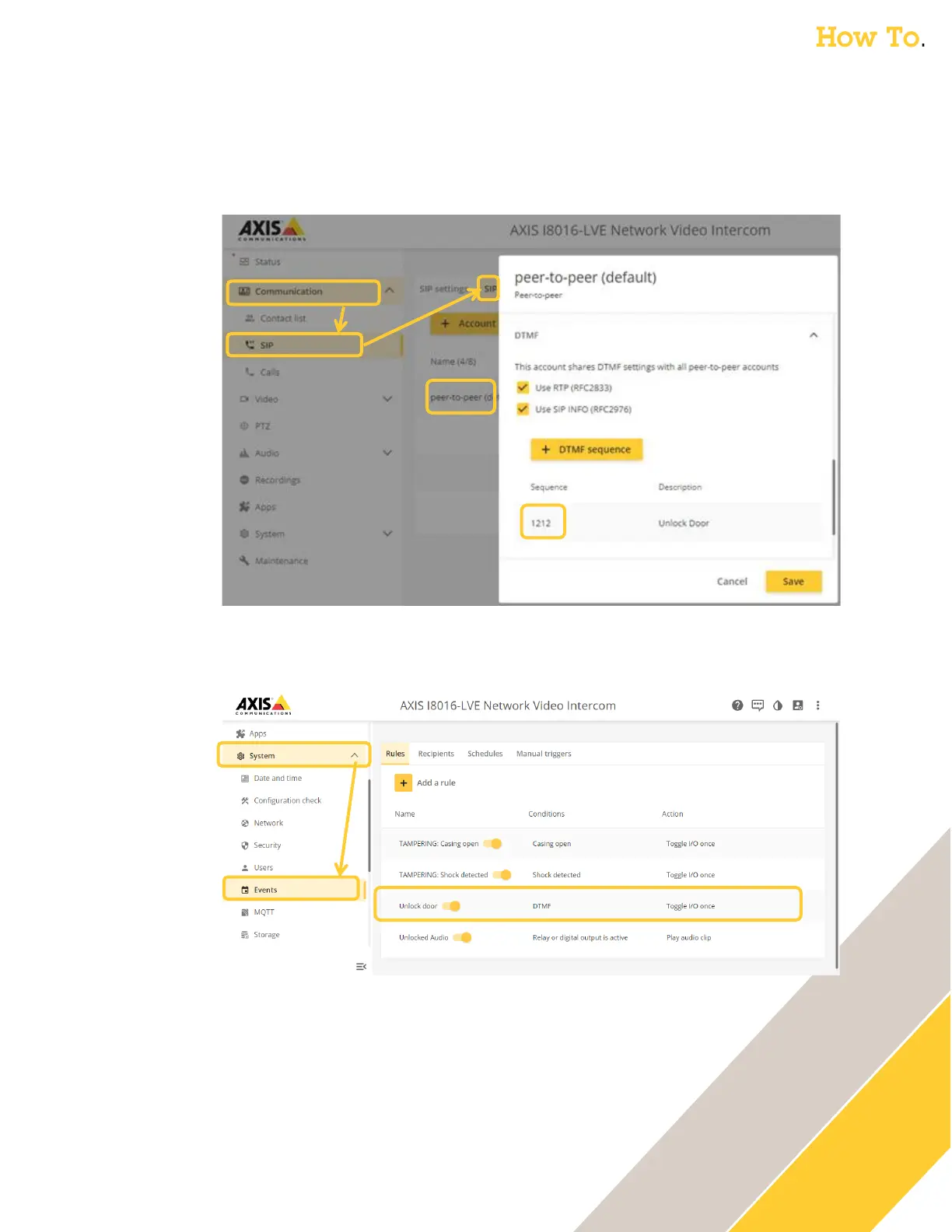
o Axis Intercoms: The DTMF sequence can be found in the Axis web GUI under
Communication → SIP then SIP Accounts. Edit the account being used (default peer-to-
peer) and scroll to the bottom to find the DTMF sequence. The description is used in the
unlock event rule (as the DTMF Event ID). If there is no DTMF sequence, then create one.
o While in the interface of the Axis Intercom, verify you have an DTMF event rule created.
This is found under System → Events (and allows the DTMF sequence to trigger the relay)
o If there is no DTMF event rule, add one
▪ Update Name with something easy to identify, name such as “Unlock Door”
▪ Set Condition to “DTMF” and select the DTMF Event ID from the drop down that
matches the DTMF Sequence description from the previous step.
▪ Update Action to “Toggle I/O once”, Port “Relay 1”, State “Active”, Duration
“00:00:05” Adjust any settings as needed.
▪ Click Save



 To Next Page