and bandwidth.
Use identical streams wherever possible to maintain a high frame rate. Stream profiles can be used to ensure
that streams are identical.
Accessing Motion JPEG and H.264 video streams simultaneously affect both frame rate and bandwidth.
Heavy usage of event settings affects the product’s CPU load which in turn affects the frame rate.
Using HTTPS may reduce the frame rate, in particular, if streaming Motion JPEG.
Heavy network utilization due to poor infrastructure affects the bandwidth.
Viewing on poorly performing client computers lowers perceived performance and affects frame rate.
Running multiple AXIS Camera Application Platform (ACAP) applications simultaneously may affect the frame
rate and the general performance.
Specifications
To find the latest version of the product’s datasheet, go to the product page on axis.com and locate Support &
Documentation.
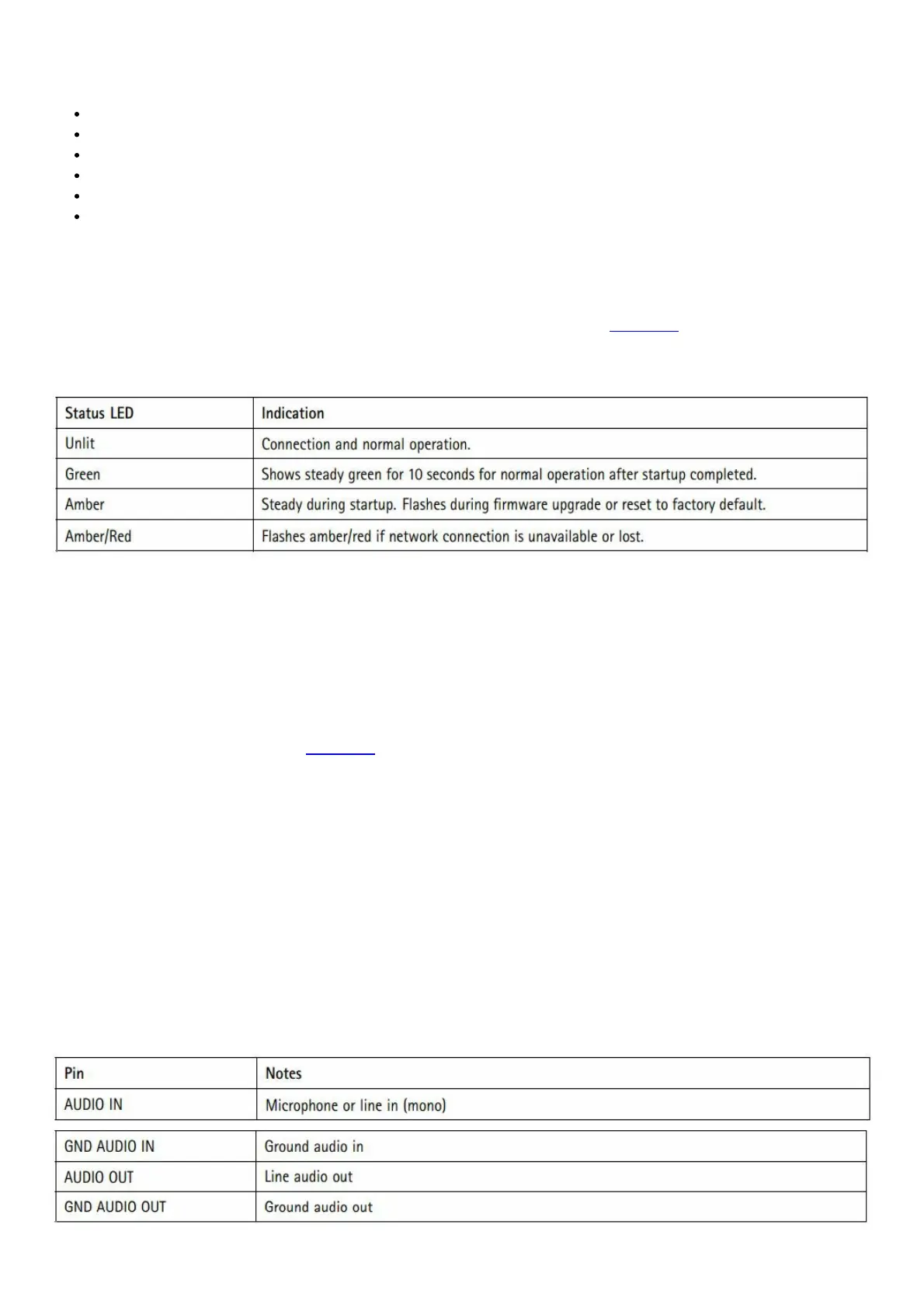
LED indicators
SD card slot
NOTICE
• Risk of damage to SD card. Do not use sharp tools, metal objects, or excessive force when inserting or removing
the SD card. Use your fingers to insert and remove the card.
• Risk of data loss and corrupted recordings. Do not remove the SD card while the product is running. Unmount the
SD card from the product’s webpage before removal.
This product supports microSD/microSDHC/microSDXC cards.
For SD card recommendations, see axis.com
Buttons
Control button
The control button is used for:
• Resetting the product to factory default settings. See How to reset to factory default settings on page 16.
• Connecting to an AXIS Video Hosting System service. To connect, press and hold the button for about 3 seconds
until the status LED flashes green.
Connectors
Network connector
RJ45 Ethernet connector with Power over Ethernet (PoE).
Audio connector
4-pin terminal block for audio input and output. See Product overview on page 3. For audio, the left channel is used
from a stereo signal.



 To Next Page