AXISP1367-ENetworkCamera
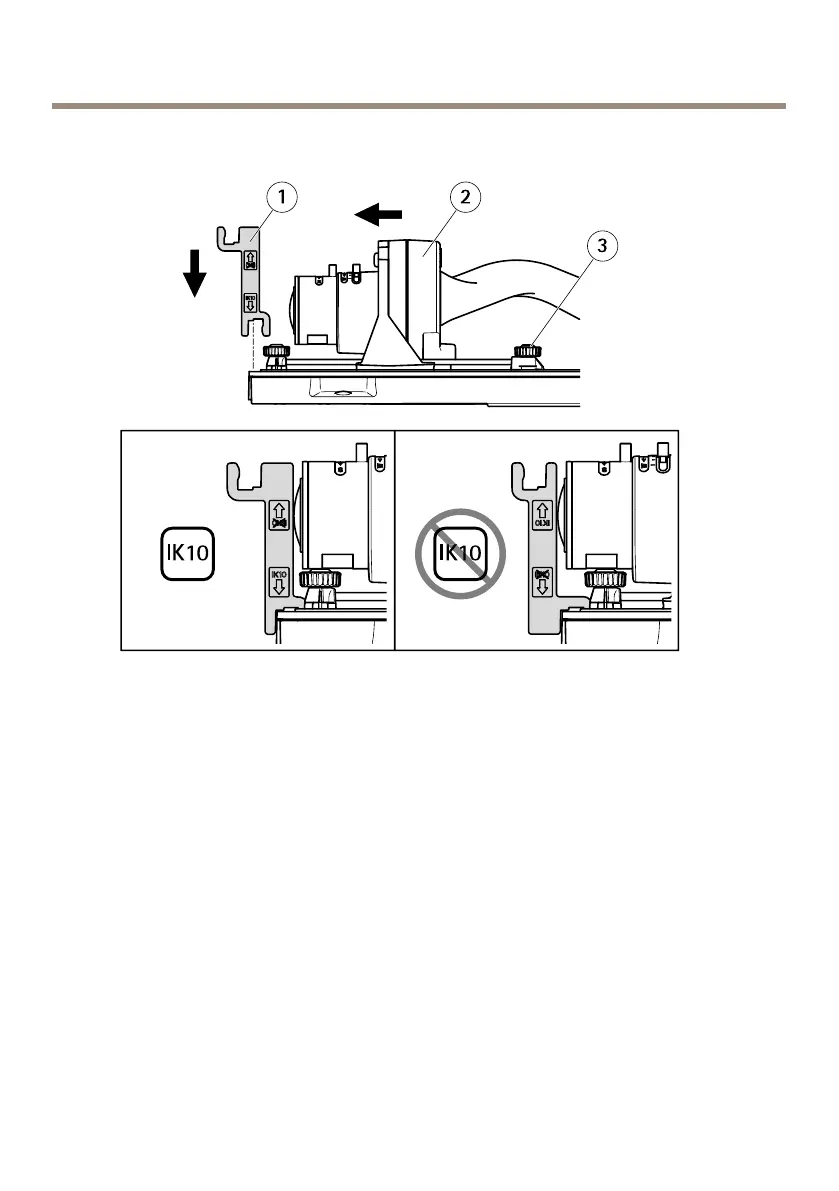
HowtopositionthelensforIK10
1
IK10tool
2
Opticunit
3
Springloadedthumbscrew(4x)
1.Zoomthelenstoitswidestposition.
2.AttachtheIK10tooltothebottomcover.
3.Loosenthespringloadedthumbscrews.
4.Movethelenssothatittouchesthetool.
5.Tightenthethumbscrews.
Howtoaccesstheproduct
AXISIPUtilityandAXISCameraManagementarerecommendedmethodsforndingAxisproducts
onthenetworkandassigningthemIPaddressesinWindows®.Bothapplicationsarefreeandcan
bedownloadedfromwww.axis.com/support
Theproductcanbeusedwiththefollowingbrowsers:
20



 To Next Page