13
AXIS P8221 - Audio
Audio
Audio equipment
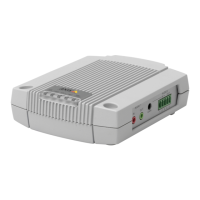
AXIS P8221 has two connectors, Audio 1 and Audio 2, for external audio equipment. See table below for examples of
supported audio equipment.
The Audio 2 terminal connector can power microphones requiring 48 V phantom power and has a built-in amplifier enabling
direct connection of passive speakers. The Audio 1 connector can power small electret microphones.
Please see Unit connectors, on page 32, for wiring information.
Notes:
• Input from Audio 1 can be combined with output from Audio 2, and vice versa
• If speakers are connected to both Audio 1 and Audio 2, the Audio 1 output will be used
Input gain adjustment (Audio 2)
The gain adjustment screw and mic level LED indicator are used to configure the input gain for microphones connected to
Audio 2.
The mic level LED indicates the strength of the sound captured by the microphone. To minimize distortions, the LED should
turn amber, but not red, at the highest sound levels.
To adjust the gain, reproduce the loudest sounds the microphone will be exposed to and simultaneously turn the gain screw
using a screwdriver until the mic level LED shows amber.
Note:
The mic level LED is enabled and disabled under Setup > Audio Settings > Audio Input.
Examples of supported audio equipment
Audio 1 (3.5 mm audio jacks) Audio 2 (terminal connector)
Input
Electret microphone
Unbalanced dynamic microphone
Line in
Balanced microphone
Output
Line out
Active speaker
Headphones
Passive speaker


 To Next Page

