AXISQ2901-ETemperatureAlarmCamera
Detectors
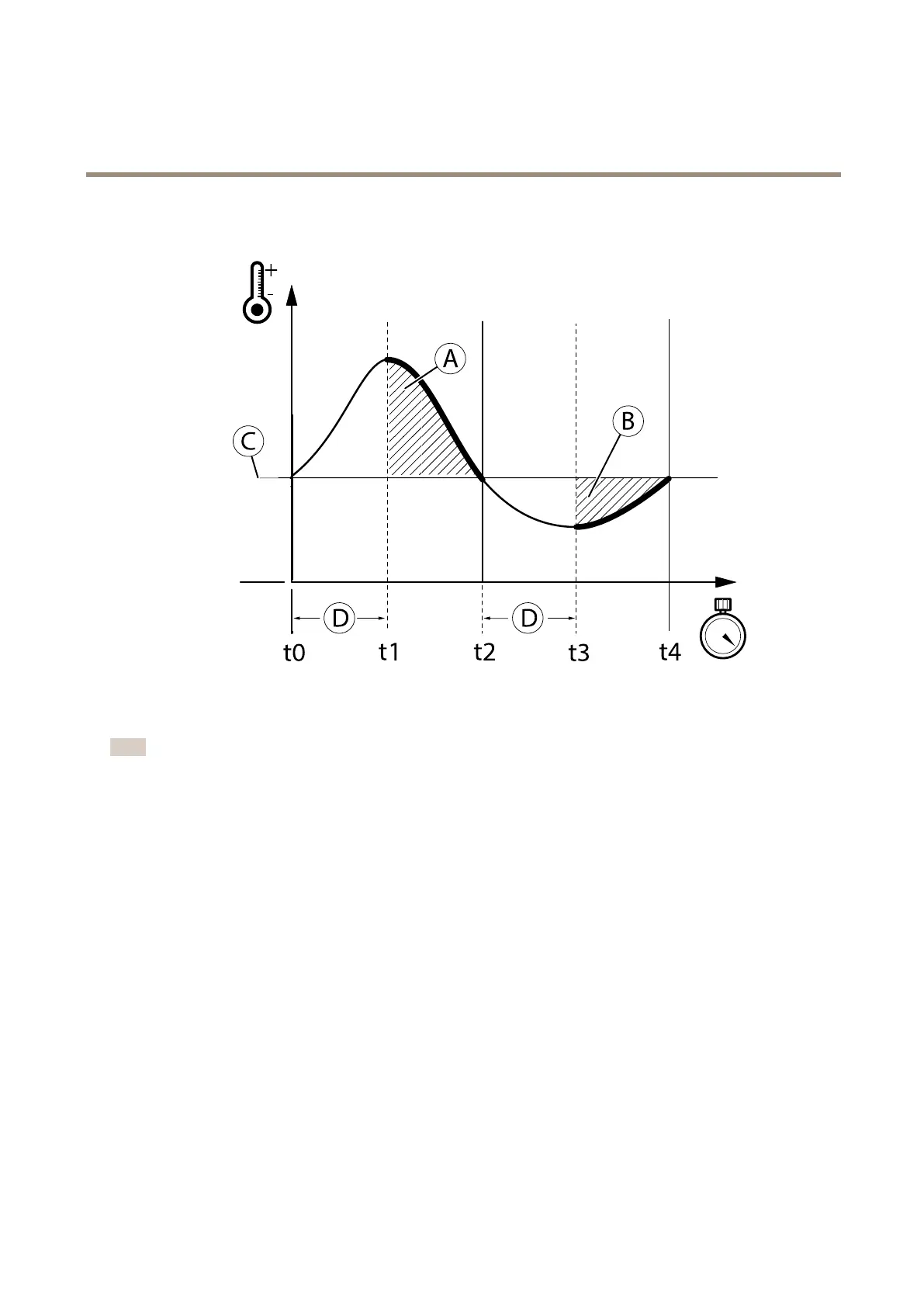
4.IfdetectiontypeAbove(A)orBelow(B)isselected:EnteraDelayTime(D)inseconds.
Note
AlarmsaretriggeredaftertheDelaytime(D)haselapsed.Intheexample,anAbovealarmistriggeredbetweent1andt2.A
Belowalarmistriggeredbetweent3andt4.
5.ClickSavetosaveyoursettings.
ShowandHideDetectionZones-
•Toviewallthedetectionzones,selectViewAllZones.
•Toviewonlyonedetectionzone,selectthezoneunderZoneNameandclickViewSelectedZone.
DetectionZoneColors-
•Thebluerectangleimpliesthatyouhaveselectedadetectionzoneforediting.
•Thegreenrectangleimpliesthatnotemperaturealarmhastriggeredinthezone.
•Theredrectangleimpliesthatatemperaturealarmhastriggeredinthezone.
MaterialEmissivityTable
Thefollowingtablelistsapproximatedemissivityvaluesforanumberofcommonmaterialtypes.
Formoreinformationaboutemissivity,seetheAXISWhitepaperRemotetemperaturemonitoringavailableatwww.axis.com
34


 To Next Page