AXISS3008Recorder
Productoverview
Productoverview
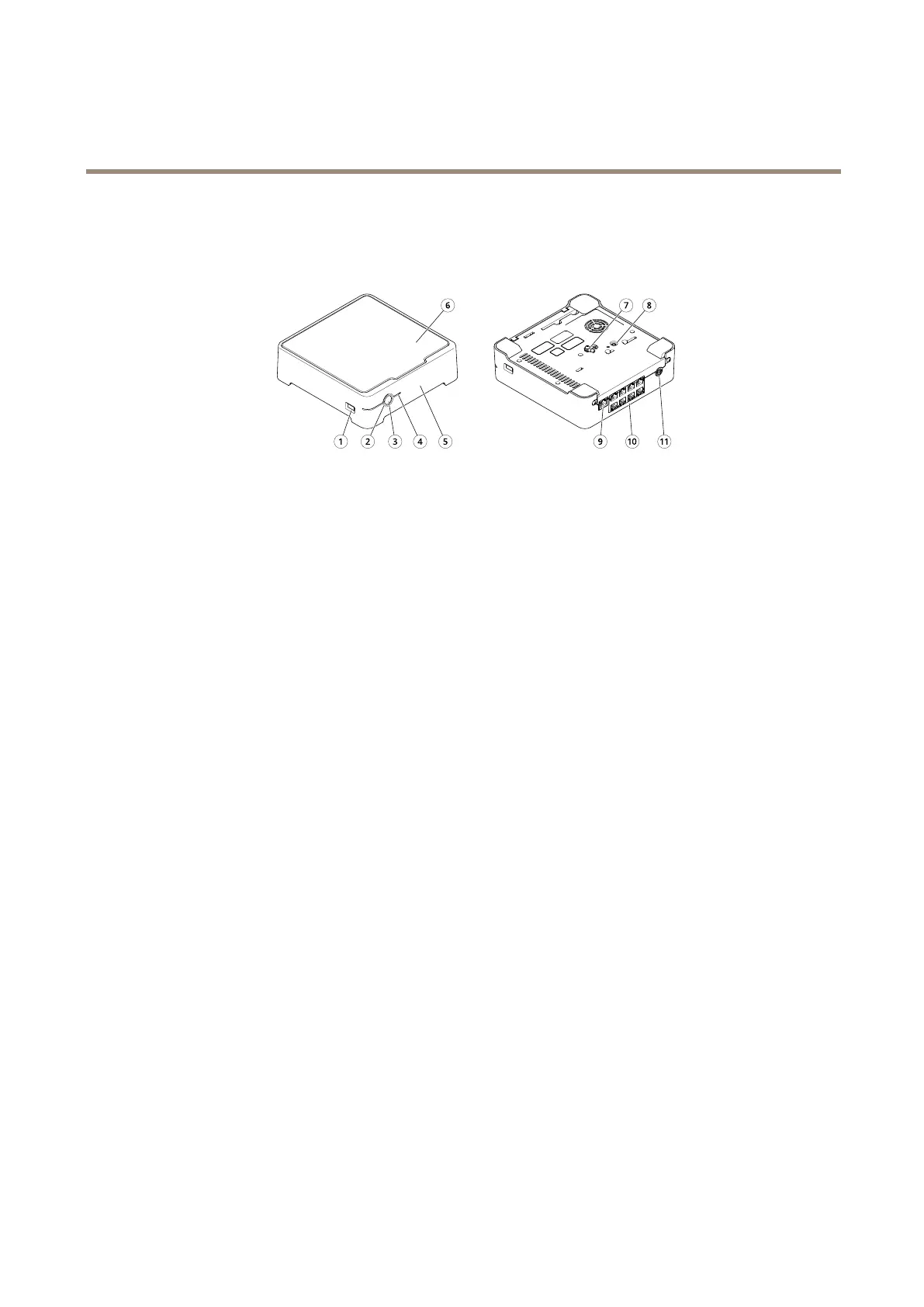
1
USBport
2
StatusLED
3
Powerbutton
4
HarddriveLED
5
Alarmbuzzer
6
Harddrive
7
Grounding
8
Controlbutton
9
LANport
10
PoEport(8x)
11
Powerinput
Powerbutton
•Toshutdowntherecorder,longpressthepowerbuttonuntilthebuzzermakesabriefsound.
•Tosilencethebuzzer,shortpressthepowerbutton.
Controlbutton
Thecontrolbuttonisusedfor:
•Resettingtheproducttofactorydefaultsettings.SeeHardresetarecorderonpage26.
•ConnectingtoanAXISVideoHostingSystemservice.Toconnect,pressandholdthebuttonforabout3secondsuntilthe
statusLEDashesgreen.
24


 To Next Page