7978
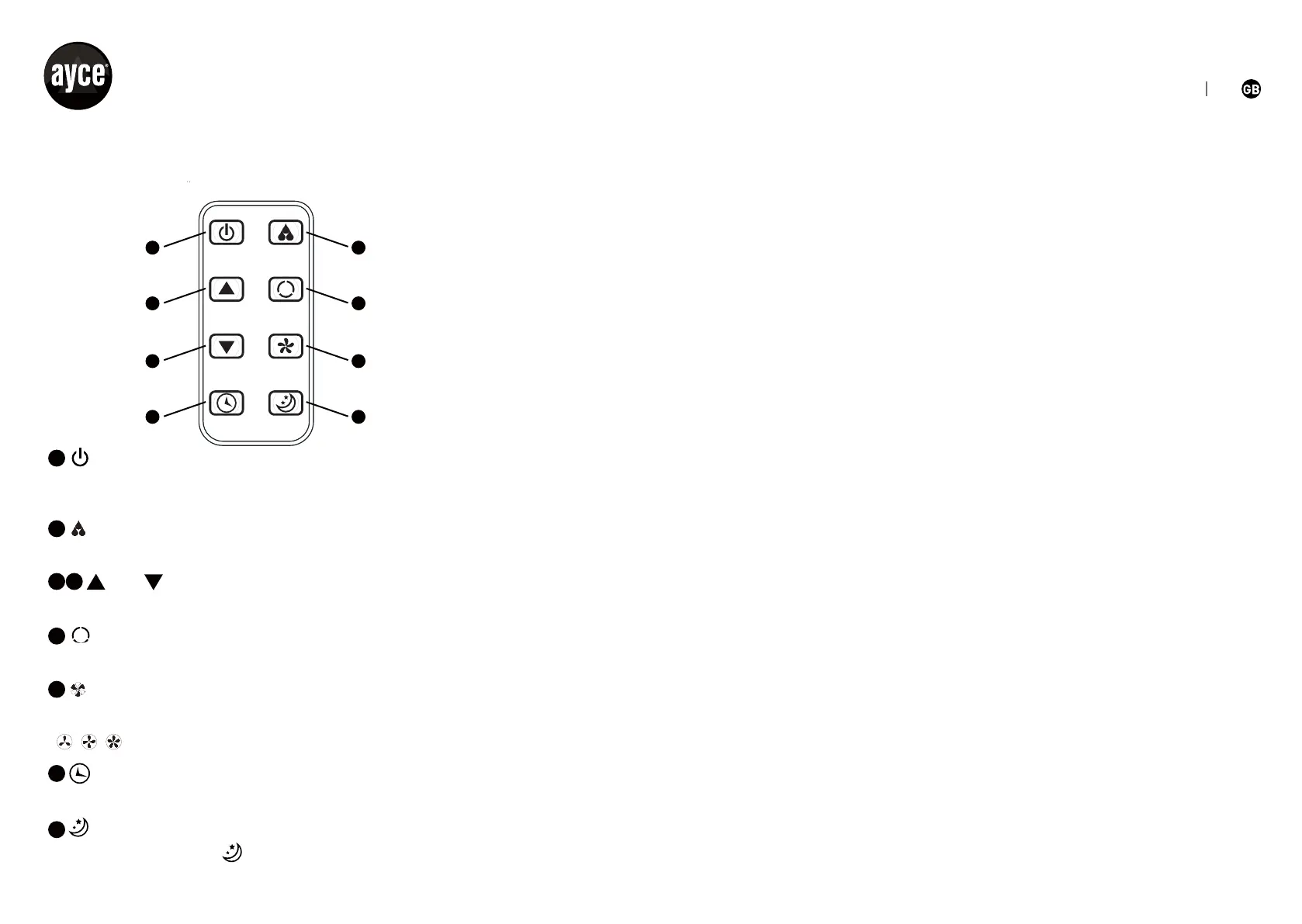
REMOTE CONTROLLER
The remote controller transmits signals to the system.
and Setting Buttons
button
button
button
button
The appliance will be started when it is energized or will be stopped
when it is in operation, if you press this button.
Can adjust the room humidity.
Used to adjust the room temperature and the timer.
Used to set or cancel Mode operation.
button
button
Used to select automatic、cool、fan mode.
Used to select fan speed in sequence.
stand for low 、middle、high fan speed.
Used to set automatic off and automatic on time.
3
4
6
7
8
5
1
2
PROTECTION
Operating condition
The protective device may trip and stop the appliance in the cases
listed below:
Cooling
Indoor air temperature is over 43 °C.
Room temperature is below 15 °C.
Dehumidifying
Room temperature is below 15 °C.
If the air conditioner runs in cooling or dry mode with door or window
opened for a long time when relative humidity is above 80%, dew may
drip down from the outlet.
Features of protector
The protective device
will work in the following cases:
• Restarting the unit at once after operation stops or changing mode
during operation, you need to wait 3 minutes.
• If the plug is taken out, when you restart the appliance, it will
return to the original mode, TIMER ON and TIMER OFF must be set
again.
DRAIN WATER
Special reminder: there is condensing water recycling hidden within
this unit. The condensing water is partly kept recycling between the
condenser and the water plate. When the water level rises
to the
upper level, the float switch and water full indicator (E4) lights on
to remind draining water. Please cut of the power supply, move the
POWER DEHUM.
UP
DOWN SPEED
TIMER SLEEP
MODE
1
3
5
7
2
4
6
8


 To Next Page