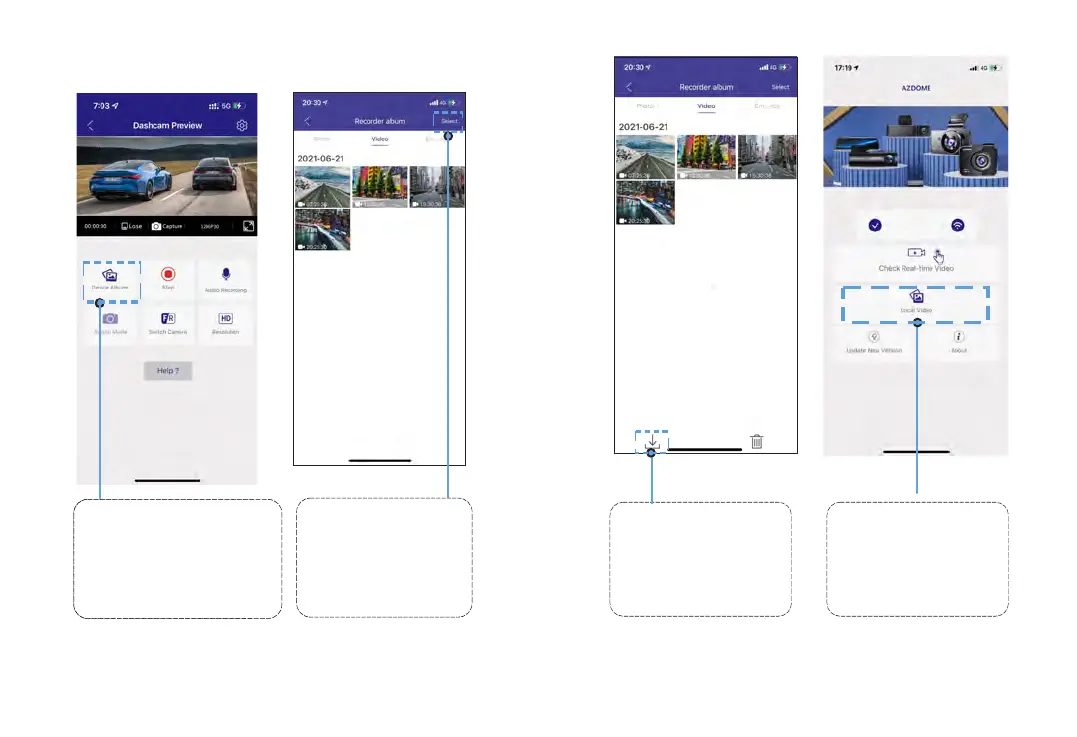
Downloadthevideofilesintoyoursmartphone
PleaseSTOPrecording
first,thenressthe‘ Device
Album’togetPhoto,Video,
Emergencyfiles.
GotoDashcamPreview
interface.PleaseSTOP
recordingfirst,thenpressthe
‘DeviceAlbum’togetPhoto,
Video,Emergencyfiles.
1
Selectthevideofiles
todownloadintoyour
smartphone.
2
Thenyoucanfind
thesedownloadedvideo
filesinAPPoriginal
interfacemenunamed
‘LocalVideo’.
4
Presstheiconto
downloadthevideofiles.
However,itwilltakeabit
oftimetodownloadone
videofile.
3
15 16
M17



 To Next Page