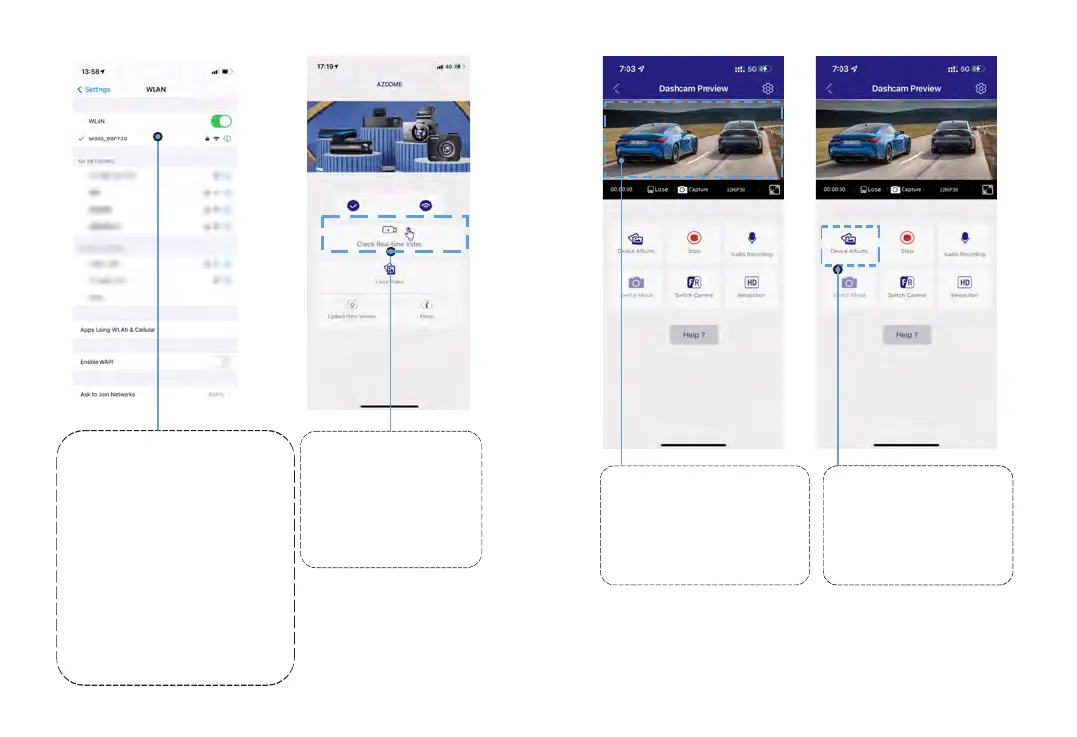
GotoPhone'sSettings>
WiFi>SelectWiFiofthedash
cam.Afterit'sconnectedtothe
WiFi,itwillsay‘ Nolnternet
Connection’whichwasnormal.
BecausedashcamWiFiisONLY
forvideo/phototransferfunction,
NOTmadetobroadcastfootage
overthecloudorinternet,
pleaseignoretheprompt.
WiFiNameSSID:M17_******
DefaultPASSWORD:12345678
Therewillshowdash
cammodelM17when
connectsuccessfully.
Press“ CheckReal-time
Video”tolivevideo
previewinterface.
2 3
PleaseSTOPrecording
first,thenressthe‘ Device
Album’togetPhoto,Video,
Emergencyfiles.
Nowyoucanviewthe
videocurrentlybeingrecorded
real-timebyconnecting
yoursmartphonetothe
dashcamviaWi-FiDirect.
4
PleaseSTOPrecording
first,thenpressthe‘ Device
Album’togetPhoto,Video,
Emergencyfiles.
5
13 14
M17



 To Next Page