HOT
-
SWAPPABLE SWITCHES
REMOVING SWTICHES
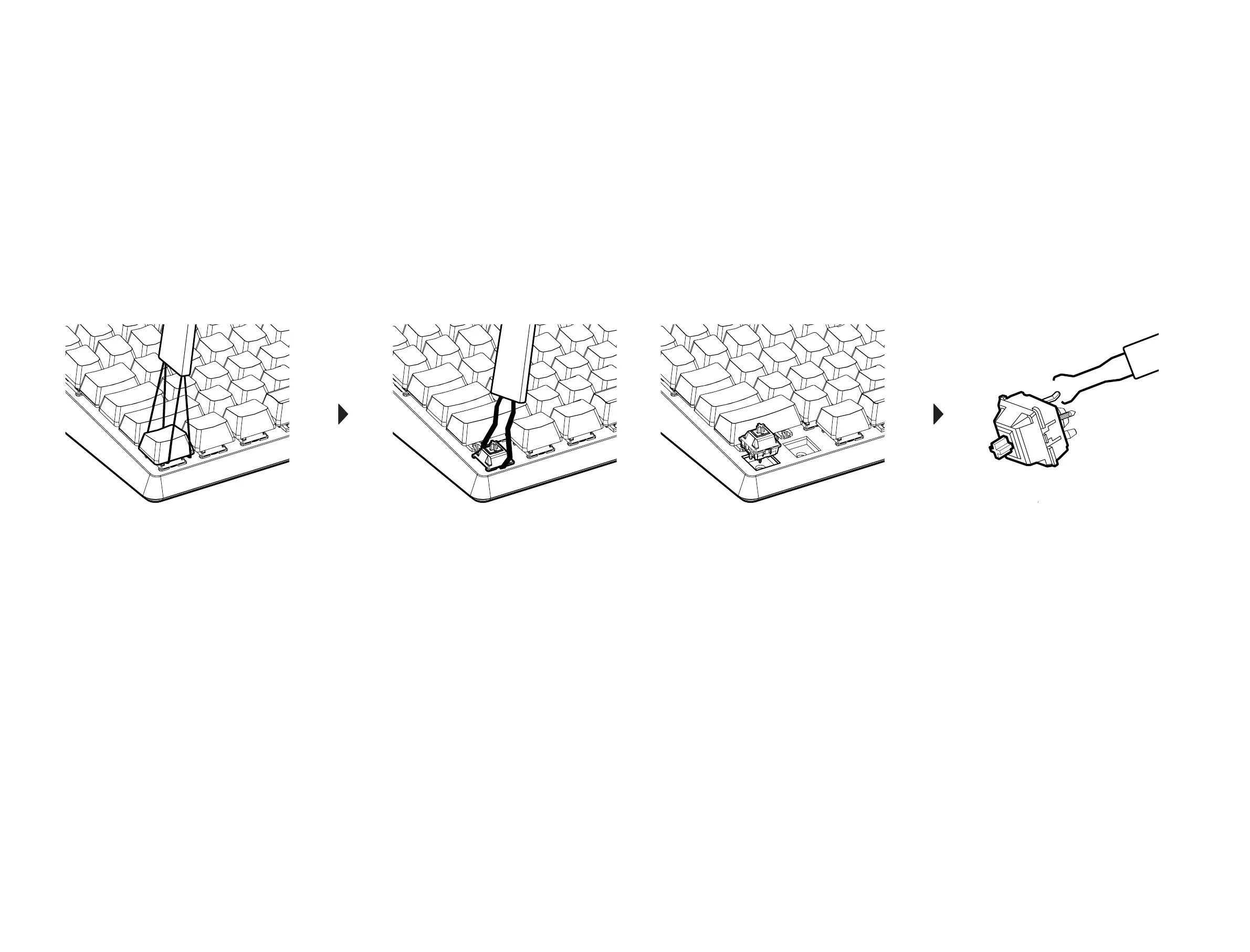
You will need the Keycap & Switch Puller provided in the package to begin removing your
switches. Use the rectangular side of the puller to gently pull and wiggle the keycaps off.
Please make sure not to yank the keycaps off as you may damage the switch.
With the keycap off, you should be able to see the switch underneath. Use the tong side of the puller
to hook underneath the switch, pushing down onto the two plastic tabs on the top and bottom of the
switches. Now you may gently pull and wiggle the switches out. Please avoid yanking on the switch.
Step.1
Step.2
Step.1
Step.2
INSTALLING NEW SWITCHES
When you are ready to install new switches, please make sure that the pins on your new
switches are straight. Start by lining up the switch pins with the sockets on the keyboard and
gently pressing down until the switch glides into place. If properly lined up, the switch should
settle in and feel secured in place.
Once you’ve installed all the switches, you may test the keys with an online key-test to see
if they were properly installed. If any of the keys are not working, you may have a bent pin
on your switch. In this case, take out the problem switch and straighten out the pins with the
switch puller then re-install the switch.
Step.1
Step.2
Step.1
Step.2


 To Next Page