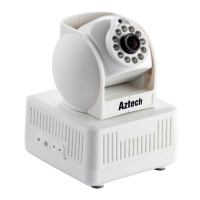
Network
Basic Protocol
TCP/IP、HTTP、SMTP、FTP、DHCP、DDNS、
UPNP、NTP
Other Protocol 802.11b/g/n
Other
Features
Mobile Phone View support
Video control support
Dual way audio support
Memory Snap or video into SD card
Browser SD card View or download from network
Motion Detection yes( 4 zone detection )
Triggered Actions
Email/FTP/SD storage/external alarm/send
message to alarm server
User Setting Three levels
Date/ Time Setting support
Upgrade Upgrade from network
DDNS A free DDNS provided by manufacturer
Hardware
Interface
Ethernet 10Base-T/100base-TX
Memory SD Slot
Alarm In 1 way
Alarm Out 1 way
Audio In Internal mic x 1, audio input interface x 1
Audio Out audio output interface x 1
Physical
Index
Weight 358g
Main body 111mm(L)*107mm(W)*121mm(H)
Power DC 5V
Power consumption <6W
Operating temperature -20~ 50
Humidity 10% ~ 80% non-condensing
Software(PC
Side)
OS Supported Microsoft Windows 98/2000/XP/Vista etc.
Browser
Internet Explorer6.0 and Above or
Compatible Browser, Safari/Firefox etc.
Application Software MDMS.exe
10 Supplementary Section
10.1 Port Forwarding References
This section provides procedure in setting the Port Forwarding Function of your
router. Please take note that the IP Camera must be connected to the Router and the
Internet Connection is up. After it has been configured successfully, user may now be



 To Next Page