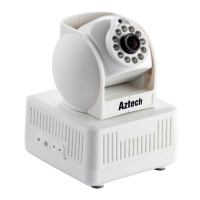
3.2 Interface of Equipment
Figure 2
1) Power Input Socket: Connect DC adaptor, its output should be 5V power specification.
2) WIFI Antenna Hole: Install the WIFI antenna.
3)
RESET Button: Press the RESET button and hold on more than 10 seconds, the
equipment will restart and recover to the factory default settings. The Pan/Tilt will move
around for one circle and finally focus to the center.
4) RJ45 Ethernet Socket: RJ45 Ethernet socket is 10/100M self-adjust. The equipment
can connect to all kinds of network devices, such as hub, router, switch, etc.
5) Audio Input Socket: Audio input socket is designed for connecting external microphone
or line-in audio signal. Please refer to 7.1.2 and select right settings.
6) Audio Output Socket: Audio output socket is for line-out audio player, such as
headphone, speaker, etc.
7) Alarm Output Socket: The alarm output socket is connected with a relay in the IP
camera. IP camera will control the switch to trigger the alarm bell or buzzer to alarm. The
relay is able to control the switch of a alarm whose voltage is no more than 36V, and
current is lower than 2A. Please refer to the Figure 3 for the connection of an external
alarm.
Figure 3
8) Alarming Input Pin: Please refer to the schematic Diagram of Figure 4 for how external
detector collects alarm information.
Output Pins
Alarm power
Alarm
Switch



 To Next Page