3 Appearance and Interface
3.1 Appearance
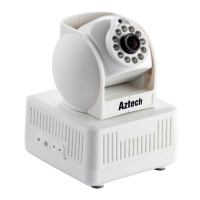
Figure 1
1 – Infrared Lights 6 – Wifi Indicator
2 – Lens 7 – Wireless Antenna
3 – Photovaristor 8 – Shell
4 – Internal Mic 9 – Heat Dissipation Hole
5 – Power Indicator 10 – SD Card Slot
Remarks:
• Power Indicator: it will turn RED if equipment was powered on.
• WIFI Indicator: If there is a WIFI module in the equipment, and there is data
transferring by WIFI, it will begin to blink.



 To Next Page