1312
EN EN
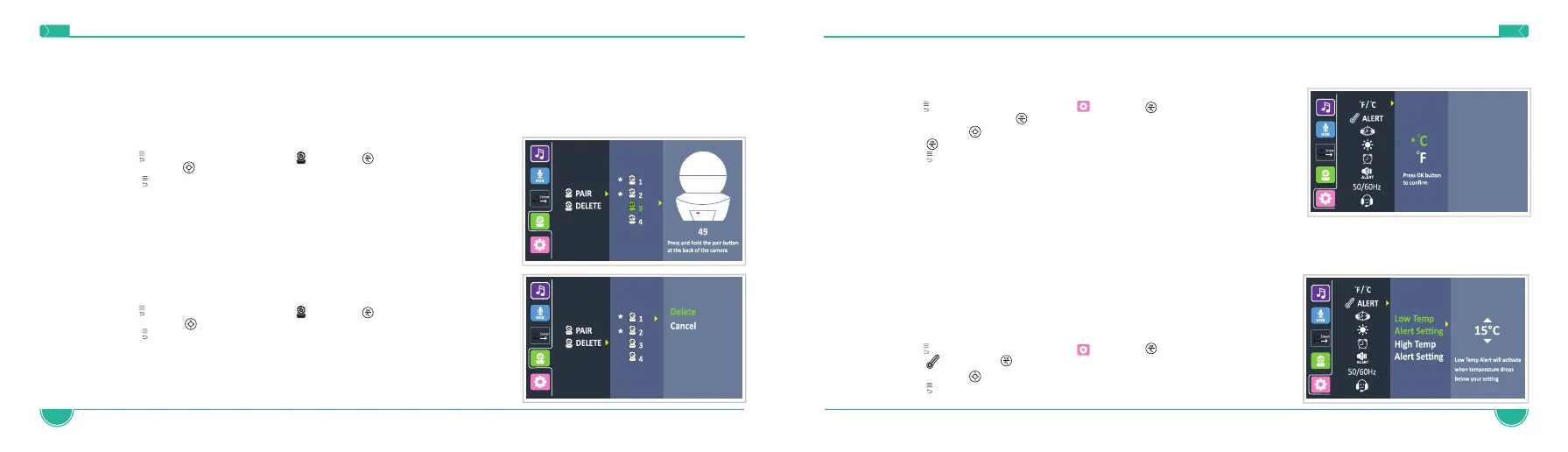
4.6 Temperature Scale Setting
The temperature reading from the temperature sensor (24) at the back of the Baby Unit will be displayed on the top of the screen. To switch
between °F (Fahrenheit) and °C (Celsius) follow the below instructions:
1. Press to access the menu, choose and press
2. Press °F / °C and press
3. Navigate with to select the desire scale
4. Press button to confirm
5. Press to exit the menu
NOTE: The monitor features a built-in automatic temperature alert. The monitor will alert
(visual indication) when the temperature in baby’s room is too high (90°F and higher) or too
low (55°F and lower).
NOTE: Make sure the temperature sensor is not positioned too close to the camera body as it may affect the correct temperature reading. It is
recommended to stretch out the sensor, so it is as far away from the camera body as possible. Also, it is recommended to place the camera
in an area where there is good air circulation and not in a closed cornered area where the temperature tends to be higher.
4.7 Temperature Alert Setting
This function is to alert if the temperature in baby’s room is too low or too high.
Default setting is: <15 °C/59 °F and >31 °C/89 °F.
To change the temperature alert levels, please follow the below instructions:
1. Press to access the menu, choose and press
2. Press and press
3. Navigate with to select the desire option
4. Press to exit the menu
4.4 Pairing the Baby Unit (Camera) with the Parent Unit
The Baby Unit is paired to the Parent Unit when supplied. There is no need to pair the units again unless the Baby Unit loses its link with the
Parent Unit. To renew the pairing of your units or pair a new/additional Baby Unit, follow the procedure below If unsuccessful, please repeat
the pairing process:
NOTE: Before you begin pairing, make sure to have the Baby and Parent Units side by side and turned on.
1. Press to access the menu, choose and press
2 Navigate with to select the camera you want to pair
3. Press to exit the menu
.
4.5 Deleting the Baby Unit (Camera)
1. Press to access the menu, choose and press
2. Navigate with to select the camera you want to delete
3. Press to exit the menu


 To Next Page