1514
EN EN
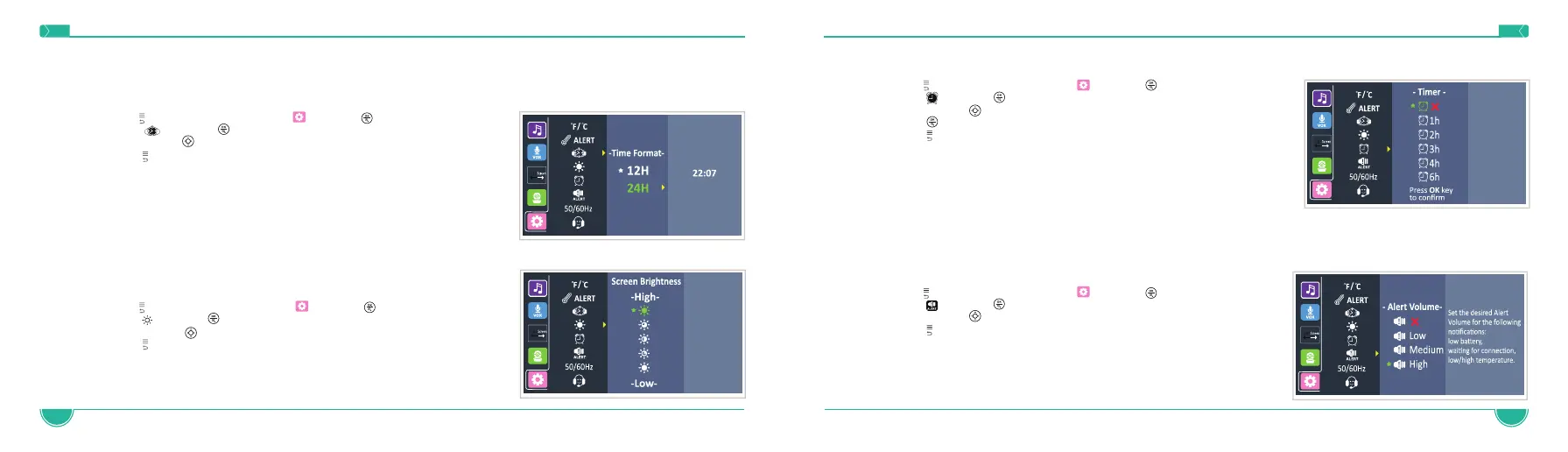
4.10 Timer Setting
1. Press to access the menu, choose and press
2. Press and press
3. Navigate with to select the desire time
4. Press button to confirm
5. Press to exit the menu
4.11 Warning Alert Volume Setting
This setting controls the volume of an audio “beep” sound alerting when the Parent Unit is low on battery, High/Low Temp alert or out of range
(no connection to Baby Unit). You can set a lower volume level during the night and higher level during the day.
1. Press to access the menu, choose and press
2. Press and press
3. Navigate with to select the desire alert volume
4. Press to exit the menu
NOTE: Selecting the OFF option will mute all alerts. In case of low battery, high/low temp or
out of range, there will be no acoustic notification heard.
4.8 Time and Time Format Setting
This function allows you to choose the desired time format: 12H or 24H and set your time.
1. Press to access the menu, choose and press
2. Press and press
3. Navigate with to select the desire format, and set the time
4. Press to exit the menu
4.9 Brightness Adjustment
1. Press to access the menu, choose and press
2. Press and press
3. Navigate with to select the desire brightness
4. Press to exit the menu



 To Next Page