BaehrTec A2000 operating instructions
English – V101 - effective 10/13
4
Description of the device
4.1
Description of the controller
4.1.1
Front view
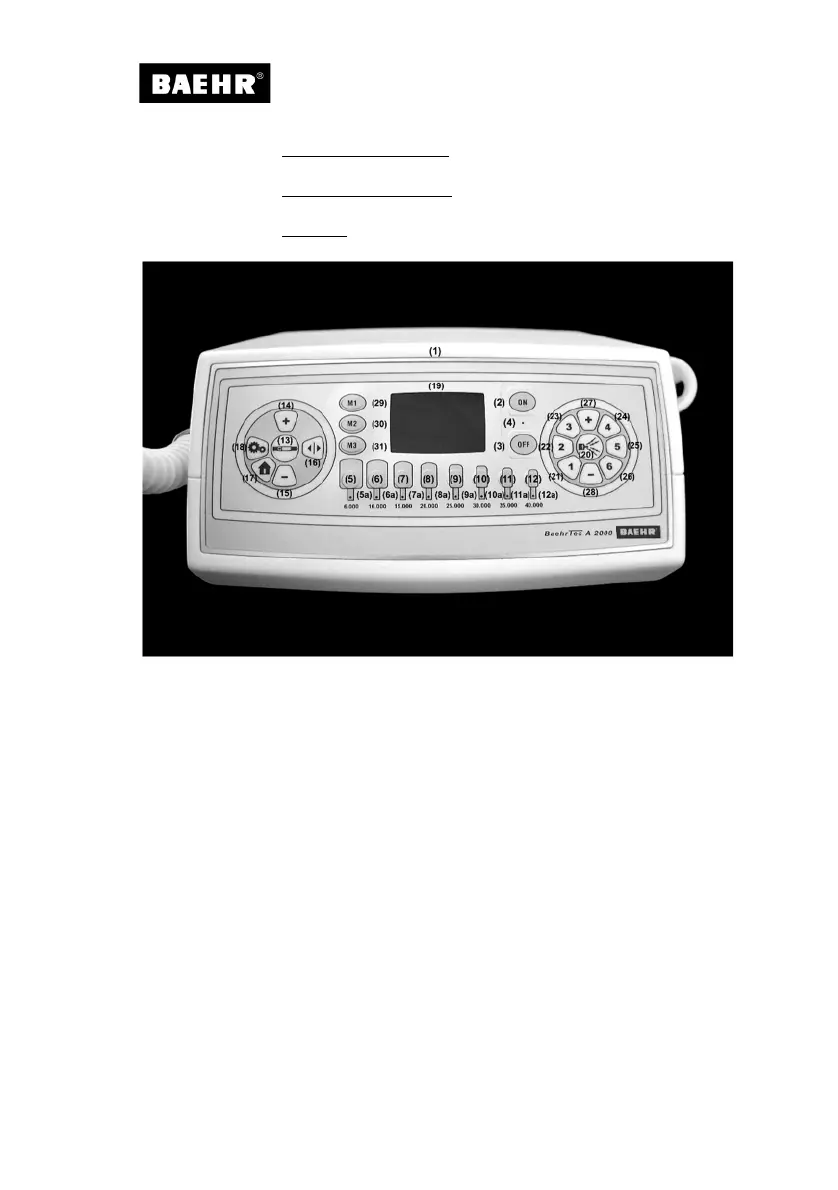
(1) Controller housing
Fig. 4
Main switch: (2) “ON” and (3) “OFF” with corresponding (4) LED
(5) – (12) Push buttons for instrument speeds (6,000 – 40,000 rpm) with the
corresponding (5a) – (12a) LEDs
(13) Push button to turn the handpiece motor on/off
Push buttons for handpiece speed: (14) + and (15) - (1,000 rpm)
(16) Push button for instrument operation clockwise/anti-clockwise
(17) Push button “Home”
(18) Push button “Options menu”
(19) Colour display
(20) Push button for operational readiness of suction
(21) - (26) Push buttons for “Suction level” (Levels 1-6)
Push buttons for “Change of suction level”: (27) + and (28) -
(29) - (31) Push buttons “Memory”


 To Next Page