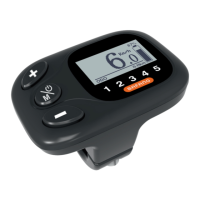
The BAFANG DP C181.CAN display is a comprehensive interface designed for electric bicycles, offering a wide array of functions and features to enhance the riding experience. It provides real-time information, allows for system customization, and includes diagnostic tools for maintenance.
Function Description
The primary function of the DP C181.CAN display is to provide essential riding data and allow users to control various aspects of their electric bicycle system. It acts as the central hub for monitoring performance, battery status, and system settings.
- Speed Display: The display shows current speed, top speed, and average speed, with the option to switch between kilometers and miles. This allows riders to track their pace and overall speed performance.
- Battery Capacity Indicator: A real-time indicator shows the remaining battery capacity, helping riders manage their range and plan their trips effectively.
- Automatic Lighting System: The display integrates with the bicycle's lighting system, featuring automatic sensors that can turn headlights and backlighting on or off depending on ambient light conditions.
- Backlight Brightness Setting: Users can adjust the brightness of the display's backlight to suit different lighting environments, ensuring optimal visibility.
- Performance Support Indication: The display shows the current level of motor assistance, allowing riders to understand and adjust the power output.
- Motor Output Power and Current Indicator: This feature provides detailed information on the motor's performance, displaying output power in watts and output current in amperes.
- Kilometer Stand: The display tracks various distances, including single-trip distance (TRIP), total distance (ODO), and remaining distance (RANGE). The remaining distance feature adapts based on the rider's style.
- Walk Assistance: A dedicated function provides assistance when walking alongside the bicycle, making it easier to maneuver at low speeds.
- Support Level Setting: Riders can easily adjust the motor's support levels, typically ranging from 0 (no support) to 5 (highest support), to match their riding preferences and terrain.
- Energy Consumption Indicator (CALORIES): For displays equipped with a torque sensor, this feature shows energy consumption in calories, offering insights into the rider's effort.
- Setting Password: The display includes a password protection feature to prevent unauthorized use of the system.
- Bluetooth Function: With Bluetooth connectivity, the display can connect to the Bafang Go APP on a mobile device, potentially unlocking additional features and data analysis.
- USB Charging Indicator: An icon indicates when an external USB device is connected and charging via the display's USB port.
- Maintenance Indicator: A dedicated icon alerts the user when maintenance is due, based on mileage or battery charge cycles.
- Error Code Definition: The display can show error codes, providing valuable information for diagnosing and troubleshooting system issues.
Usage Features
The DP C181.CAN display is designed for intuitive and user-friendly operation, with clear key definitions and straightforward navigation.
- System ON/OFF: The system is switched on or off by pressing and holding the power button for more than 2 seconds. An "automatic shutdown time" can be set, after which the display will turn off if inactive. If a password is enabled, it must be entered to use the system.
- Support Level Selection: Riders can easily switch between support levels (0-5) by briefly pressing the "+" or "-" buttons. The system defaults to level 1 upon startup, with level 0 providing no motor assistance.
- Selection Mode (Trip Data): A brief press of the power button cycles through different trip modes, displaying daily kilometers (TRIP), total kilometers (ODO), maximum speed (MAX), average speed (AVG), range (RANGE), energy consumption (CALORIES), and travel time (TIME).
- Headlights / Backlighting Control: Holding the "+" button for more than 2 seconds activates or deactivates the headlight and taillights. The backlight brightness can be adjusted in the display settings. The system can automatically turn on lights in dark environments, but manual override deactivates the automatic sensor until the system is restarted.
- Walk Assistance Activation: To activate walk assistance, the bicycle must be stationary. Pressing the "-" button until the walk assistance symbol appears, then holding it down, will activate the function, moving the pedelec at approximately 6 km/h. Releasing the button stops the motor and returns the support level to 0.
- Settings Menu Navigation: The "SETTINGS" menu is accessed by pressing and holding the "+" and power buttons for more than 1 second. Within this menu, users can navigate through "Display Settings," "Information," or "EXIT" using the "+" or "-" buttons, confirming selections with a brief press of the power button.
- "Display Setting" Options: This submenu allows customization of various display parameters:
- Unit Selection (km/Miles): Users can choose between "Metric" (kilometers) or "Imperial" (miles) for speed and distance units.
- "Service" Notification: The maintenance notification can be turned "ON" or "OFF."
- "Brightness" Adjustment: Backlight brightness can be set to 100%, 75%, 50%, 30%, or 10%.
- "Auto Off" Time: The automatic system shutdown time can be configured from "OFF" to 1-9 minutes.
- "MAX PAS" Support Level: The maximum number of support levels (3, 5, or 9) can be selected.
- "Power View" Indicator: Users can choose to display motor output as "Power" (watts) or "Current" (amperes).
- "SOC View" (Battery View): Battery status can be displayed as "percent" or "voltage."
- "TRIP Reset": The daily trip mileage can be reset.
- "AL Sensitivity" (Automatic Headlight Sensitivity): The sensitivity of the automatic headlight sensor can be adjusted from 0 to 5 or turned "OFF."
- "Password" Management: This section allows users to set, change, or deactivate a 4-digit PIN code for system access.
- "Set Clock": The display's internal clock can be set.
- "Vibration": The vibration function can be turned "ON" or "OFF."
- "Information" Menu: This menu provides read-only data about the system:
- Wheel Size and Speed Limit: Displays the configured wheel size and speed limit. These values cannot be changed from the display.
- Battery Information: Detailed battery data, including total voltage, current discharge, remaining capacity, total capacity, default loader status, instant charge, charging cycles, maximum uncharge time, total cell count, and individual cell voltages.
- Controller Information: Displays hardware and software versions of the controller.
- Display Information: Shows hardware and software versions of the display.
- Torque Information: Provides hardware and software versions related to the torque sensor.
- Error Code: Lists the last ten error codes encountered by the pedelec, with "00" indicating no error.
Maintenance Features
The DP C181.CAN display includes features that aid in system maintenance and troubleshooting, helping users and technicians identify and resolve issues.
- Service Notification: The display will show "Service" after a certain mileage (e.g., 5000 km) or number of battery charge cycles (e.g., 100), prompting the user for maintenance. This interval can be configured in the display settings.
- Error Code Definition: The manual provides a comprehensive list of error codes (e.g., 04 for throttle position, 05 for throttle fault, 07 for overvoltage, 08 for hall sensor error, 09 for engine phase error, 10 for engine over-temperature, 11 for temperature sensor error, 12 for current sensor error, 13 for battery temperature sensor error, 14 for controller over-temperature, 15 for controller temperature sensor error, 21 for speed sensor error, 25 for torque signal error, 26 for torque sensor speed signal error, 27 for overcurrent from controller, 30 for communication problem, 33 for brake signal error, 35 for 15V detection circuit error, 36 for keypad detection circuit error, 37 for WDT circuit fault, 41 for battery overvoltage, 42 for battery undervoltage, 43 for battery cells over-power, 44 for single cell overvoltage, 45 for battery over-temperature, 46 for battery under-temperature, 47 for battery SOC too high, 48 for battery SOC too low, 61 for switching detection defect, 62 for electronic derailleur cannot release, 71 for electronic lock jammed, 81 for Bluetooth module error). Each code is accompanied by a declaration and troubleshooting steps, guiding users to check connections, restart the system, cool down components, or replace faulty parts.
- BESST Tool Integration: Many troubleshooting steps suggest using the BAFANG BESST tool to update the controller or display software, run diagnostics, or read sensor signals, indicating a deeper level of diagnostic capability for technicians.
- Password Reset/Deactivation: The password feature can be managed, allowing users to change or deactivate their PIN, which is useful for security and access control. If a password is forgotten, contacting the retailer is advised.
The DP C181.CAN display serves as an indispensable component for electric bicycle riders, offering a blend of real-time data, customizable settings, and diagnostic support to ensure a safe, efficient, and enjoyable riding experience.

 Need help?
 General









 To Next Page