103
MICROWAVEOVEN
4.Turn the knob to adjust the cooking time
(thedisplaywillshowwhatyouselected).
5.PressStartbutton.
WhenyoupressStartbutton,theDEFandM/W
indicatorscomeontoconrmthepowerlevels
selected.TheDEFindicatorstartsblinkingto
showyouthattheovenisinDEFROSTmode.
The display counts down the time remaining
inDEFROSTmode.Whentheovenbeeps,turn
over,breakapartand/orredistributethefood.
At the end of DEFROST mode, the oven will
beep and start M/Wcook.The DEF indicator
disappears and the M/W indicator starts
blinking. The display counts down the time
remaininginM/Wmode.WhenM/Wcookends,
youwillhear3beeps.
Easy Cooking
EasyCookallowsyoutoreheatfor30seconds
at 100% (full power) by simply pressing the
EasyCookbutton.
1. Press Easy Cook button (when you press
EasyCookbutton,“30”appears).After1.5
seconds, the oven starts reheating. When
thecookingtimeends,youwillhear3beeps.
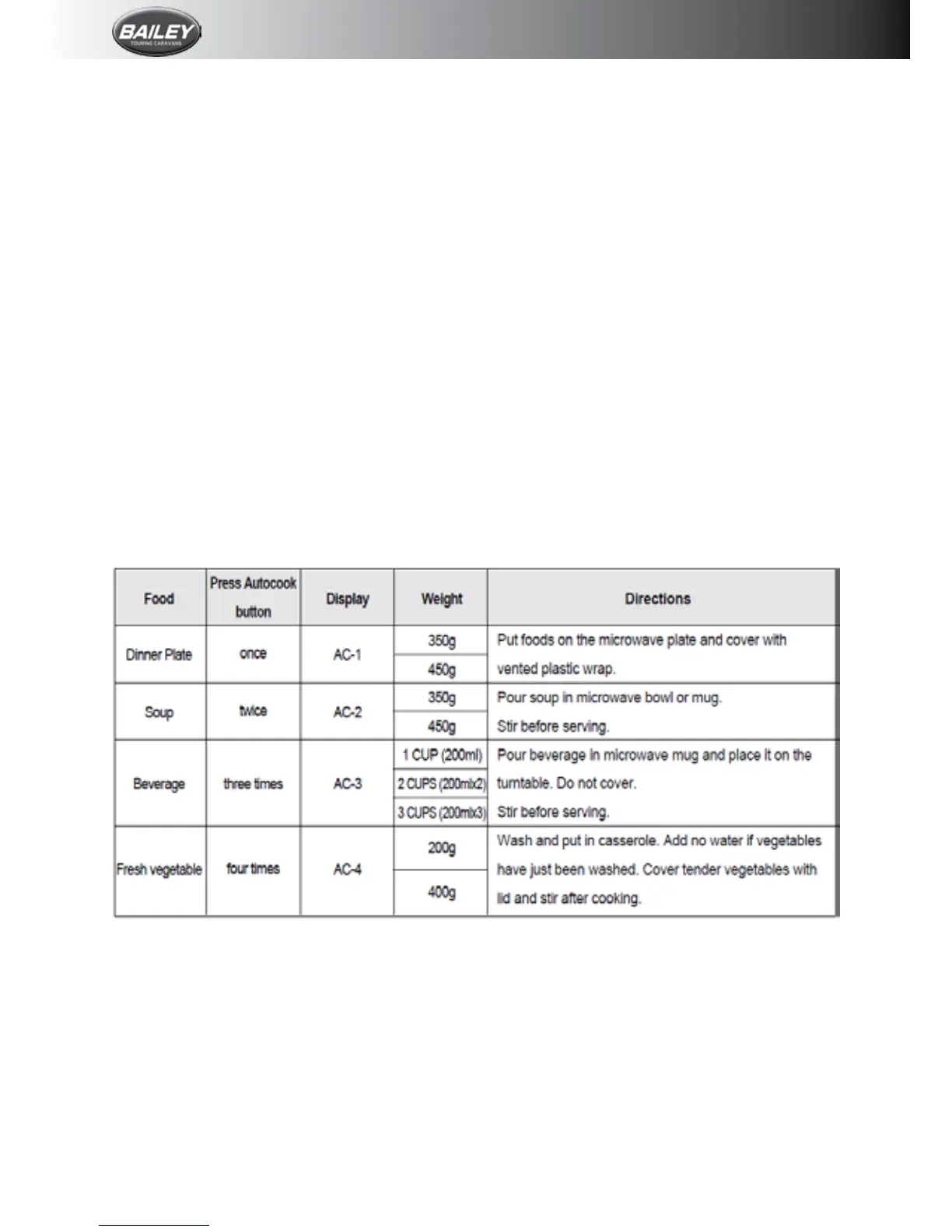
Auto Cook
AutoCookallowsyoutocookorreheatmany
ofyourfavouritefoodsbyrepeatedlytouching
AutoCookbutton.
1. Press the Auto Cook button (when you
press the Auto Cook button once, “AC-1”
is displayed. By repeatedly pressing this
button,youcanselectoneofthefourmenu
programmes.
2.Turn the dial knob to adjust the desired
quantity (the display will show what you
haveselected).
3.Press Start button. When you press the
Start button, the display changes into
cooking time and the oven starts cooking.
Whenthe cookingtime ends, youwillhear
3beeps.





 To Next Page