23
CLUTCH ADJUSTMENT
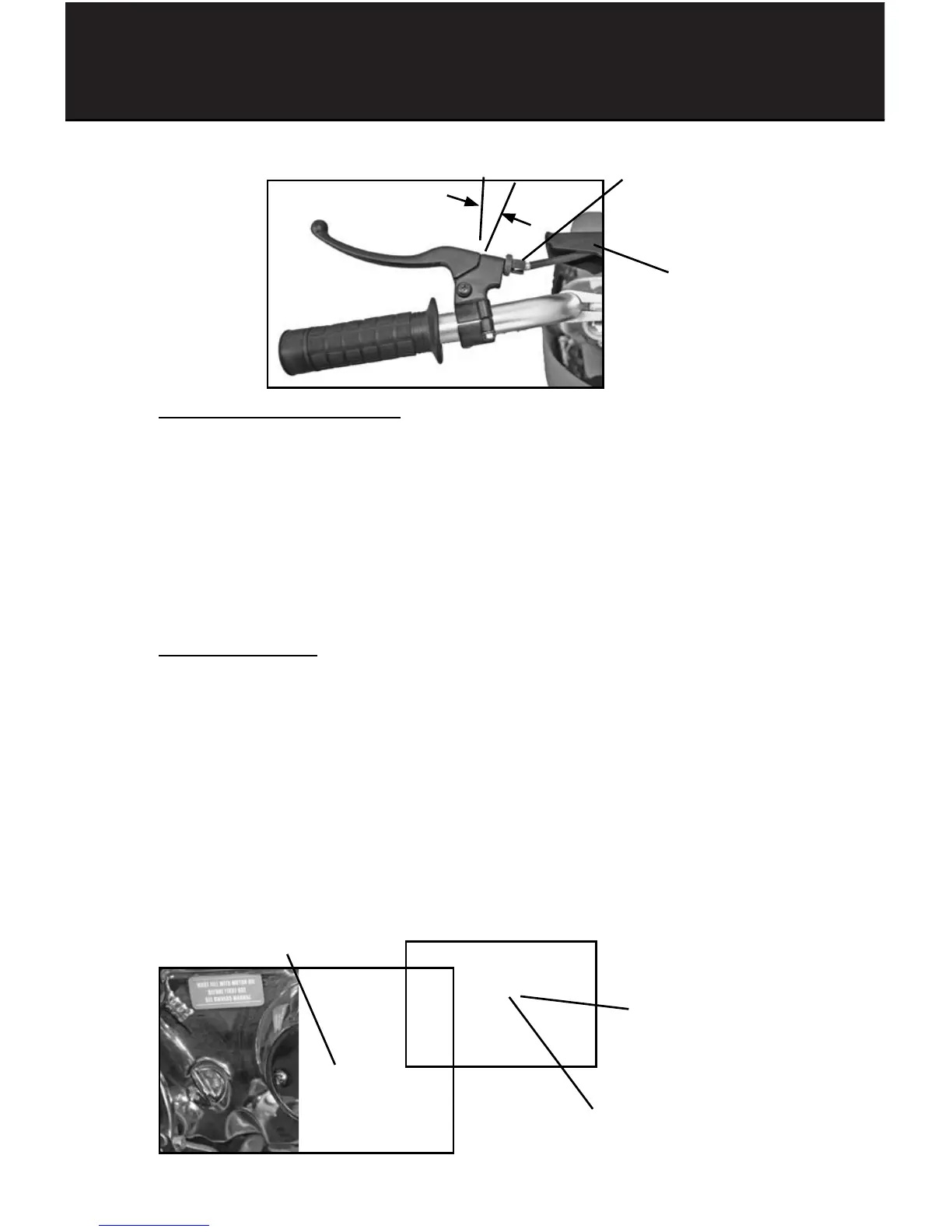
To adjust the clutch lever play:
1- Remove adjuster cover (slide back on cable).
2- Loosen adjuster nut and move adjuster in or out to obtain the correct
play. Correct free play should be 0.12-0.20 inch (3.0-5.0mm)
3- Tighten adjuster nut
4- Recheck the clutch lever free distance.
Readjust if it is not within the correct limits.
To adjust the clutch:
1- Remove clutch adjustment cover from right side of engine housing.
2- Loosen clutch adjuster cinch nut and move adjuster screw in or out to
obtain correct clutch tension.
3- Turn Clutch adjustment screw in (Clockwise) to increase clutching ability
or out (Counterclockwise) to reduce.
4- After correct adjustment, tighten cinch nut and re-install cover
5- Recheck clutch lever free distance.
Readjust it if it is not within correct limits.
Clutch lever
adjustment nut
3.0 - 5.0mm play
(0.12”-0.20”)
Adjustment Cover
Clutch adjustment screw
Clutch adjuster cinch nut
Clutch adjustment cover
MAINTENANCE



 To Next Page