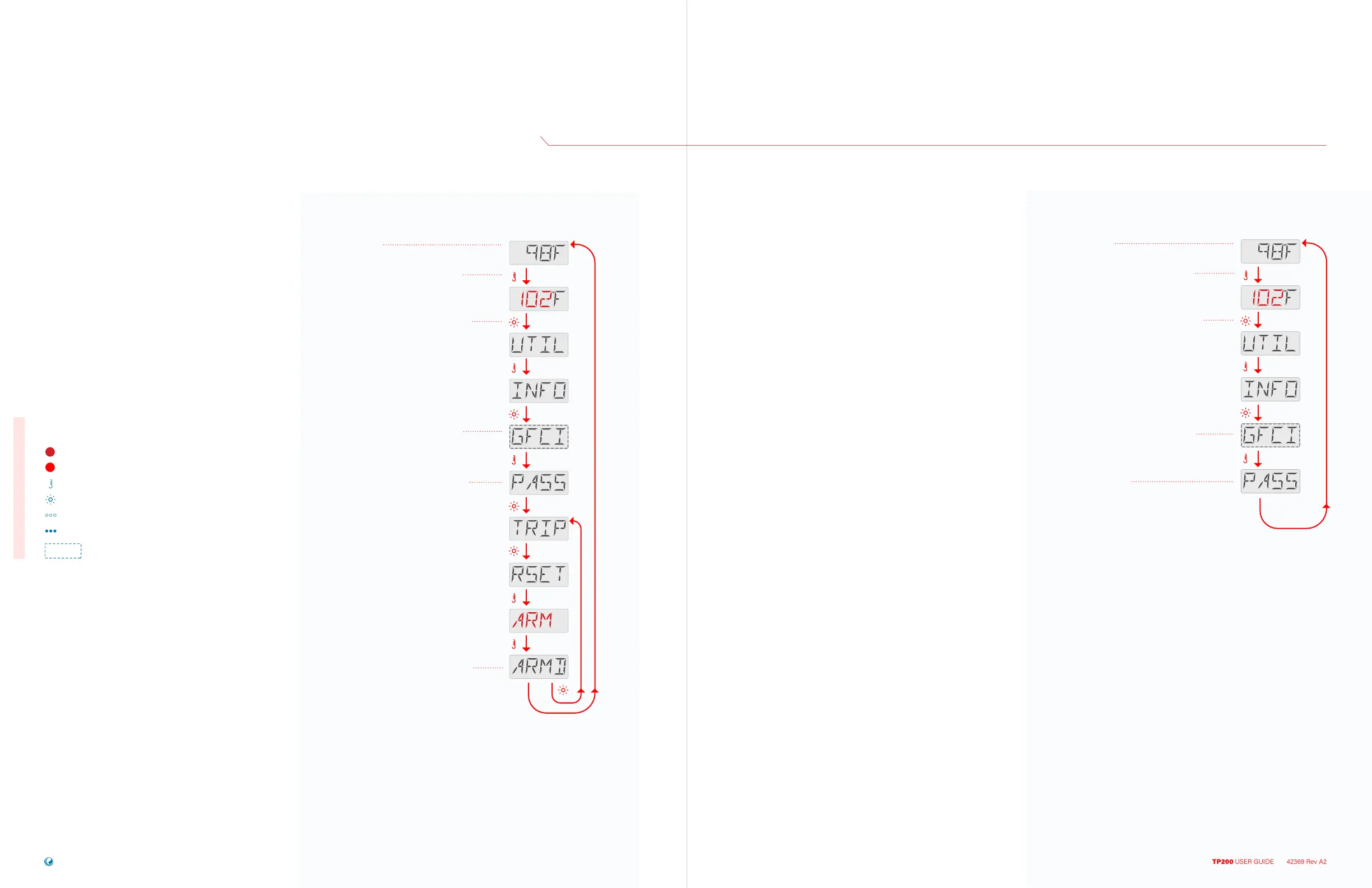
Press the TEMP button. The Set
Temperature will appear and flash.
While the Set Temperature is flashing,
press LIGHT until UTIL appears.
This indicates that you are entering
GFCI Test Mode. (This feature is not
available on CE rated systems.)
PASS appears if the GFCI test was
successful. If PASS is not shown, you
cannot reset the GFCI test to ARMD,
since it is already ARMD.
This indicates that the GFCI is armed.
Press LIGHT to navigate back to TRIP.
Or, pause a moment, and the Main
Screen will appear automatically.
SEQUENCE RESET GFCI TEST
Main Screen
UTILITIES
GFCI TEST FEATURE CONTINUED
TP200 USER GUIDE 42369 Rev A2
54
53
Balboa Water Group | Your Single Source Solution
Follow this sequence to reset the GFCI
test feature and bring it back to its armed
state within the control system.
You may want to reset the GFCI test
feature if the spa is about to be moved
to a new location, so that it will need to
be re-tested after installation at the new
location.
• • •
Flashing characters
Progressive message
Press TEMP button for “action”
Press LIGHT button to “select”
Pause / back to Main Screen / setting not saved
Pause / back to Main Screen / setting saved
Menu Items may or may not appear
SEQUENCE KEY
( View page 2 for full description )
SEQUENCE GFCI TEST STATUS
Main Screen
Follow this sequence to check the
current status of the GFCI test feature.
The current status is either PASS or
ARMD.
If the last screen of this sequence
displays PASS, the most recent GFCI
test was performed and passed
successfully.
If the last screen of this sequence
displays ARMD, either no GFCI test
has been performed yet, or the most
recent GFCI test was unsuccessful.
Press the TEMP button. The Set
Temperature will appear and flash.
While the Set Temperature is flashing,
press LIGHT until UTIL appears.
This indicates that you are entering
GFCI Test Mode. (This feature is not
available on CE rated systems.)
This screen will display either
ARMD or PASS.
Pause for a moment, and the Main
Screen will appear automatically.
°°°



 To Next Page