TP200 USER GUIDE 42369 Rev A2
2
1
Balboa Water Group | Your Single Source Solution
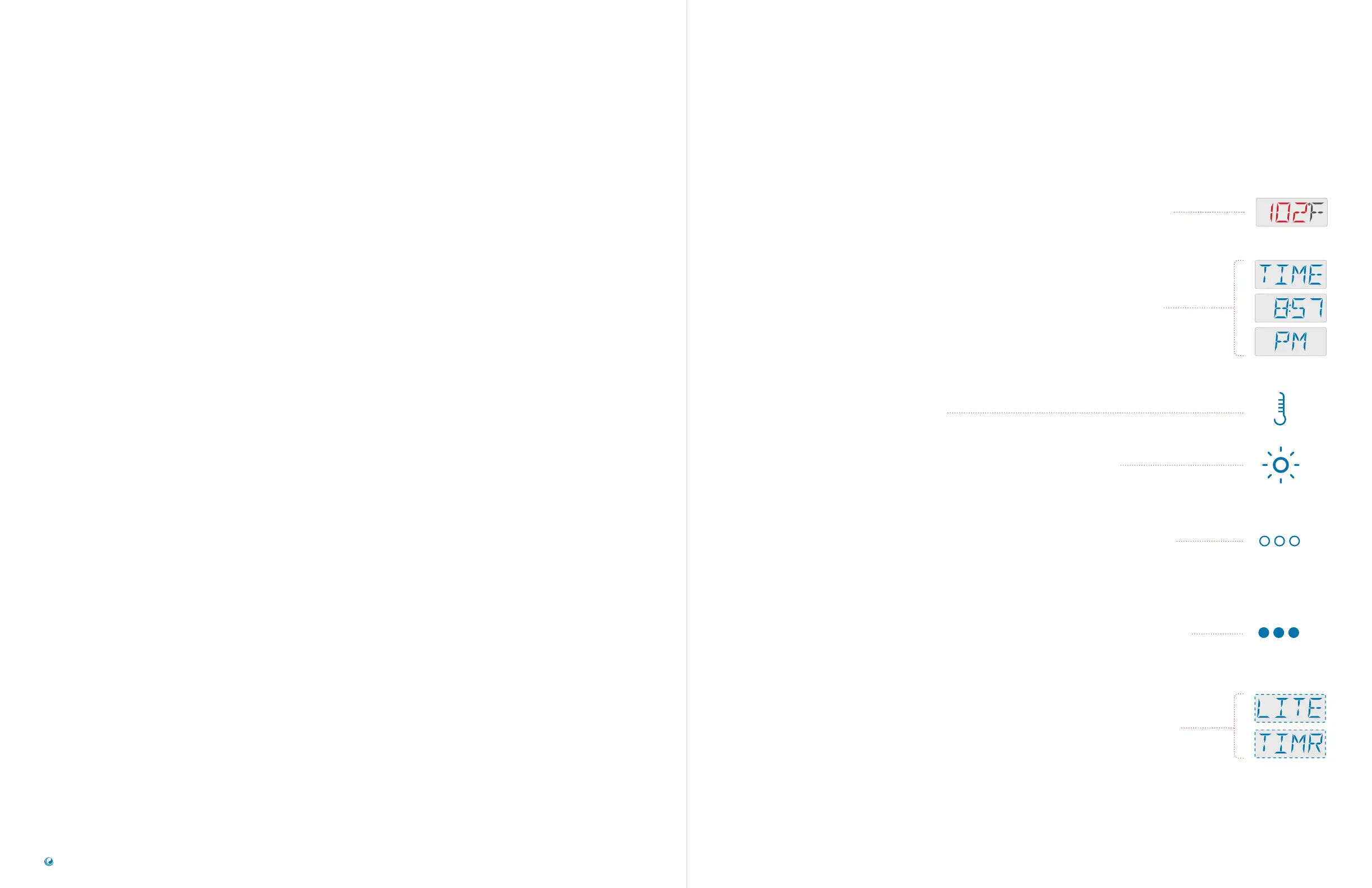
RED LCD CHARACTERS
Red indicates flashing or changing characters. For example, these
segments flash when you press the TEMP button to change the Set
Temperature.
BLUE LCD CHARACTERS
Blue indicates an alternating message or a progressive message.
When you view Time-of-Day, this progressive message appears.
TEMPERATURE BUTTON
The TEMP button icon indicates an “action.” For example, pressing
the TEMP button initiates any one of the following actions: adjusting
the Set Temperature, menu navigation, setting the Filter Cycle Time,
setting the Heat Mode, etc.
LIGHT BUTTON
The LIGHT button icon indicates navigation or a selection.
HOLLOW DOTS
Hollow dots indicate that your last setting was not saved. For
example, when you set a feature such as Time-of-Day, you need to
press the LIGHT button to save your setting. If you do not press the
LIGHT button, the Main Screen will appear automatically after a few
moments, and your last setting will not be saved.
SOLID DOTS
Solid dots indicate that your last setting will be saved. For example, if
you change the Set Temperature and pause a few moments, the Main
Screen will appear automatically, and your setting will be saved. The
same applies to other features that will be discussed later.
DASHED LINE AROUND THE DISPLAY
Dashed lines indicate a Menu item that depends on a manufacturer
configuration and may or may not appear.
TABLE OF CONTENTS SEQUENCE KEY
SEQUENCE KEY
PANEL INTERFACE & TERMINOLOGY
MAIN MENUS & NAVIGATION
SET TIMEOFDAY
CHANGE SET TEMPERATURE
SET FILTER CYCLE TIMES
RESTRICT OPERATIONS
INVERT DISPLAY
HOLD MODE STANDBY
LIGHT TIMER PROGRAMMING
SPA BEHAVIOR
HEAT SETTINGS
FILL IT UP!
PANEL MESSAGES
27 GENERAL
29 HEATER RELATED
31 TEMPERATURE SENSOR RELATED
33 MISCELLANEOUS
34 CONTROL SYSTEM RELATED
36 REMINDER
PREFERENCES
42 DISPLAY F° OR C°
43 TURN ON/OFF REMINDERS DISPLAY
44 SET 12 OR 24 HOUR CLOCK
45 SET CLEANUP CYCLE DURATION
46 TURN ON/OFF M8
UTILITIES
50 INFORMATION SUBMENU
51 GFCI TEST FEATURE
55 FAULT LOG
57 TEMPERATURE SENSOR READINGS



 To Next Page