EasyManua.ls Logo

BALDR B0359WST2H2R - User Manual

BALDR B0359WST2H2R
104 pages
Print Icon
To Next Page IconTo Next Page
Loading...
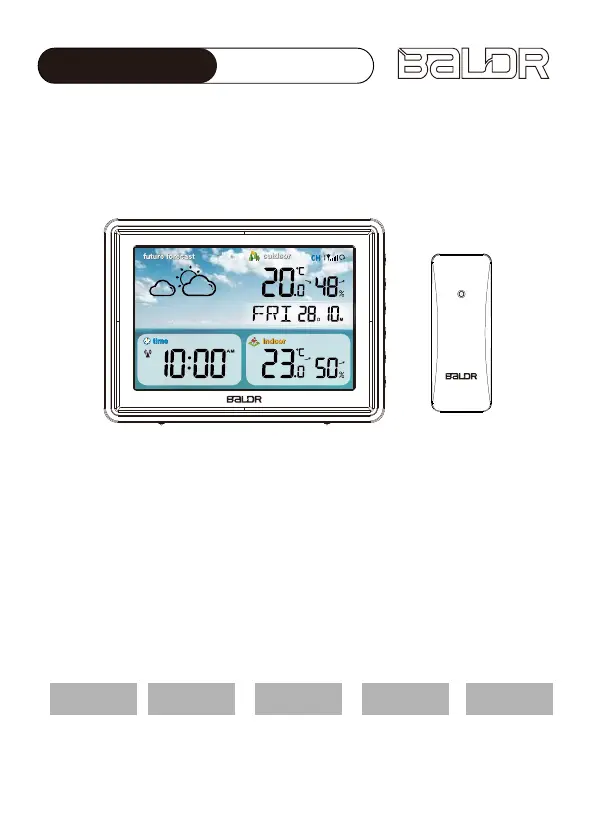
USER MANUAL
MODEL: B0359WST2H2R
(EU VERSION)
WIRELESS COLOR WEATHER STATION
WITH TEMPERATURE ALERTS
We thank you for your purchase of Baldr wireless color weather
station with temperature alerts. It has been designed and construct-
ed using innovative components and techniques to enable the
perfect display. Please read the instructions carefully to become
familiar with the properties and functions before you use the unit.
English
Deutsche Français Italiano Español

Questions and Answers

  • J
    Joshua SmithAug 5, 2025
    Why is my BALDR Weather Station outdoor reading flashing?
    • K
      Kelly FaulknerAug 5, 2025
      If the outdoor reading on your BALDR Weather Station is flashing or showing dashes, it's likely due to wireless interference. To resolve this: * Bring the sensor and main unit indoors, placing them side by side, and remove the batteries from both. * Ensure the CH 1-2-3 switch on both units is set to the same channel. * Reload the batteries in both the outdoor sensor and the main unit. * Allow both units to sit close to each other for a few minutes to establish a strong connection before moving the sensor back outdoors.
  • B
    Benjamin EvansAug 14, 2025
    What to do if my BALDR B0359WST2H2R has no outdoor sensor reception?
    • L
      Lindsay JacobsAug 14, 2025
      If your BALDR Weather Station isn't receiving the outdoor sensor signal, ensure both the main unit and the sensor are at least 3 feet (0.9 meters) away from electronics like TVs, microwaves, and computers that could cause interference. Use standard alkaline batteries and avoid heavy-duty or rechargeable batteries. Allow a few minutes for the main unit and sensor to synchronize after reloading the batteries.
  • J
    Jennifer PattersonAug 25, 2025
    What does “HH.H/LL.L” display mean on my BALDR B0359WST2H2R Weather Station?
    • D
      David WilkersonAug 25, 2025
      If the indoor and/or outdoor temperature on your BALDR Weather Station displays “HH.H” or “LL.L”, it indicates that the temperature is outside of the device's detection range. “HH.H” appears when the temperature is higher than the maximum detection range, while “LL.L” appears when the temperature is lower than the minimum detection range.

Summary

PRODUCT OVERVIEW

MAIN UNIT

Overview of the main unit components and display elements.

OUTDOOR SENSOR

FEATURES

Lists key features of the outdoor sensor, including connectivity and display options.

PACKAGE CONTENT

GETTING START

MAIN UNIT INSTALLATION

Instructions for installing the main unit, including power connection.

SENSOR INSTALLATION

Steps for installing the sensor, starting with removing the battery cover.

SENSOR SETUP

MAIN UNIT SETUP

SIGNAL RECEIVING

RF Signal Receiving

Explains how the main unit receives signals from outdoor sensors.

DCF Signal Receiving

Details on the unit's ability to receive radio signals for time synchronization.

Manual Settings

ALARM FUNCTION

Alarm Time Setting

Instructions for setting the alarm time and its default activation.

Alarm ON;OFF Setting

How to turn the alarm function on or off from the time display mode.

SNOOZE FUNCTION

PLACEMENT INSTRUCTION

Main Unit Placement

Guidelines for placing the main unit to ensure accurate indoor measurements.

Outdoor Sensor Placement

Recommendations for placing the outdoor sensor for optimal performance and longevity.

OPERATION GUIDELINES

MAX AND MIN RECORD

How to view and clear the maximum and minimum temperature/humidity records.

TEMPERATURE

Details on temperature display ranges, accuracy, and change indications.

OUTDOOR TEMPERATURE ALERTS

HUMIDITY

WEATHER FORECAST

FROST-POINT ALERT

ADJUSTABLE BACKLIGHT

LOW BATTERY INDICATORS

TROUBLE SHOOTING

PRECAUTIONS

WARRANTY

BALDR B0359WST2H2R Specifications

General IconGeneral
BrandBALDR
ModelB0359WST2H2R
CategoryWeather Station
LanguageEnglish

Related product manuals