
 Need help?
Do you have a question about the BALDR B0389WST2H2 and is the answer not in the manual?
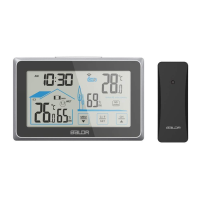
Indicates the status of the signal from the outdoor sensor.
Details on selecting and switching between outdoor sensor channels.
Displays the real-time outdoor temperature reading.
Shows maximum and minimum temperature and humidity records for the outdoor sensor.
Displays the real-time outdoor humidity reading.
Provides weather predictions for the next 12-24 hours.
Shows the day of the week in multiple languages.
Displays the current time in 12/24 hour format.
Indicates when an alarm is active.
Shows when the snooze function is active.
Displays the real-time indoor humidity reading.
Shows maximum and minimum temperature and humidity records for the indoor unit.
Displays the real-time indoor temperature reading.
Alerts when the main unit's battery power is low.
Alerts when the outdoor sensor's battery power is low.
Indicates the comfort level based on indoor humidity.
Alerts when frosting conditions are detected.
Designated hole for hanging the device.
Vents for sensor airflow and temperature/humidity readings.
Location for installing batteries in the main unit.
Integrated bracket for positioning the device.
Button for time setting and other manual adjustments.
Button to switch channels or adjust values.
Button to decrease data or navigate down.
Button to manage alarm settings and functions.
Button to check or clear Max/min records.
Touch button to control backlight brightness and snooze function.
Indicates the operational status of the outdoor sensor's signal.
Hole for mounting the outdoor sensor.
Compartment for installing batteries in the outdoor sensor.
Switch to select the transmission channel for the outdoor sensor.
Measures indoor and outdoor temperature and humidity.
Specifies the operational temperature range for the indoor unit.
Specifies the operational temperature range for the outdoor sensor.
Specifies the operational humidity range for both units.
Records and displays maximum and minimum temperature and humidity.
Provides weather forecasts for the next 12-24 hours.
Includes time, alarm setting, and snooze features.
Option to display time in 12-hour or 24-hour format.
Supports weekday display in seven different languages.
Supports up to 3 RF channels for outdoor sensors.
Includes a calendar function.
Indicates the indoor comfort level based on humidity.
Features a white backlight with adjustable brightness.
Allows selection to turn key tones ON or OFF.
Warns when outdoor temperature indicates frosting conditions.
Steps for installing batteries in the main weather station unit.
Steps for installing batteries in the outdoor sensor.
Procedure for setting sensor channel and synchronizing with the main unit.
Describes the initial LCD display and default settings like temperature unit and time format.
Instructions for entering manual settings and navigating through options.
Guide to selecting the display language for weekdays.
Procedure to select between 12-hour and 24-hour time display.
Instructions for setting the current hour, minute, year, and date.
How to select the temperature unit (Celsius or Fahrenheit).
Procedure for enabling or disabling the key tone sound.
How to select the weather forecast icon from available options.
Step-by-step guide to setting the alarm time.
Instructions for activating and deactivating the alarm.
How to activate the snooze function when the alarm rings.
Recommendations for placing the main unit for optimal performance.
Recommendations for placing the outdoor sensor for accurate readings.
Key considerations for optimal wireless range and accuracy.
Details on the accuracy of temperature and humidity readings.
Instructions for viewing and clearing maximum and minimum records.
Explanation of the frosting point warning indicator.
Explains how indoor humidity relates to comfort level indicators.
Describes the five weather modes and their corresponding icons.
How to change the backlight brightness and its duration.
Solutions for flashing or missing outdoor readings due to interference.
Steps to resolve issues with the main unit not receiving sensor data.
Tips for ensuring accurate temperature and humidity measurements.
Explanation for 'HH' (high) or 'LL' (low) readings on the display.
Guidelines for cleaning the product safely.
Important warnings regarding product handling and environmental factors.
Instructions on battery usage and mixing.
Details on the product's limited warranty and how to obtain service.
 General
| Model Number | B0389WST2H2 |
|---|---|
| Brand | BALDR |
| Category | Weather Station |
| Temperature Display | Yes |
| Humidity Display | Yes |
| Weather Forecast | Yes |
| Power Source | Battery |
| Display Type | LCD |
| Humidity Range | 20% to 95% |
| Wireless Range | 100 meters |
| Alarm | Yes |
| Temperature Range | -10°C to 50°C |













 To Next Page