EasyManua.ls Logo

BALDR B0359WST2H2PR - User Manual

BALDR B0359WST2H2PR
24 pages
Print Icon
To Next Page IconTo Next Page
Loading...
USER MANUAL
MODEL:B0359WST2H2PR
(UK VERSION)
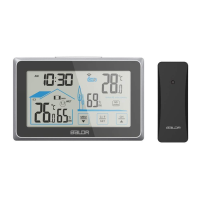
WIRELESS COLOR WEATHER STATION
WITH TEMPERATURE ALERTS
For the start-up of this device:
Main unit by AC adaptor (included) and 1x CR2032 (included)
Sensor by 2 x AA batteries (not included)
We thank you for your purchase of Baldr wireless color
weather station with temperature alerts. It has been designed
and constructed using innovative components and techniques
to enable the perfect display. Please read the instructions
carefully to become familiar with the properties and functions
before you use the unit.
1

Questions and Answers

Summary

User Manual Introduction and Setup

Package Contents for Start-up

List of components needed to begin using the weather station.

Main Unit Product Overview

Core Display Features

Weather forecast, calendar, weekdays, and alarm functions.

Data Readings and Indicators

Temp, humidity, pressure, max/min, alerts, warnings, comfort levels.

Controls and Physical Components

Functions of all buttons and description of unit parts.

Important Notes and Warnings

Battery Handling and Safety Warning

Notes on CR2032 battery use and critical safety warning for ingestion.

Outdoor Sensor

Outdoor Sensor Features

Signal light, hanging hole, battery compartment, channel switch, and key features.

Package Contents and Initial Setup

Package Contents

List of items included in the product package.

Main Unit Installation

Steps to install the main unit by plugging in the adapter.

Sensor Installation and Setup

Outdoor Sensor Installation

Steps to install batteries in the outdoor sensor.

Sensor Channel Setup and Synchronization

How to set and synchronize sensor channels with the main unit.

Outdoor Signal Reception Notes

Notes on receiving outdoor signals and troubleshooting.

Main Unit Setup and RF Signal

Default Unit Settings

Default values for pressure unit, language, time, date, and weather.

RF Signal Receiving Process

How the unit receives outdoor sensor signals.

MSF Signal Receiving

Radio Signal Searching and Reception

Process of searching for and receiving radio signals.

RCC Symbol Display

Explanation of the RCC symbol during signal reception.

Manual Settings Configuration

Weekday Language and Beep Settings

Setting the weekday language and beep ON/OFF.

Unit and Time Format Settings

Setting pressure unit, temperature unit, and time format.

Date, Year, and Weather Settings

Setting the year, date format, and weather forecast display.

Alarm Functions

Checking Alarm Times

How to check set alarm times for weekdays and weekends.

Alarm Time Setting and Snooze

Setting Alarm Times

Procedure for setting specific alarm times and ON/OFF.

Snooze Function Operation

How to activate the snooze function when an alarm rings.

Operation Guidelines

Max;Min Record Functionality

How to view and clear max/min temperature and humidity records.

Temperature Display and Indicators

Indoor/outdoor temperature display, ranges, and change indicators.

Temperature Alerts

Checking and Enabling Temperature Alerts

How to check and turn ON/OFF temperature alerts.

Temperature Alerts Setting and Humidity

Setting Temperature Alerts

Procedure for setting specific temperature alert values.

Humidity Readings and Accuracy

Humidity display range, readings, and accuracy.

Weather Forecast and Comfort Level

Weather Forecast Icons and Accuracy

Explanation of weather forecast icons and forecast accuracy.

Comfort Level Indicator Explained

Interpretation of comfort levels based on humidity readings.

Alerts and Calibration

Frost-Point Alert Indicator

How the frost-point alert symbol is displayed.

Manual Calibration Procedure

Steps to manually calibrate temperature, humidity, and barometer.

Backlight, Battery Indicators, and Troubleshooting

Adjustable Backlight Settings

How to adjust backlight brightness levels.

Low Battery Indicator Meanings

What the battery indicators for sensors and main unit mean.

Troubleshooting: Outdoor Reading Issues

Solutions for flashing or missing outdoor readings.

Troubleshooting

Troubleshooting: No Outdoor Sensor Reception

Solutions for when the outdoor sensor is not received.

Troubleshooting

Troubleshooting: Inaccurate Readings

Causes and solutions for inaccurate temperature/humidity readings.

Troubleshooting: HH.H;LL.L Display

Explanation of HH.H/LL.L display for out-of-range temperatures.

Placement Instructions

Main Unit Placement Guidelines

Recommended placement for the main unit for accurate readings.

Outdoor Sensor Placement Guidelines

Recommended placement for the outdoor sensor for optimal performance.

Interference Prevention Guidelines

Tips to avoid interference for wireless communication.

Precautions

General Handling and Safety Precautions

Important precautions for using and maintaining the product.

Warranty Information

BALDR Product Warranty Details

Details of the 1-year limited warranty and its coverage.

BALDR B0359WST2H2PR Specifications

General IconGeneral
Model NumberB0359WST2H2PR
BrandBALDR
CategoryWeather Station
Display TypeLCD
Temperature Range (Indoor)0°C to 50°C (32°F to 122°F)
Temperature Range (Outdoor)-40°C to 60°C (-40°F to 140°F)
Wireless Range100 meters (328 feet)
Featurescalendar
Power (Remote Sensor)2 x AAA batteries (not included)

Related product manuals