EasyManua.ls Logo

BALDR B0389WST4H4-V3 - User Manual

BALDR B0389WST4H4-V3
68 pages
Print Icon
To Next Page IconTo Next Page
Loading...
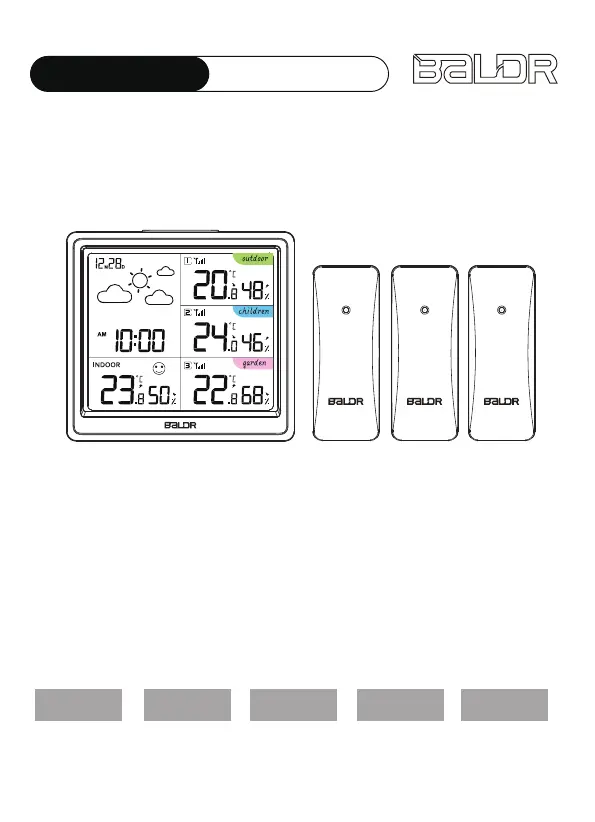
USER MANUAL
MODEL:B0389WST4H4-V3
DIGITAL WIRELESS WEATHER STATION
WITH 3 REMOTE SENSORS
English Deutsche Français Italiano Español
We thank you for your purchase of Baldr digital wireless weather
station with 3 remote sensors.It has been designed and constructed
using innovative components and techniques to enable the perfect
display. Please read the instructions carefully to become familiar with
the properties and functions before you use the unit.If your BALDR
product does not operate properly after trying the troubleshooting
steps, please contact the seller on your order page or shoot an email
to: service@baldr.com.

Questions and Answers

  • C
    Christian MartinAug 12, 2025
    What to do if my BALDR Weather Station shows flashing outdoor readings?
    • D
      Daniel CookAug 12, 2025
      Flashing outdoor readings on your BALDR Weather Station usually indicate wireless interference. To resolve this: Bring both the sensor and display indoors, placing them side by side, and remove the batteries from both units. Ensure the 1-2-3 switch on both units match. Reload the batteries in the outdoor sensor, then reload the batteries in the main unit. Allow both units to sit within a couple of feet of each other for a few minutes to establish a strong connection before moving the sensor back to the outdoor area.
  • K
    kim91Aug 20, 2025
    Why is my BALDR B0389WST4H4-V3 Weather Station not receiving the outdoor sensor signal?
    • L
      lewisgaryAug 21, 2025
      If your BALDR Weather Station isn't receiving the outdoor sensor signal, try the following: 1. Reload the batteries in both the outdoor sensor and the main unit. 2. Relocate the main unit and/or the outdoor sensor, ensuring they are within 100m (328ft) of each other. 3. Position both units at least 0.9 m (3 ft) away from electronics that may cause interference, such as TVs, microwaves, and computers. 4. Use standard alkaline batteries; avoid heavy-duty or rechargeable batteries. It may take a few minutes for the main unit and sensor to synchronize after reloading the batteries.
  • C
    Christopher CisnerosAug 31, 2025
    How to fix inaccurate temperature/humidity readings on my BALDR Weather Station?
    • H
      Henry SullivanSep 1, 2025
      To address inaccurate temperature or humidity readings on your BALDR Weather Station: 1. Place the entire device set in the same location for half an hour after powering it on. 2. Position both the main unit and the sensor horizontally, and place the sensor at a height of 2-2.5 meters above the ground. 3. Ensure that both the main unit and the sensor are kept out of direct sunlight and away from any sources.

BALDR B0389WST4H4-V3 Specifications

General IconGeneral
BrandBALDR
ModelB0389WST4H4-V3
CategoryWeather Station
LanguageEnglish

Related product manuals