EasyManua.ls Logo

BALDR B0389WST2H2-V1 - User Manual

BALDR B0389WST2H2-V1
92 pages
Print Icon
To Next Page IconTo Next Page
Loading...
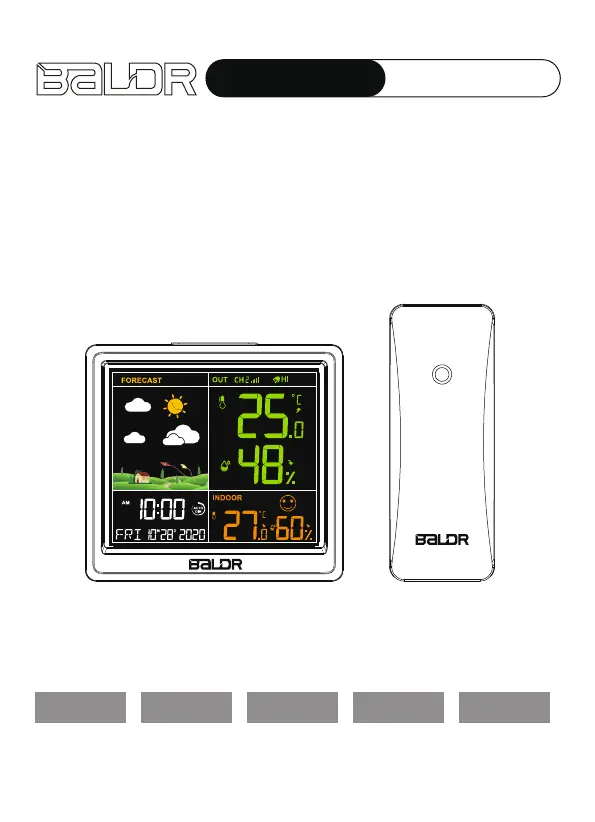
WIRELESS COLOR
WEATHER STATION
USER MANUAL
MODEL:B0389WST2H2-V1
English Deutsche Français Italiano Español

Questions and Answers

  • P
    Peter JohnsonAug 5, 2025
    What to do if my BALDR Weather Station outdoor reading is flashing or showing dashes?
    • A
      athomasAug 5, 2025
      Flashing outdoor readings on your BALDR Weather Station usually indicate wireless interference. Try this: 1. Bring both the sensor and display indoors, placing them side by side, and remove the batteries from both. 2. Ensure the 1-2-3 switch on both units is set the same. 3. Reinstall the batteries in the main unit. 4. Reinstall the batteries in the outdoor sensor. 5. Allow both units to sit close together for a few minutes to establish a strong connection before moving the sensor back outdoors.
  • K
    Keith FriedmanAug 13, 2025
    What to do if my BALDR B0389WST2H2-V1 has no outdoor sensor reception?
    • T
      Tammy ChavezAug 13, 2025
      If your BALDR Weather Station isn't receiving the outdoor sensor signal, try these steps: * Reload the batteries in both the outdoor sensor and the main unit. * Relocate the main unit and/or the outdoor sensor, ensuring they are within 328 ft (100 m) of each other. * Make sure both units are at least 3 feet (0.9 m) away from electronics that could interfere with wireless communication, such as TVs, microwaves, and computers.
  • M
    Melissa BishopAug 21, 2025
    Why is the temperature/humidity on my BALDR B0389WST2H2-V1 Weather Station inaccurate?
    • D
      dawsonjosephAug 21, 2025
      For inaccurate temperature or humidity readings on your BALDR Weather Station, ensure that both the main unit and the sensor are placed out of direct sunlight and away from any heat sources or vents.
  • S
    Samuel BakerAug 28, 2025
    What does “HH/LL” display mean on my BALDR B0389WST2H2-V1?
    • K
      Kendra KnoxAug 28, 2025
      The “HH/LL” displayed on your BALDR Weather Station indicates that the temperature is either higher (HH) or lower (LL) than the detection range of the device.

Summary

Product Overview

Main Unit Front View

Details the front view of the main unit, numbering key display elements and indicators.

Main Unit Back View Controls

Button Functions

Details the functions of the SET/MEM, +/CH, -/AUTO DIM, ALARM, and ALERTS buttons on the back.

Main Unit Top View and Outdoor Sensor

Top View Button

Explains the zz|-- button for backlight and snooze functions.

Outdoor Sensor Components

Shows different views of the outdoor sensor, numbering its parts.

Product Features

Measurement and Forecast

Lists features like temperature/humidity measurement, weather forecast, and calendar.

Alerts and Indicators

Covers alert functions, low battery indicators, comfort levels, and key tone.

Package Content

Lists the items included in the product package.

Getting Started

Battery Recommendations

Recommends high-quality batteries and advises against rechargeable ones.

Main Unit and Sensor Installation

Guides on powering the main unit and installing batteries in the outdoor sensor.

Sensor Setup and Synchronization

Explains channel setup and synchronization between main unit and sensor.

Main Unit Setup

Auto Synchronization

Explains the auto synchronization process for receiving outdoor signals.

Manual Settings - Time and Year

Details manual settings for time display, time, minutes, and year.

Manual Settings Continued

Date, Language, and Unit Settings

Covers month/date format, weekday language, and temperature unit settings.

Beep, Exit, and Language Table

Explains beep function, exit procedures, and provides a weekday language table.

Alarm and Snooze Functions

Alarm Time and ON;OFF Setting

Guides on setting the alarm time and turning the alarm on or off.

Snooze Operation

Details how to activate snooze, stop the alarm, and its duration.

Operation Guidelines

Max;Min Records and Temperature

Explains max/min records and covers temperature ranges, limits, and arrow indications.

Humidity, Comfort, and Re-registration

Humidity Readings and Comfort Levels

Details humidity ranges, accuracy, comfort levels, and arrow indications.

RF Sensor Re-registration

Instructs on re-registering sensors to clear data and receive signals.

Temperature Alert and Weather Forecast

Temperature Alert Settings

Guides on setting high/low temperature alerts and enabling/disabling them.

Weather Forecast Icons

Describes the 7 types of weather forecast icons and their accuracy.

Weather Modes, Frosting, and Backlight

Weather Mode Icons and Frosting Warning

Illustrates weather icons and explains the frosting point warning indication.

Backlight and Low Battery Indicators

Details backlight control and how to interpret low battery indicators.

Troubleshooting

Outdoor Reading and Reception Issues

Provides solutions for flashing/dashed readings and no outdoor sensor reception.

Troubleshooting and Placement

Inaccurate Readings and Support

Addresses inaccurate readings, HH/LL displays, and contact support.

Main Unit Placement Guidelines

Guides on placing the main unit in a dry, dust-free area away from heat sources.

Placement and Precautions

Outdoor Sensor Placement and Guidelines

Recommends sensor placement and provides guidelines for wireless range and interference.

Cleaning, Battery, and Tampering Precautions

Advises on cleaning, battery use, tampering, and storage precautions.

Warranty Information

Warranty Coverage and Exclusions

Details the 1-year warranty, coverage, exclusions, and service requirements.

BALDR B0389WST2H2-V1 Specifications

General IconGeneral
BrandBALDR
ModelB0389WST2H2-V1
CategoryWeather Station
LanguageEnglish

Related product manuals