EasyManua.ls Logo

BALDR B0340WST2H2R-V7 - User Manual

BALDR B0340WST2H2R-V7
40 pages
Print Icon
To Next Page IconTo Next Page
Loading...
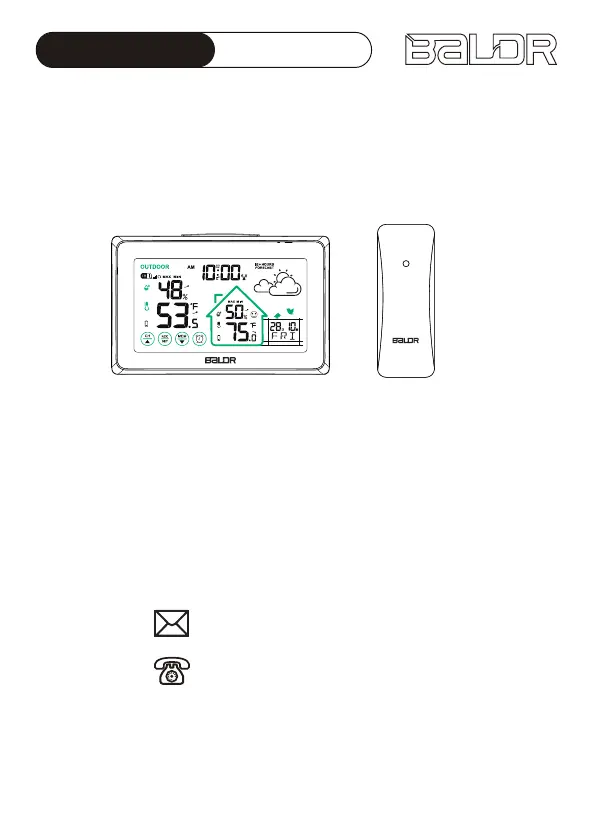
USER MANUAL
MODEL:B0340WST2H2R-V7
WIRELESS WEATHER STATION
WITH TOUCH BUTTONS
Email: baldrservice@baldr.com
USA Tel.: 1-833-381-5659
Thank you for your purchasing of BALDR Wireless Weather Station.
To ensure proper use, please read the user manual carefully before
use. If you have any problems during use, please feel free to contact
us for support.
ALWAYSDST

Questions and Answers

  • D
    Daniel RoweAug 5, 2025
    How to synchronize BALDR B0340WST2H2R-V7 sensor with main unit?
    • B
      Brian SandersAug 5, 2025
      To resynchronize your BALDR Weather Station sensor with the main unit, press and hold the "CH/?" button for 5-6 seconds, ensuring both are on the same channel. If this doesn't work, try a factory restart: remove all batteries from both units, set the sensor channel to "CH1", reinsert the batteries into the main unit, press the "CH/?" button to fix the outdoor sensor signal to channel "CH1", and then reinsert the batteries into the sensor. Allow both units to sit together for 30 minutes to establish a strong connection. Also, check the sensor's battery and replace it if necessary. Ensure the sensor is within 328ft/100m of the main unit and at least 3ft/0.9m away from electronics that might interfere with wireless communication. Finally, ensure the sensor is installed properly.
  • B
    Belinda LongAug 12, 2025
    What to do if BALDR Weather Station buttons not responding?
    • F
      fordjohnAug 12, 2025
      If your BALDR Weather Station isn't responding when you press any button, the battery may be dying. Replace the batteries with a new set.
  • B
    browndanielAug 17, 2025
    Why does my BALDR B0340WST2H2R-V7 Weather Station outdoor temperature keep cycling?
    • C
      Cheryl RiddleAug 17, 2025
      The cycling display on your BALDR Weather Station means the main unit has entered Circular Channels Model, displaying data from three channels every 10 seconds. To exit this mode and fix the display to a specific channel (CH1, CH2, or CH3), press the "CH/?" button 1-3 times.
  • M
    Matthew BruceAug 25, 2025
    How to fix high temperature readings on BALDR Weather Station?
    • R
      Rachel HunterAug 25, 2025
      To prevent inaccurate high-temperature readings on your BALDR Weather Station during the daytime, make sure both the main unit and the sensor are placed out of direct sunlight and away from any heat sources or vents.
  • B
    Brandi SchwartzAug 29, 2025
    What does HH.H/LL.L mean on BALDR B0340WST2H2R-V7 Weather Station?
    • C
      castillocurtisAug 29, 2025
      If your BALDR Weather Station displays "LL.L" for indoor temperature, it means the temperature is lower than 14 °F/-10?. If it displays “HH.H", the temperature is higher than 122 °F/+50.0?. For outdoor temperatures, "LL.L" indicates a temperature lower than -40 °F/-40?, while “HH.H" means it's higher than 140 °F/+60?.

Summary

PRODUCT OVERVIEW

WEATHER STATION (MAIN UNIT)

Details the components and features of the main weather station unit, including display elements and indicators.

BUTTONS INTRODUCTION

Explains the functions of the various buttons on the main unit for operation and setting.

REMOTE SENSOR

Introduces the remote sensor, its parts, and general placement advice.

PACKAGING INCLUDES

QUICK SET-UP GUIDE

POWER UP

Provides step-by-step instructions for installing batteries and powering on the main unit and sensor.

RCC FUNCTION

Introduces the Radio Controlled Clock (RCC) function for automatic time synchronization.

MANUAL SETTINGS

Details how to manually configure time, date, time zone, DST, and units.

REMOTE SENSOR INSTALLATION

Guides on the proper placement and installation of the remote outdoor sensor for optimal signal and accuracy.

ALARM SETTING

Explains how to set, check, and manage alarm functions, including turning alarms ON/OFF.

SNOOZE MODE

Describes the snooze function for alarms and how to activate it when the alarm rings.

MAX;MIN TEMPERATURE & HUMIDITY RECORDS

Explains how to view and manually clear maximum and minimum temperature and humidity records.

TEMPERATURE & HUMIDITY TREND ARROWS

COMFORT LEVEL INDICATOR

WEATHER FORECAST

BACKLIGHT FUNCTION

LOW BATTERY INDICATOR

SPECIFICATIONS

TECHNICAL SPECIFICATIONS

Lists the technical details, ranges, and power requirements of the weather station.

MEASUREMENT SPECIFICATIONS

Provides details on the accuracy and resolution of indoor/outdoor temperature and humidity measurements.

TROUBLESHOOTING GUIDE

PRECAUTIONS

FCC Statement

WARRANTY

BALDR B0340WST2H2R-V7 Specifications

General IconGeneral
ModelBALDR B0340WST2H2R-V7
CategoryWeather Station
Display TypeLCD
Temperature DisplayYes
Humidity DisplayYes
Humidity Range20% to 95%
Alarm FunctionYes
Temperature Range (Indoor)0°C to 50°C
Temperature Range (Outdoor)-40°C to 60°C
Wireless Range100 meters
Power Source (Main Unit)AAA batteries
Power Source (Remote Sensor)AAA batteries
Memory FunctionYes

Related product manuals