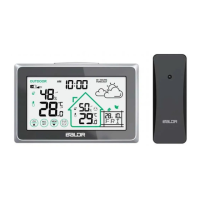
The BALDR Digital Color Weather Station is a comprehensive device designed to provide users with detailed weather information and environmental monitoring. It functions as a central hub for both indoor and outdoor atmospheric conditions, offering a range of features to enhance daily planning and comfort.
Function Description
At its core, the weather station displays outdoor temperature and humidity, along with their maximum and minimum records, allowing users to track environmental changes over time. Similarly, it monitors indoor temperature and humidity, providing insights into the comfort level of the immediate surroundings. The device includes arrow trends to indicate whether temperature and humidity are increasing or decreasing, offering a quick visual cue for atmospheric shifts.
A key feature is its weather forecast capability, predicting conditions for the next 12-24 hours based on hourly calculations of indoor/outdoor temperature, humidity, and barometric pressure data. The forecast is represented by intuitive icons for sunny, partly cloudy, cloudy, rainy, and snowy conditions. The station also tracks barometric pressure history, displaying changes over the past 12 hours through a dynamic histogram, which is always active and cannot be switched off.
For personal comfort, a five-level comfort indicator for both indoor and outdoor environments is provided, based on humidity values. The device also includes a moon phase display, showing the current phase of the moon, from New Moon to Waning Crescent. A frost-point alert is integrated, notifying users when outdoor temperatures approach freezing, with an audible "BIBIBI" sound and a flashing symbol.
Beyond environmental monitoring, the weather station incorporates essential timekeeping and alarm functions. It displays the current time in either 12/24 hour format, along with the calendar display, including weekdays in seven languages. The device supports an alarm with a snooze function, allowing users to set a wake-up time and temporarily delay the alarm. High/low temperature alerts can be set for both indoor and outdoor conditions, providing notifications when temperatures exceed or fall below predefined thresholds.
The weather station also features an RCC (Radio Controlled Clock) function, which automatically synchronizes the time with a radio signal, ensuring accuracy. This function includes daily signal reception attempts and a manual receiving option.
Usage Features
The weather station is designed for user-friendly operation with a clear, color display and a set of intuitive buttons. The "SET" button is central for entering manual settings for time, date, language, time zone, display format, temperature unit, barometric unit, and weather forecast. The "▲/CH" and "▼/RCC" buttons are used to adjust values during settings, switch outdoor sensor channels, and control the RCC function. The "ALERTS" button allows users to check and set temperature alerts, while the "MEM" button is used to check and clear maximum/minimum records for temperature and humidity.
The backlight is adjustable, offering 10%, 50%, 100% brightness, or off, controlled by a dedicated button. This button also serves as the snooze activator when an alarm is ringing.
Powering up the device involves plugging in the AC adapter and inserting a CR2032 cell battery for memory function during power outages. The outdoor sensor requires two AA batteries and needs to be set to a specific channel (CH1, CH2, or CH3) to synchronize with the main unit. Establishing a strong connection between the main unit and the outdoor sensor is recommended by placing them together for 30 minutes after initial setup.
Manual setting allows for customization of various parameters, including weekday language, RCC ON/OFF, DST ON/OFF, time zone, time format, date format, temperature unit (°C/°F), barometric unit (mmHg, inHg, hPa/mb), beep ON/OFF, and weather forecast type. The device supports time zones from AST(-4) to HAT(-10).
The alarm time setting is straightforward, allowing users to set the hour and minute. The alarm can be turned ON or OFF, and the snooze function provides a 5-minute interval. Temperature alerts can be configured for outdoor high/low and indoor high/low temperatures, with default settings provided.
Maintenance Features
Maintenance of the weather station focuses on ensuring optimal performance and longevity. Low battery indicators are present for both the outdoor sensor and the main unit's CR2032 cell battery, prompting users to replace batteries when needed.
For the outdoor sensor, proper installation is crucial. It should be protected from direct sunlight and rain, kept well-ventilated with a gap from walls, and placed vertically at a height of about 1.2-2.5 meters (3.93-8.20 feet). To ensure reliable data transmission, the sensor should be placed near the main unit, avoiding thick walls or strong interference sources (like TVs, microwaves, computers) operating on the same 433MHz frequency. The transmission range is up to 100m/330ft in open areas.
Troubleshooting guidance is provided for common issues such as flashing outdoor readings, no outdoor sensor reception, RCC function not working, inaccurate temperature/humidity, inaccurate weather forecast, outdoor sensor draining batteries quickly, inaccurate barometric value, incorrect weekday display, "HH.H/LL.L" display for temperature, and unresponsive buttons. Solutions often involve reconnecting the sensor, checking battery power, repositioning the unit for better signal reception, or performing a side-by-side test for accuracy.
In cases where issues cannot be resolved through troubleshooting, a factory reset option is available. This involves unplugging the adapter, removing all batteries from both units, then plugging in the adapter, ensuring the main unit's channel is fixed at CH1, and placing the main unit vertically. Batteries are then reinserted into the sensor and main unit, and both devices are placed together for 30 minutes to re-establish a strong connection.
General precautions include avoiding cleaning with harsh chemicals, never immersing the product in water, protecting it from extreme force, shock, or temperature/humidity fluctuations, and not tampering with internal components. It is also advised not to mix old and new batteries or different types of batteries, and to remove batteries if storing the product for extended periods. Proper disposal of the device as unsorted municipal waste is also emphasized.



 To Next Page

 General