
 Need help?
Do you have a question about the BALDR B0360WST4H4PR and is the answer not in the manual?
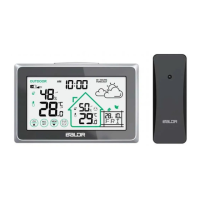
Details on temperature, humidity, forecast, pressure, calendar, and time displays.
Explanation of buttons for backlight, setting, memory, channel, RCC, time format, and alarm functions.
Description of the stand bracket, hanging hole, and battery compartment.
Details on the outdoor sensor's battery compartment and channel selection switch.
Information on the signal light and hanging hole for the outdoor sensor.
Instructions for powering the main unit using batteries or AC adapter.
Steps for installing batteries into the remote outdoor sensors.
Procedure for pairing remote sensors with the main unit, including signal receiving.
Details on the initial LCD display and the default configuration settings.
Instructions for calibrating the barometer and its operational range.
Process for receiving outdoor sensor signals and handling RCC signal reception.
Details on searching for radio signals, display updates, and daily receiving schedules.
Procedure for manually initiating and exiting radio signal reception.
Steps for setting weekday language, hours, and minutes.
Instructions for setting date format, month, date, and barometric unit.
Guide to configuring the RCC function and selecting the time zone.
Steps to select weather conditions and confirm/exit settings.
Detailed steps for setting the alarm time and its default ON status.
Instructions on how to check, turn on, and turn off the alarm.
How to activate snooze, its interval, and how to stop the alarm.
Instructions for checking, clearing, and updating maximum and minimum records.
Details on indoor/outdoor temperature display, ranges, and change indications.
Information on indoor/outdoor humidity display, ranges, accuracy, and change indications.
Explanation of comfort level indicators based on humidity ranges (Dry, Comfort, Wet).
Procedure to clear sensor data and restart the signal receiving process.
Details on the 5 weather forecast modes and their accuracy.
Instructions for adjusting backlight brightness and automatic turn-off.
Guidance on recognizing and responding to low battery indicators.
Solutions for flashing outdoor readings or missing data due to interference.
Steps to resolve issues where the main unit does not receive outdoor sensor signals.
Troubleshooting for inaccurate temperature/humidity and HH.H/LL.L display errors.
Recommendations for placing the main unit for accurate indoor measurements.
Best practices for outdoor sensor placement for optimal performance and longevity.
Guidelines on maintaining distance from interfering sources for wireless communication.
Important warnings regarding cleaning, immersion, tampering, and battery usage.
Instructions on proper disposal of the product as per waste regulations.
Details on the 1-year limited warranty, exclusions, and service procedures.
 General
| Brand | BALDR |
|---|---|
| Model | B0360WST4H4PR |
| Category | Weather Station |
| Language | English |













 To Next Page