VIGIL3 Voice Alarm
Overview, Architecture and Configuration
16 VIGIL3 Overview, Architecture & Configuration issue 2
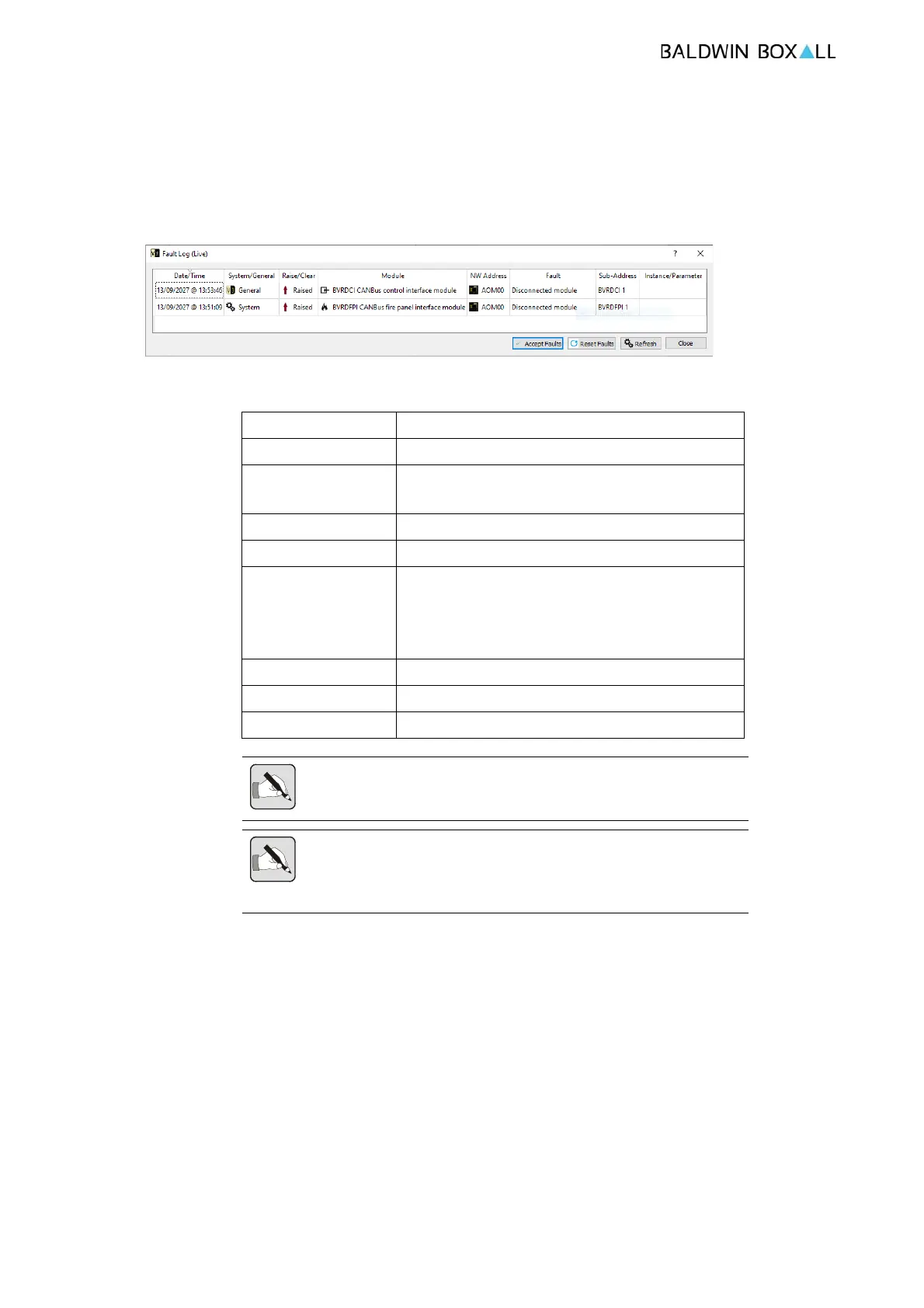
Faults in a VIGIL3 System are self describing and contain several
elements as shown in the screen shot from the Live Faults Display
in the VIGIL3 configuration software below;
Figure 3.1 — VIGIL3 Configuration Live Faults View
The elements shown are described below;
Element Description
Date/Time The date and time that the fault was raised
System/General Whether the fault is a General or EN54 System
Fault
*1
Raise/Clear Used when analysing fault logs
Module The module type raising the fault
NW Address The ID of the BV3AIM2/4 or BV3AOM8 module
raising the fault. For CAN Bus faults the NW
Address is the ID of the BV3AOM8 module
that
the CAN bus device is connected to
Fault Self describing fault description
Sub-Address Varies depending on Fault type
*2
Instance/Parameter Varies depending on Fault type
*2
NOTE:
*1
All EN54 System faults cause the System Fault LED’s
to illuminate and must be manually reset
NOTE:
*2
Example for a BVRDACO, Sub-Address indicates
BVRDACO 1 or 2 and Instance/Parameter indicates the line
number against which the fault is raised.


 To Next Page