EasyManua.ls Logo

Bandit 240 DB - User Manual

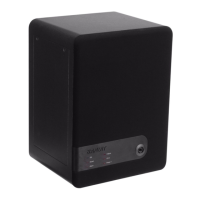
Bandit 240 DB
34 pages
Print Icon
To Next Page IconTo Next Page
Loading...
BANDIT 240 DB v.206
Introduction - p. 1
INTRODUCTION
By selecting this device, you have acquired advanced active access-prevention technology.
With BANDIT we offer you an affordable system which guarantees operational reliability, top
performance and a discrete design.
More and more private and public buildings are being equipped with a protection system
against burglary. When armed, these systems detect a burglary attempt. The detection is
generally communicated by means of a siren and/or strobe or sometimes an automatic
phone call to an alarm control centre or police station. In real terms these notifications are
satisfying, but the subsequent human intervention often arrives more than 10 minutes
after the event! Burglars are aware of this and use this time to steal the most valuable
things and get away in time.
BANDIT offers a unique and active solution to this problem. For this system is totally capable
of filling a large office, store or other room, within a few seconds, with a non transparent fog.
This fog prevents persons from entering the room for at least 10 minutes after setting off the
alarm, since they cannot see a thing. The ejected fog has a soft mint smell (to avoid possible
fire interpretation by outsiders), it is colourless and leaves no traces. So the fog safely and
quickly disables the vision capabilities of unwanted visitors.
BANDIT is installed in those rooms that contain the most valuable objects; by doing so,
burglary damage is effectively limited to a strict minimum.
Advantages:
- Fills 28 m³ of space per second of fog expulsion.
- Extremely compact and discrete design.
- A system free of maintenance with very high operational reliability (by lack of moving
components).
- The standard integrated “Power saver” and good thermal isolation, maintains a very
low energy consumption, between 30 and 40 W/h, depending on the adjusted fog
expulsion period.
- Continuous control of liquid level. When the level is too low to guarantee a full
expulsion period it will be shown by an LED and an electrical contact will occur. In this
case you’ll have to replace the internal HY-3 pack. The recognition and acceptance of
the new HY-3 pack (such as the resetting of the HY-3 shortage notification), occur
automatically. For recharging, the empty HY-3 pack has to be returned to your BANDIT-
dealer.
- In case of interrupted power supply voltage (230 VAC), operation is guaranteed:
electronics ~24 hours, fog generator ~2 hours.
- The PCB is equipped with 3 dipswitch blocks (with a total of 10 dips). It gives you the
possibility to easily program all elementary adjustments in a rather simple way without
the need of other adjustment devices, such as PC/laptop and/or adjustment links.
- The device is prepared through plug-in connectors, to be extended with a control box
and/or a wireless remote control.
- If mentioned while ordered, the device can be equipped with additional options, such
as: straight ejection mouth, elongated ejection mouth, etc.

Other manuals for Bandit 240 DB

Question and Answer IconNeed help?

Do you have a question about the Bandit 240 DB and is the answer not in the manual?

Summary

Introduction

Standards

Industrial Property

Producer

Safety Precautions

Location

Guidelines for safe placement and environmental considerations.

Electrical Connection

Instructions for connecting the device to the mains power supply.

Cleaning

Procedures for cleaning the exterior of the appliance.

Fog Ejection Control

Safety precautions for operating the fog ejection system.

Specifications

Descriptions

General physical and performance characteristics of the device.

Fog Generator

Technical details of the fog generation system.

HY-3 Pack

Specifications related to the HY-3 fluid pack.

Electrical

Electrical supply and consumption details.

Mounting

Hidden Mounting

Instructions for discreet installation within a closet.

Electrical Connection

Connection to the Mains Power Supply

Detailed steps for connecting the unit to the AC power source.

PCB Layout

Inputs

Electrical Properties of an Input

Characteristics and behavior of device inputs.

Guard Input [Grdin]

Configuration and function of the guard mode input.

Alarm Input [Alin]

Configuration and function of the alarm activation input.

Panic Input [Panin]

Configuration and function of the panic mode input.

Outputs

12 V Supply [Supply]

Description of the 12V power output for external devices.

Sabotage Loop [Tmpout]

Function of the tamper detection output.

Failure Output [OKout]

Description of the technical failure relay output.

Guard Output [Grdout]

Description of the guard mode npn-transistor output.

Jumbo-LED Option

Details on the optional Jumbo-LED accessory.

Alarm Output [Alout]

Description of the alarm mode npn-transistor output.

Control Box

Installation

Guidelines for installing the optional Control Box.

Communication Status

Front LEDs

Explanation of the front panel status indicator LEDs.

Informative PCB LED

Details on the error status LED located on the PCB.

Dip-Switch Adjustments

Dip Block A

Configuration settings for inputs via dip switches.

Dip Block B

Configuration settings for remote control via dip switches.

Replacement of HY-3 Pack

Procedure to Change the HY-3 Pack

Step-by-step guide for replacing the HY-3 fluid pack.

Maintenance

First Aid

Examples of Application

Frequently Asked Questions

Bandit 240 DB Specifications

General IconGeneral
BrandBandit
Model240 DB
CategorySecurity System
LanguageEnglish