SFVP
grading
Dip switch settings - p. 23
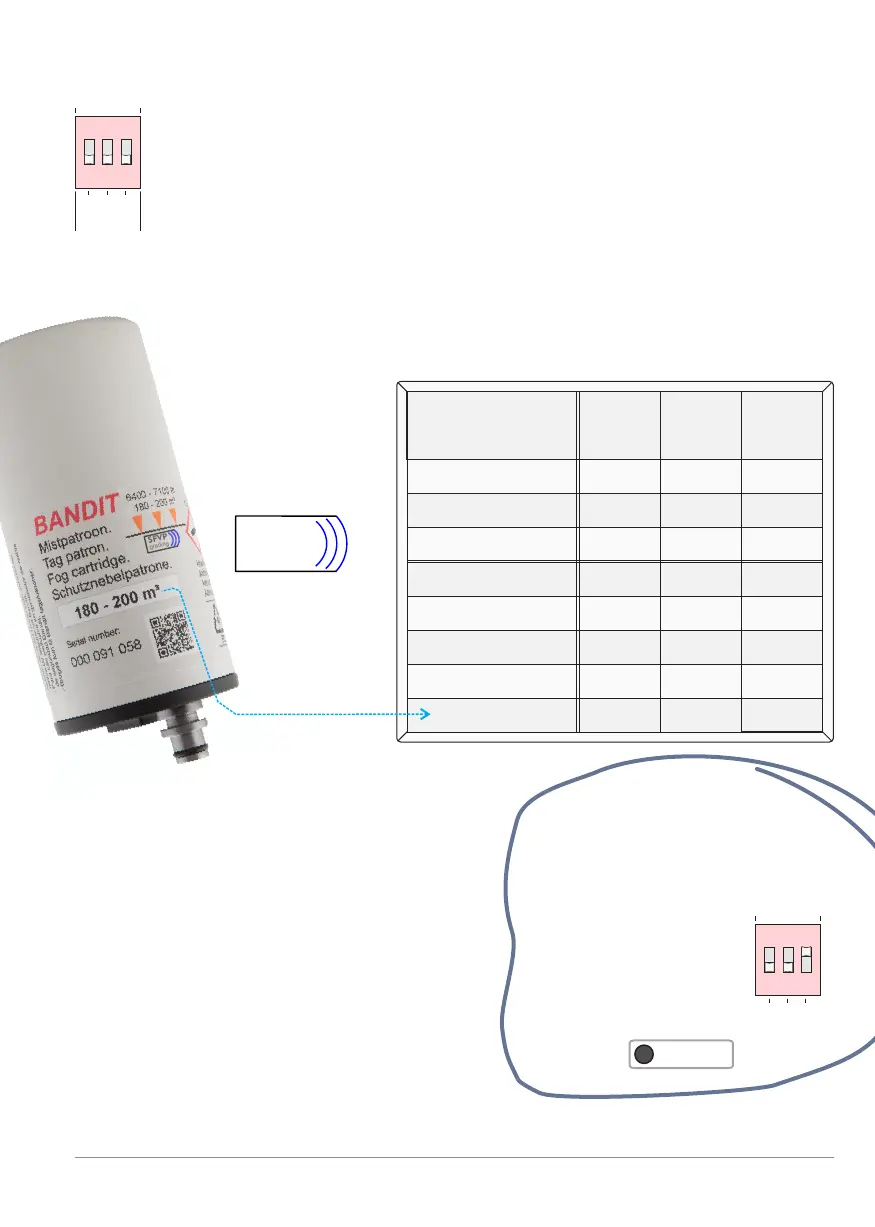
Block: Setting the volume of the space to be protected [M³]
Each fog ejection of the BANDIT fog generator produces a fog
volume corresponding to the volume of fog fluid content within the
installed cartridge, which is selected to provide the correct room
filling capacity in cubic meters (m³). In order to make sure that the
fog capacity corresponds to the volume of the secured area, a fog
volume setting is provided. Using this setting, the fog generator can
control if an installed cartridge matches the volume of the area
which needs to be protected (m³).
1 2 31 2 3
M³
2
3
1
1 2 3
Volume of
the area
dip
1
dip
2
dip
3
OFF OFF
OFF
OFF
OFF
OFF OFF
OFF
OFF OFF
OFF
OFF
ON
ON
ON
ON ON
ON
ON
ON
ON
ON
ON
ON
40 - 60 m³
160 - 180
60 - 80
80 - 100
100 - 120
140 - 160
180 - 200
120 - 140
Set up table: Fog volume of the area (M³).
Setting example:
To ensure fog ejection fills a
space with a volume of 70 m³ to
Grade 4, use cartridge 60-80 m³
and
put dip’s at:
dip 1 = OFF
dip 2 = OFF
dip 3 = ON
+ press
1 2 31 2 3
M³
2
3
1
1 2 3
Read dips
Maximum fog ejection capacity is different
for each Bandit model fog generator.
See manual of the connected fog
generator.
If a connected fog generator has a
cartridge installed that differs from the
dip-switch setting (Eg. 320-xx has a
max. fog ejection capacity of 200 m³ for
Grade 4 and 300 m³ for Grade 3)
this will be indicated on the controller.
See also p. 26 and p. 31.
The specified
volumes are
based on
a fog density
according to
Grade 4
See also p. 31
ON
ON
SFVP
grading
BANDIT Controller CF31 v2 / Manual v.102


 To Next Page