1 2 31 2 3
Front
Move
X Y
ON
1 2 3
Moved
In the event of a tamper alarm by the motion sensor ,
look for any changes of the installed fog generator position, direction,
scratches, impact, etc .
This message may be an indication of a "break-in preparation or an
“inside job.
Block: Setting panic button [PanBut.]
This block of three DIP-switches is used to set the function of the
panic button input [PanBut.].
For adjustment and settings, see p. 9, 10 and 11.
See also: Example diagram 3 on p. 36.
1 2 31 2 3
PanBut.
1 2
3
1 2 3
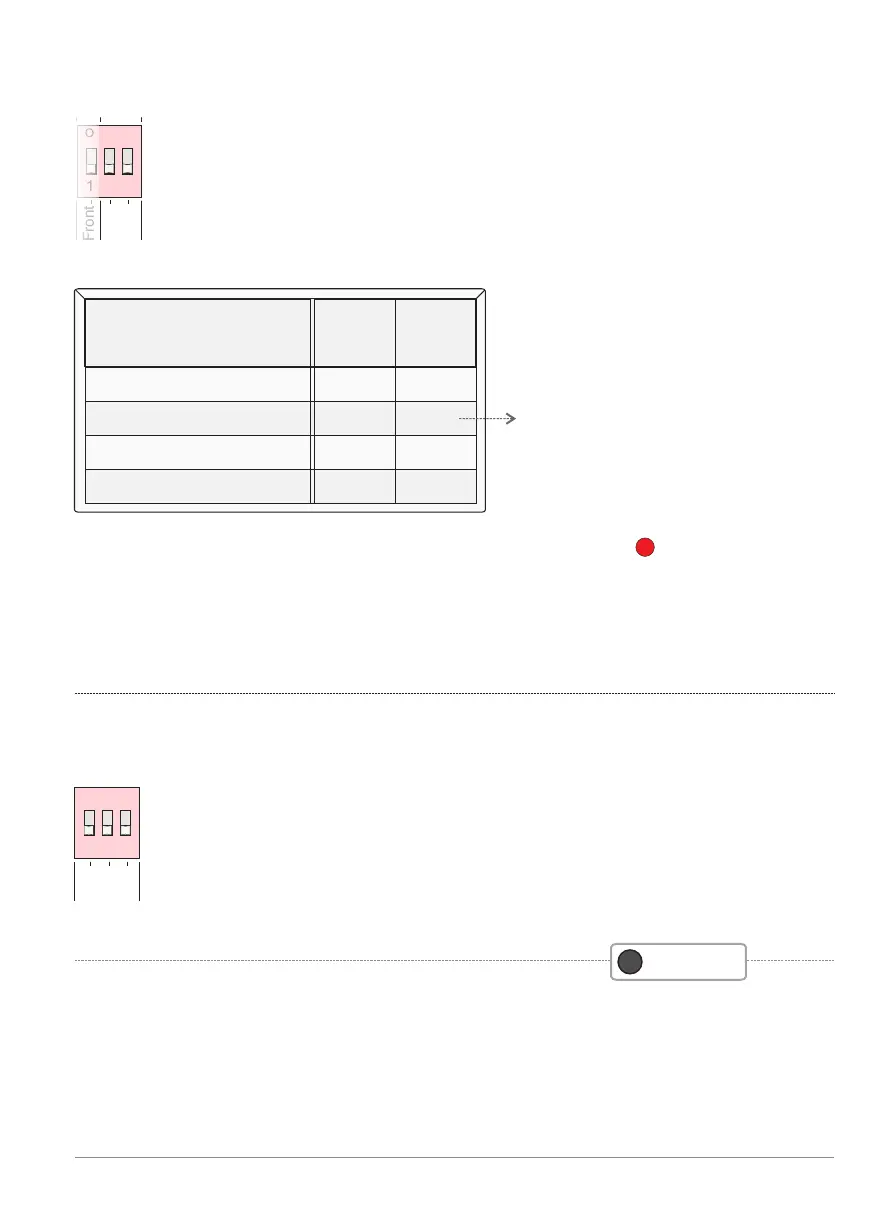
Block: Motion control [Move]
The BANDIT fog generator is internally equipped with a
motion sensor (solid-state gyroscope). This sensor
detects when the fog generator is moved and this will
show on its controller and activate the tamper output [Tamper].
Reset this message via the Tamper reset button.
See also p. 15 and p. 16.
Detection sensitivity can be
adjusted using the 2 DIP
switches X and Y [Move].
F
Read dips
ON
Sensitivity
dip
X
dip
Y
OFF
OFF
ON
ON
ON ON
OFF
OFF
0% (off)
30% (normal)
60% (sensitive)
90% (very sensitive)
Factory default
Dip switch settings - p. 25
BANDIT Controller CF31 v2 / Manual v.102


 To Next Page