EasyManua.ls Logo

Banner DF-G1 - User Manual

Banner DF-G1
27 pages
Print Icon
To Next Page IconTo Next Page
Loading...
For Sales and Support, Contact Walker EMD • Toll-free: (800) 876-4444 • Tel: (203) 426-7700 • Fax: (203) 426-7800 • www.walkeremd.com
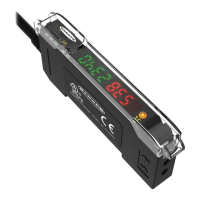
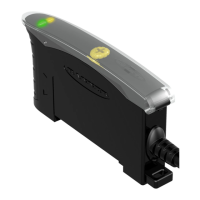
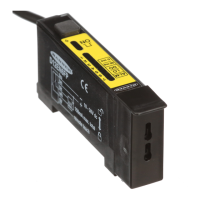
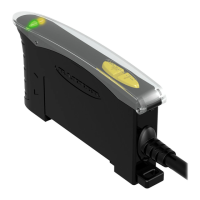
Advanced sensor with dual digital displays for use with plastic and glass fiber optic assemblies
Features
Easy to read dual digital displays show both signal level and threshold simultaneously
Lever action fiber clamp provides stable, reliable, and trouble-free fiber clamping
Simple user interface ensures easy sensor set-up and programming via displays and
switches/buttons, or remote input teach wire
Expert TEACH and SET methods ensure optimal gain and threshold for all applica-
tions, especially low contrast applications
User has full control over all operating parameters: threshold, Light Operate or Dark
Operate, output timing functions, gain level, and response speed
Thermally stable electronics minimize warm-up drift and the effect of side-by-side
mounting of multiple fiber amplifiers
ECO (economy) display mode reduces amplifier power consumption by 25%
Cross talk avoidance algorithm allows two sensors to operate in close proximity for
many applications
Response speeds of: 200 µs (High Speed), 500 µs (Standard), 2 ms (Long Range),
and 5 ms (Extra Long Range) allow operator to optimize for fast or long distance ap-
plications
Sleek 10 mm wide housing mounts to 35 mm DIN standard rail
Visible red LED sensing beam
Models
Model Outputs Connector*
DF-G1-NS-2M Single NPN
2 m (6.5') cable, 4-wire
DF-G1-PS-2M Single PNP
DF-G1-NS-Q3 Single NPN
150 mm (6") PVC pigtail, M8 Pico QD connector, 4-
pin
DF-G1-PS-Q3 Single PNP
DF-G1-NS-Q7 Single NPN
Integral M8 Pico QD connector, 4-pin
DF-G1-PS-Q7 Single PNP
* Connection options: A model with a QD connector requires a mating cordset (see Quick-Disconnect Cordsets on page 26).
For 9 m cable, change the suffix 2M to 9M in the 2 m model number (example, DF-G1-NS-9M).
For M12 Euro QD pigtail change the suffix 2M to Q5 in the 2 m model number (example, DF-G1-NS-Q5).
WARNING: Not To Be Used for Personnel Protection
Never use this product as a sensing device for personnel protection. Doing so could lead to seri-
ous injury or death. This product does NOT include the self-checking redundant circuitry necessary to
allow its use in personnel safety applications. A sensor failure or malfunction can cause either an ener-
gized or de-energized sensor output condition.
DF-G1 - Expert Dual Display Fiber Amplifier Manual
P/N 161999 Rev. A 1/12/2012

0 161999 7

Other manuals for Banner DF-G1

Questions and Answers

  • D
    Donald MendozaAug 10, 2025
    What does '% Offset after SET - FAIL (with % Offset)' mean for Banner Accessories?
    • K
      Kelsey LeeAug 10, 2025
      A '% Offset after SET - FAIL (with % Offset)' message on your Banner accessories indicates the minimum required percentage offset necessary to pass the SET method is being displayed.
  • K
    kbowenAug 15, 2025
    What does '% Offset after SET - PASS' mean for Banner DF-G1 Accessories?
    • E
      Eric MooreAug 15, 2025
      A '% Offset after SET - PASS' message on your Banner accessories displays the percentage offset used for the SET method.
  • J
    Jordan BradleyAug 20, 2025
    What does '% Offset after SET - FAIL (without % Offset)' mean on Banner DF-G1 Accessories?
    • S
      simsjenniferAug 20, 2025
      A '% Offset after SET - FAIL (without % Offset)' message on your Banner accessories means the presented condition cannot be used for the SET method.
  • T
    Tracy JosephAug 25, 2025
    What to do if I get a Threshold Error with my Banner DF-G1 Accessories?
    • J
      Jacqueline Guzman DVMAug 26, 2025
      If you are experiencing a threshold error with your Banner accessories, this is likely due to severe contamination or changes in the taught condition. Cleaning or correcting the sensing environment and re-teaching the sensor is required to resolve this issue.
  • Z
    Zachary MarquezAug 30, 2025
    What to do if I get a Threshold Alert on my Banner DF-G1 Accessories?
    • B
      Brian PetersonAug 30, 2025
      A threshold alert with Banner accessories typically indicates severe contamination or changes in the taught condition. It's highly recommended to clean or correct the sensing environment and/or re-teach the sensor.
  • D
    Dustin TurnerSep 4, 2025
    What to do if I get a Threshold Error on my Banner DF-G1?
    • T
      tphillipsSep 4, 2025
      If you're encountering a Threshold Error with your Banner Accessories, it's likely due to significant contamination or changes in the learned conditions. Cleaning or correcting the sensing environment and re-teaching the sensor is required to resolve this issue.

Banner DF-G1 Specifications

General IconGeneral
TypeFiber Optic Amplifier
Supply Voltage10 to 30 V DC
Light SourceRed LED
OutputNPN or PNP
Housing MaterialABS
Operating Temperature55 °C
Sensing RangeUp to 300 mm (depending on fiber optic cable)

Related product manuals