
 Need help?
Do you have a question about the Banner Expert D12 Series and is the answer not in the manual?
Explains how the sensor evaluates light/dark conditions to optimize sensitivity.
Allows setting output timing and light/dark operate modes for sensor outputs.
Emphasizes that these sensors are not safety devices and warns against personnel protection use.
Details the physical dimensions for D12 Expert glass fiber optic models.
Details the physical dimensions for D12 Expert plastic fiber optic models.
Information regarding the mounting bracket and its dimensions for DIN rail mounting.
Describes normal operation and the function of the 7-segment LED display.
Procedure to restore the sensor's sensitivity to its maximum setting via TEACH mode.
Lists the default settings for D12E and D12E2 sensors.
Explains how the 7-segment display indicates relative contrast level after teaching.
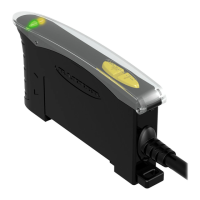
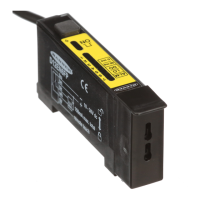
The Banner D12 Expert Series are TEACH-Mode Fiber Optic Sensors designed for use with either glass or plastic fibers, offering one-button programmability for a wide range of sensing applications. These self-contained sensors are engineered for DIN rail mounting and operate on a 10 to 30V dc power supply. They feature a visible red (680 nm) light source, making them versatile for both high optical sensing power when needed and excelling in low-contrast sensing scenarios.
The D12 Expert Series sensors are capable of differentiating between two received light levels, referred to as the "light condition" (higher received light) and the "dark condition" (lower received light). The difference between these two is the "sensing contrast." The core functionality revolves around two primary programming modes: TEACH mode and SENSOR OUTPUT CONFIGURATION mode.
In TEACH mode, the sensor automatically evaluates the light and dark sensing conditions and adjusts its sensitivity to an optimal level. This process is designed to be fast, easy, and accurate. D12E models are specifically tailored for low-contrast sensing, setting their switching threshold just above the "dark" condition. This is particularly effective when the dark condition's light level remains constant. D12E2 models, on the other hand, set their switching threshold midway between the "dark" and "light" conditions. This allows them to ignore subtle changes, such as web flutter in high-speed registration color-mark-sensing applications. The sensor indicates the relative sensing contrast at the end of the TEACH mode process, providing feedback on how forgiving the application will be to changing sensing conditions.
The SENSOR OUTPUT CONFIGURATION mode allows users to customize the sensor's output behavior. This includes setting the output for either no delay or a fixed 40 millisecond pulse stretcher (OFF-delay). The no-delay option provides a fast 200 microsecond sensing response, suitable for quick events. The pulse stretcher is useful for loads or circuit inputs that are too slow to react to rapid events. Additionally, the output can be configured for either light operate (LO) or dark operate (DO). In LO mode, the sensor's load output is energized when the light condition is sensed, while in DO mode, it's energized for the dark condition.
The D12 Expert Series also incorporates an alarm output to signal marginal sensing conditions, enhancing reliability. A separate input allows for remote programming by an external device, such as a switch or a process controller, offering flexibility in integration.
The D12 Expert Series is designed for ease of use with its secure one-button programming. This single button manages both TEACH and sensor configuration settings through quick commands, eliminating the need for exposed switches or adjustments found on competitive sensors. This design also ensures the sensor is sealed against environmental elements.
For glass fiber installation, the fiber ends are slid into the sensor's fiber ports, pushed firmly to compress o-rings and align grooves, and then secured with a retaining clip. For plastic fiber installation, the fiber ends are cut as per instructions, the fiber gripper is slid up, the prepared fiber ends are inserted, and the gripper is slid back down to lock. Small fiber adaptors are used for smaller diameter fibers.
The sensor offers a fast 200 microsecond sensing response and a programmable 40 millisecond pulse stretcher, allowing it to adapt to various application speeds and load requirements. The output can be programmed for either light or dark operate, providing flexibility in how the sensor responds to detected conditions.
Remote programming is possible by connecting the sensor's gray wire to a remote programming switch. This input parallels the on-sensor push button, allowing for single-, double-, and triple-click commands to be executed remotely, with specific timing requirements for each click type to ensure accurate programming.
The D12 Expert Series includes advanced and comprehensive LED status displays for monitoring and diagnostics. A 7-segment LED bargraph indicates relative received signal strength, sensing contrast, programming status, and diagnostic trouble warnings. This visual feedback is crucial for understanding the sensor's current state and performance.
A marginal sensing alarm is a key maintenance feature. The sensor flashes LED #7 continuously and energizes the alarm output when a marginal sensing condition develops during RUN mode. This alerts users to check the sensing area for changes that might affect the received light level, such as dirt buildup on fibers, misalignment, or changes in the target's physical properties. If no changes are identified, re-teaching the sensor is recommended.
The LED display also indicates specific trouble conditions:
These diagnostic features provide clear indications of operational issues, enabling timely troubleshooting and maintenance to ensure continuous and reliable performance. The robust design, with its sealed push button, also contributes to reduced maintenance by protecting internal components from environmental ingress.
 General
| Brand | Banner |
|---|---|
| Model | Expert D12 Series |
| Category | Accessories |
| Language | English |



 To Next Page