For Sales and Support, Contact Walker EMD • Toll-free: (800) 876-4444 • Tel: (203) 426-7700 • Fax: (203) 426-7800 • www.walkeremd.com
Light SET
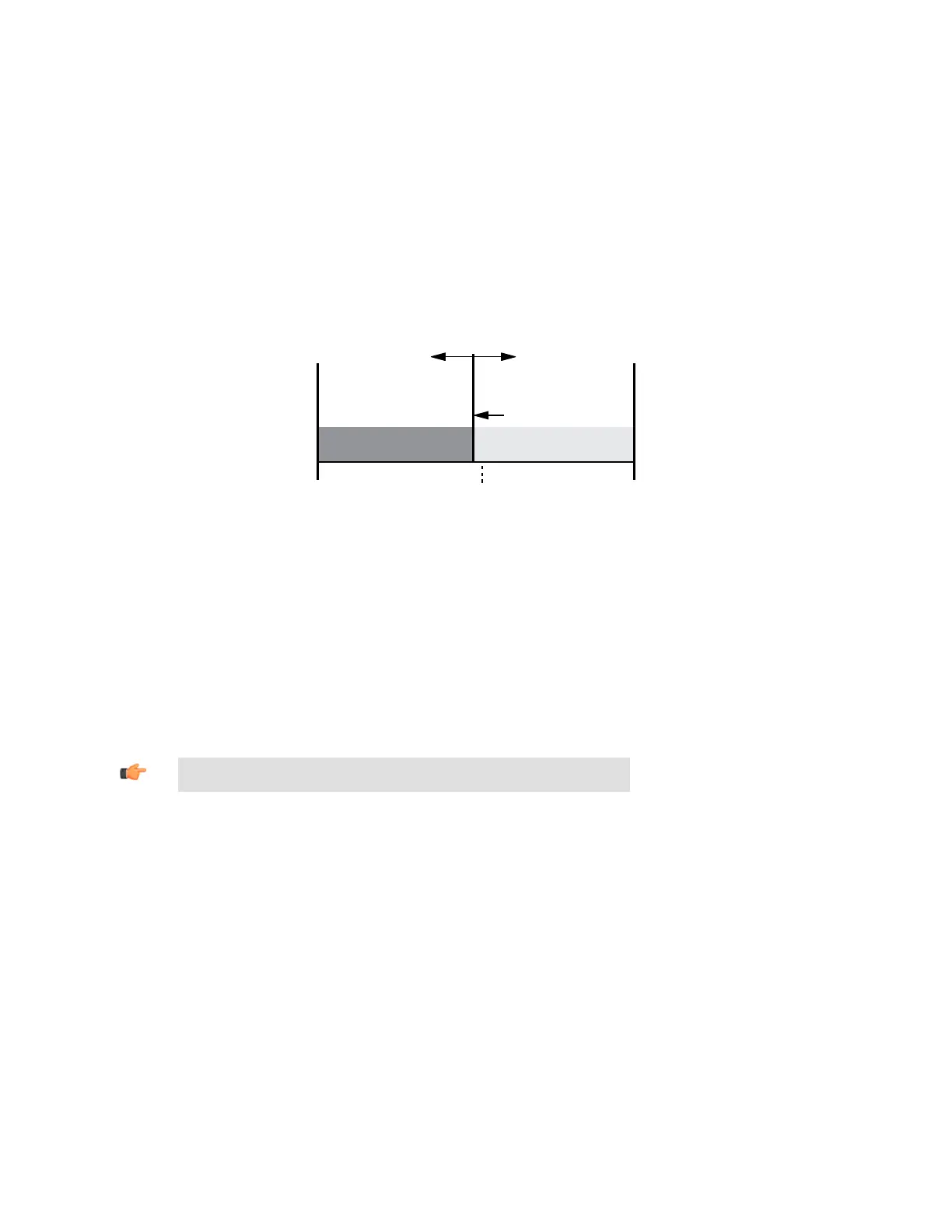
• Sets a threshold a programmable % offset below the presented condition
• Changes output state on any condition darker than the threshold condition
• Threshold can be adjusted using “+” and “-” rocker button (Manual Adjust)
• Recommended for applications where only one condition is known, for example a stable light background with varying darker targets
• See Program Mode on page 3 for programming the Offset Percent setting
A single sensing condition is presented, and the sensor positions a threshold a programmable % offset below the presented condition.
When a condition darker than the threshold is sensed, the output either turns ON or OFF, depending on the LO/DO switch setting (see
LO/DO Switch in Top Panel Interface on page 2).
Threshold position
adjusted by
Manual Adjust
Sensor positions
threshold a programmable
% offset below the
presented condition
Darkest
(no signal)
Most Light
(saturated
signal)
Output OFF Output ON
Condition
Presented
Figure 9. Light SET (Light Operate shown)
Light SET and Manual Adjust
• Moves switching threshold value up or down to make adjustments
• Slide Mode switch to ADJ to enter Adjust mode
• Press “+” to increase; press “-” to decrease
• GREEN display shows the switching threshold value
• 2 seconds after adjustment, the GREEN display will flash 3 times to confirm
• Slide Mode switch to RUN to complete operation
Remember: Manual adjustments are disabled when Auto Thresholds are ON
DF-G1 - Expert Dual Display Fiber Amplifier Manual
P/N 161999 Rev. A www.bannerengineering.com - tel: 763-544-3164 13





 To Next Page