December 19, 2023page2
TL50 Basic Wireless Andon Tower Light Instruction Manual
Device Settings
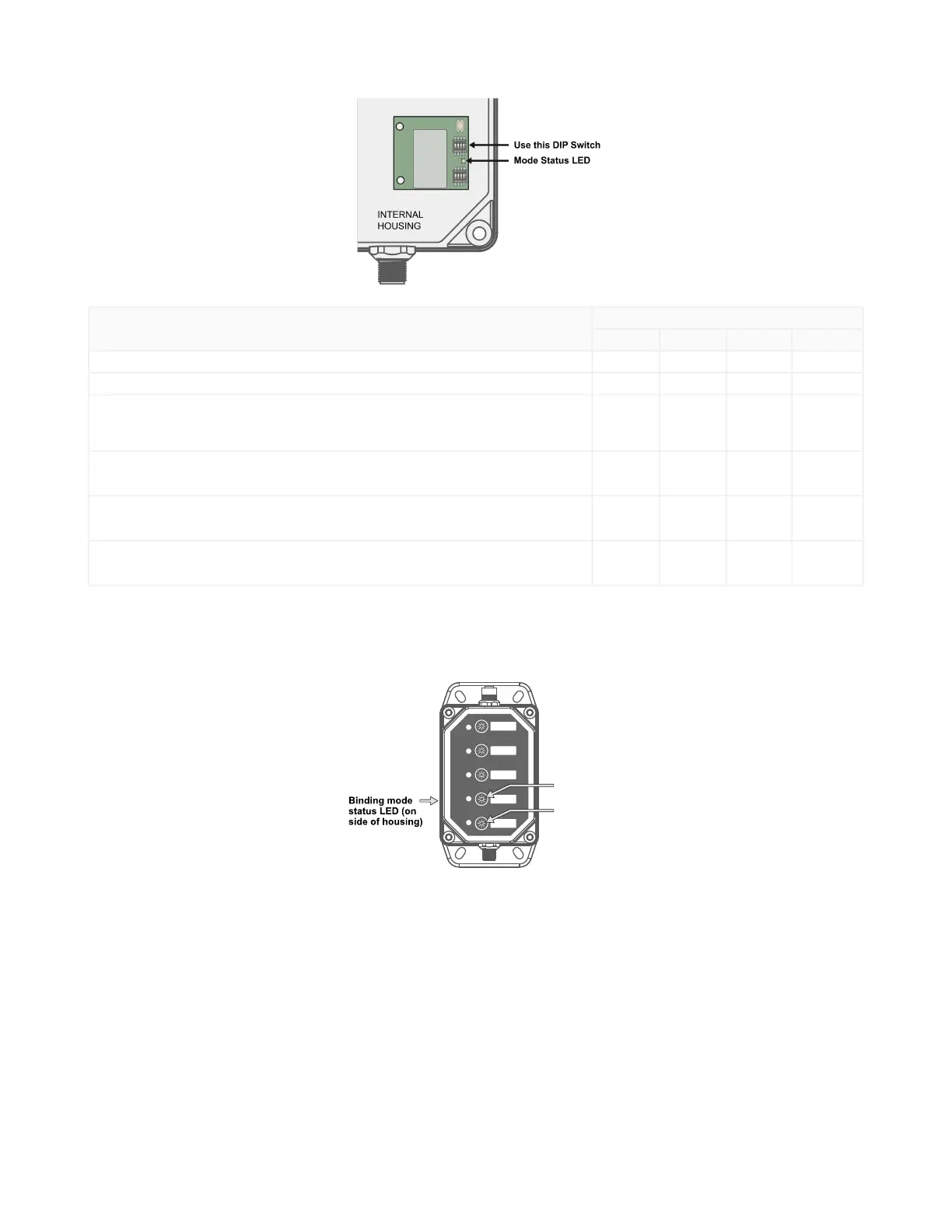
DIP Switches
1 2 3 4
Transmit Power Level:500mW(defaultsetting) OFF
Transmit Power Level:250mW ON
Bit-Packed Button / Light Status:
Input 1: ENABLED
Output 1 Overwrite Input Status: ENABLED
(default setting)
OFF OFF OFF
Conventional Button / Light Status:
Inputs 2-6 (OFF = 0, Solid = 1, Flashing = 2): ENABLED
Outputs 2-6 (Overwrite Input Status): ENABLED
ON OFF OFF
Bit-packed Button / Light Status:
Input 1: ENABLED
Output 1 Overwrite Input Status: DISABLED
OFF ON OFF
Conventional Button / Light Status:
Inputs 2-6 (OFF = 0, Solid = 1, Flashing = 2): ENABLED
Outputs 2-6 (Overwrite Input Status): DISABLED
ON ON OFF
Bind the LCA130T to a DXM and Assign the Device Address
Before beginning the binding procedure, apply power to all the devices. Separate the radios by two meters when running the binding
procedure.PutonlyoneDXMintobindingmodeatatimetopreventtheKey definition for "{keyrefName}" not found in the DITA map.from
binding to the wrong DXM.
OntheDXM:UsethearrowkeystoselecttheISM RadiomenuontheLCDandclickENTER.
HighlighttheBindingmenuandclickENTER.
UsethearrowkeystoselecttheNodeaddresstobindtheKey definition for "{keyrefName}" not found in the DITA map.to.
OntheKey definition for "{keyrefName}" not found in the DITA map.,enterbindingmode:
The red and green LEDs flash alternately and the sensor searches for a DXM in binding mode. After the LCA130T binds, the LEDs
staysolidmomentarily,thentheyflashtogetherfourtimes.TheKey definition for "{keyrefName}" not found in the DITA map.exits
bindingmode.
Press and hold button 1.
Triple-click button 2.
Release button 1.
LabeltheLCA130TwiththeNodeaddressnumberforfuturereference.
OntheDXM:ClickBACKtoexitbindingforthatspecificNodeaddress.
Repeatsteps3through6andchangetheNodeaddressforasmanyKey definition for "{keyrefName}" not found in the DITA map.s
asareneededforyournetwork.
OntheDXM:Afteryouhavefinishedformingyournetwork,clickBACKuntilyoureachthemainmenu.
© Banner Engineering Corp. All rights reserved.



 To Next Page