EasyManua.ls Logo

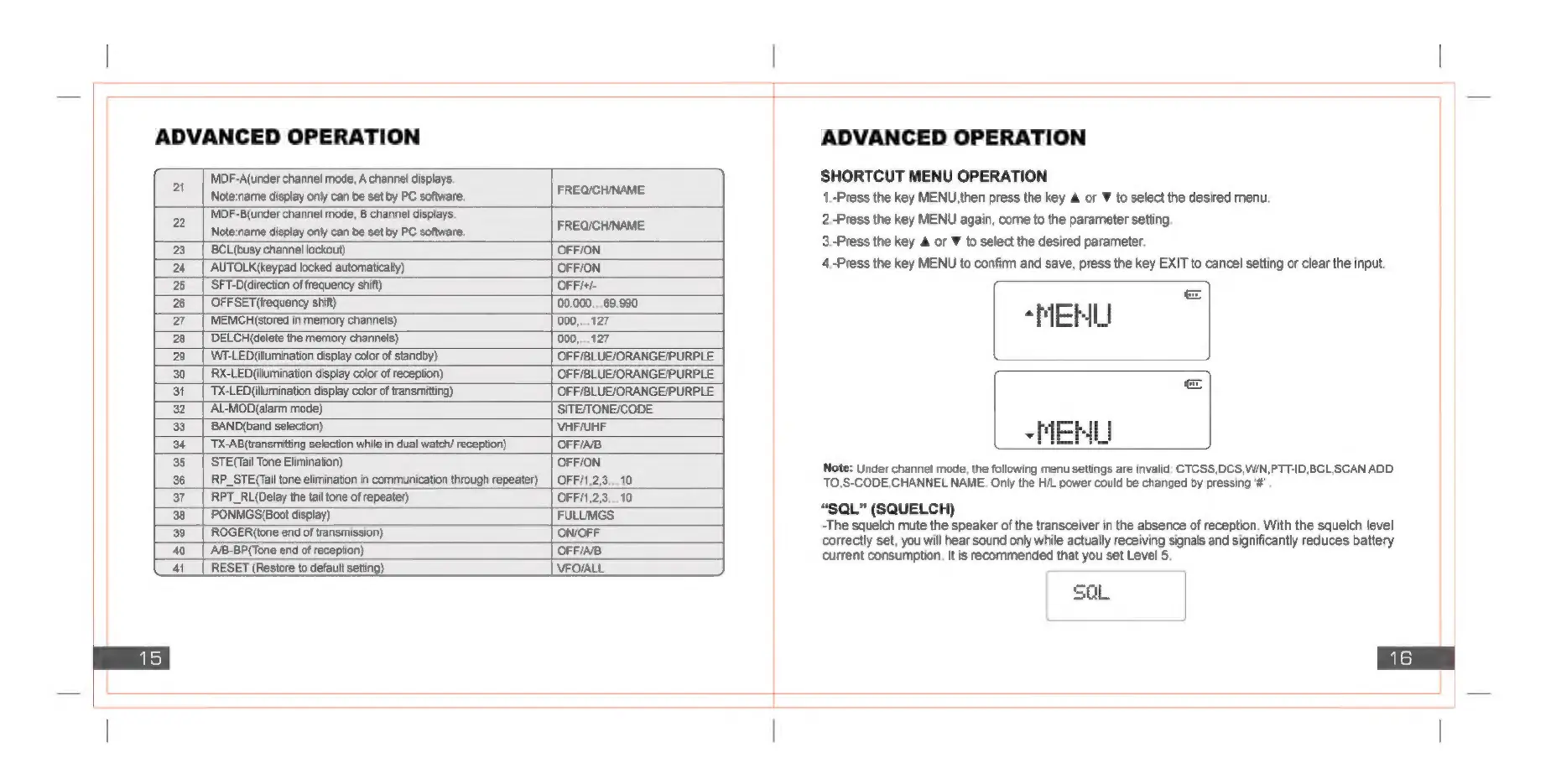
Baofeng UV82 - Advanced Operation: Channel Display Modes; Channel Mode A and B Notes; Advanced Operation: Key and Lock Functions; Busy Channel Lockout, Auto Key Lock, LED Colors

Baofeng UV82
17 pages
Print Icon
To Next Page IconTo Next Page
To Previous Page IconTo Previous Page
Loading...
ADVANCED
OPERATION
MDF-A(under
channel
mode,
A
channel
displays.
21
|
Note:name
display
only
can
be
set
by
PC
software.
ASE
aS
2
MDF-B(under
channel
mode,
B
channel
displays.
FREOC
cE
Note:name
display
only
can
be
set
by
PC
software,
a
23
|
BCL(busy
channel
lockout)
‘OFFION
24
AUTOLK(keypad
locked
automatically)
OFFION
25
‘SFT-D(direction
of
frequency
shift)
OFFi+/-
26
OFFSET
(frequency
shift)
00.000...69.990
27
MEMCH(stored
in
memory
channels)
000,...127
28
DELCH(delete
the
memory
channels)
000,...127
29
_|
WF-LED(ilumination
display
color
of
standby)
OFF/BLUEJORANGE/PURPLE
30
|
RX-LEDilumination
display
color
of
reception)
OFF/BLUE/ORANGE/PURPLE
31
TX-LED(illumination
display
color
of
transmitting)
OFF/BLUE/ORANGE/PURPLE
32
AL-MOD(alarm
mode)
‘SITE/TONE/CODE
33
BAND(band
selection)
VHF/UHF
34
TX-AB(transmitting
selection
while
in
dual
watch/
reception)
OFF/AB
35
STE(Tail
Tone
Elimination)
OFF/ON
36
RP_STE(Tail
tone
elimination
in
communication
through
repeater)
|
OFF/1,2,3...10
37
RPT_RL(Delay
the
tail
tone
of
repeater)
OFF/1,2,3...10
38
PONMGS(Boot
display)
FULUMGS
39
|
ROGER(tone
end
of
transmission)
ON/OFF
40__|
A/B-BP(Tone
end
of
reception)
OFFIAB
41_
|
RESET
(Restore
to
default
set
VFOVALL
ADVANCED
OPERATION
SHORTCUT
MENU
OPERATION
1.-Press
the
key
MENU,then
press
the
key
or
¥
to
select
the
desired
menu.
2.-Press
the
key
MENU
again,
come
to
the
parameter
setting
3.-Press
the
key
&
or
¥
to
select
the
desired
parameter.
4.-Press
the
key
MENU
to
confirm
and
save,
press
the
key
EXIT
to
cancel
setting
or
clear
the
input.
“MEHL
“MEHL
Note:
Under
channel
mode,
the
following
menu
settings
are
invalid:
CTCSS,DCS,WIN,PTT-ID,BCL,SCAN
ADD
TO,S-CODE,CHANNEL
NAME,
Only
the
H/L
power
could
be
changed
by
pressing
'#”
“SQL”
(SQUELCH)
-The
squelch
mute
the
speaker
of
the
transceiver
in
the
absence
of
reception.
With
the
squelch
level
correctly
set,
you
will
hear
sound
only
while
actually
receiving
signals
and
significantly
reduces
battery
current
consumption.
It
is
recommended
that
you
set
Level
5.
SQL

Related product manuals