EasyManua.ls Logo

Baofeng UV82 - Advanced Operation: Repeater Offset and Tail Tone; Offset Example, Notes, and STE Function; Saving Channels; Memory Content and Saving Example

Baofeng UV82
17 pages
Print Icon
To Next Page IconTo Next Page
To Previous Page IconTo Previous Page
Loading...
ADVANCED
OPERATION
When
communicating
via
a
repeater,
the
direction
of
displacement
of
frequency
should
be
timed
to
the
displacement
of
the
transmission
frequency
is
higher
or
lower
than
the
receiving
frequency.
example:
\f
we
want
to
make
a
communication
through
amateur
radio
repeater
whose
frequency
input
is
145,000
MHz
and
145,600
MHz
is
output,
we
select
the
"OFFSET"
of
the
previous
section
in
0600
and
the
direction
of
travel
"SHIFT"
programmed
to
[-],
so
the
transceiver
will
always
145,600
MHz
in
frequency
and
when
you
press
[PTT]
to
transmit
transceiver,
the
frequency
will
automatically
move
to
145,000
MHz.
Note:
-
"TO"
(Time
Operation)
‘Scanning
will
stop
when
it
detects
an
active
signal.
The
scanning
will
stop
on
each
channel
or
active
frequency
for
a
predetermined
time,
after
that
time
the
scan
will
resume
automatically.
-"CO"
(Carrier
Operation):
‘The
scanning
will
stop
and
remain
in
the
frequency
or
channel,
unti
the
active
signal
disappears.
-""SE"(Search
Operation):
‘The
scanning
will
stop
and
remain
in
the
frequency
or
channel
after
it
detects
an
active
signal
STE
(TAIL
TONE
ELIMATION)
This
function
is
used
to
activate
or
deactivate
the
transmission
end
of
the
transceiver.
this
final
tone
transmission
only
be used
in
communications
between
transceivers
and
not
in
communications
through
a
repeater,
which
must
be
deactivated.
STE
THE
INSTRUCTIONS
TO
SAVE
CHANNEL
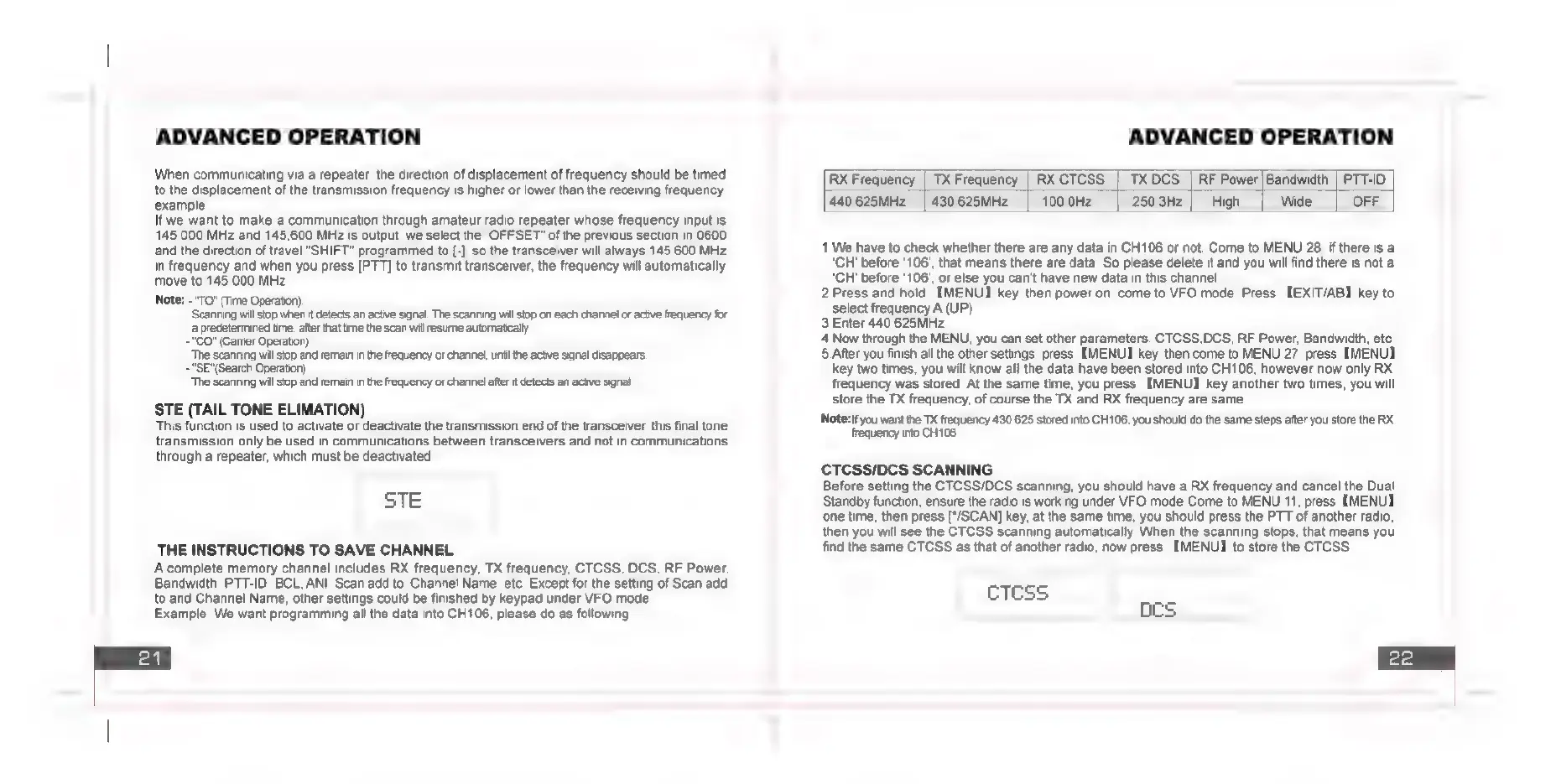
Acomplete
memory
channel
includes
RX
frequency,
TX
frequency,
CTCSS,
DCS,
RF
Power,
Bandwidth,
PTT-ID,
BCL,
ANI,
Scan
add
to,
Channel
Name,
etc.
Except
for
the
setting
of
Scan
add
to
and
Channel
Name,
other
settings
could
be
finished
by
keypad
under
VFO
mode.
Example:
We
want
programming
all
the
data
into
CH106,
please
do
as
following:
ADVANCED
OPERATION
RX
Frequency
|
TX
Frequency
|
RXCTCSS
|
TX
DCS
|
RF
Power|Bandwidth
|
PTT-ID
440.625MHz
|
430.625MHz
100.0Hz
250.3Hz
High
Wide
OFF
1.We
have
to
check
whether
there
are
any
data
in
CH106
or
not.
Come
to
MENU
28,
if
there
is
a
‘CH’
before
‘106’,
that
means
there
are
data.
So
please
delete
it
and
you
will
find
there
is
not
a
‘CH’
before
‘106’,
or
else
you
can’t
have
new
data
in
this
channel.
2.Press
and
hold
[MENU]
key,
then
power
on,
come
to
VFO
mode. Press
[EXIT/AB]
key
to
select
frequency
A
(UP).
3.Enter
440.625MHz
4.Now
through
the
MENU,
you
can
set
other
parameters.
CTCSS,DCS,
RF
Power,
Bandwidth,
etc.
5
After
you
finish
all
the
other
settings,
press
[MENU]
key,
then
come
to
MENU
27,
press
[MENU]
key
two
times,
you
will
know
all
the
data
have
been
stored
into
CH106,
however
now
only
RX.
frequency
was
stored.
At
the
same
time,
you
press
[MENU]
key
another
two
times,
you
will
store
the
TX
frequency,
of
course
the
TX
and
RX
frequency
are
same.
‘Note:if
you
want
the
TX
frequency
430.625
stored
into
CH108,
you
should
do
the
same
steps
after
you
store
the
RX
frequency
into
CH106.
CTCSS/DCS
SCANNING
Before
setting
the
CTCSS/DCS
scanning, you
should
have
a
RX
frequency
and
cancel
the
Dual
Standby
function,
ensure
the
radio
is
working
under
VFO
mode.Come
to
MENU
11,
press
[MENU]
‘one
time,
then
press
[*/SCAN]
key,
at
the
same
time,
you
should
press
the
PTT
of
another
radio,
then
you
will
see
the
CTCSS
scanning
automatically.
When
the
scanning
stops,
that
means
you
find
the
same
CTCSS
as
that
of
another
radio,
now
press
[MENU]
to
store
the
CTCSS.
cTcss
ocs

Related product manuals