99R5905752 /16 DP2K C
• Framing_uncorrected
• RGB-12bit-Color Bars
• RGB-12bit-Convergence Pattern
• RGB-12bit-Log Step Blue
• RGB-12bit-Log Step Cyan
• RGB-12bit-Log Step Green
• RGB-12bit-Log Step Magenta
• RGB-12bit-Log Step Red
• RGB-12bit-Log Step White
• RGB-12bit-Log Step Yellow
• RGB-12bit-MacBeth ColorChecker
• RGB-12bit-Shallow Horizontal Ramp
• RGB-12bit-Split Ramp
• RGB-12bit-Vertical Bars Plus Crosshairs
• SCC_13PNTS
• SCC_27PNTS
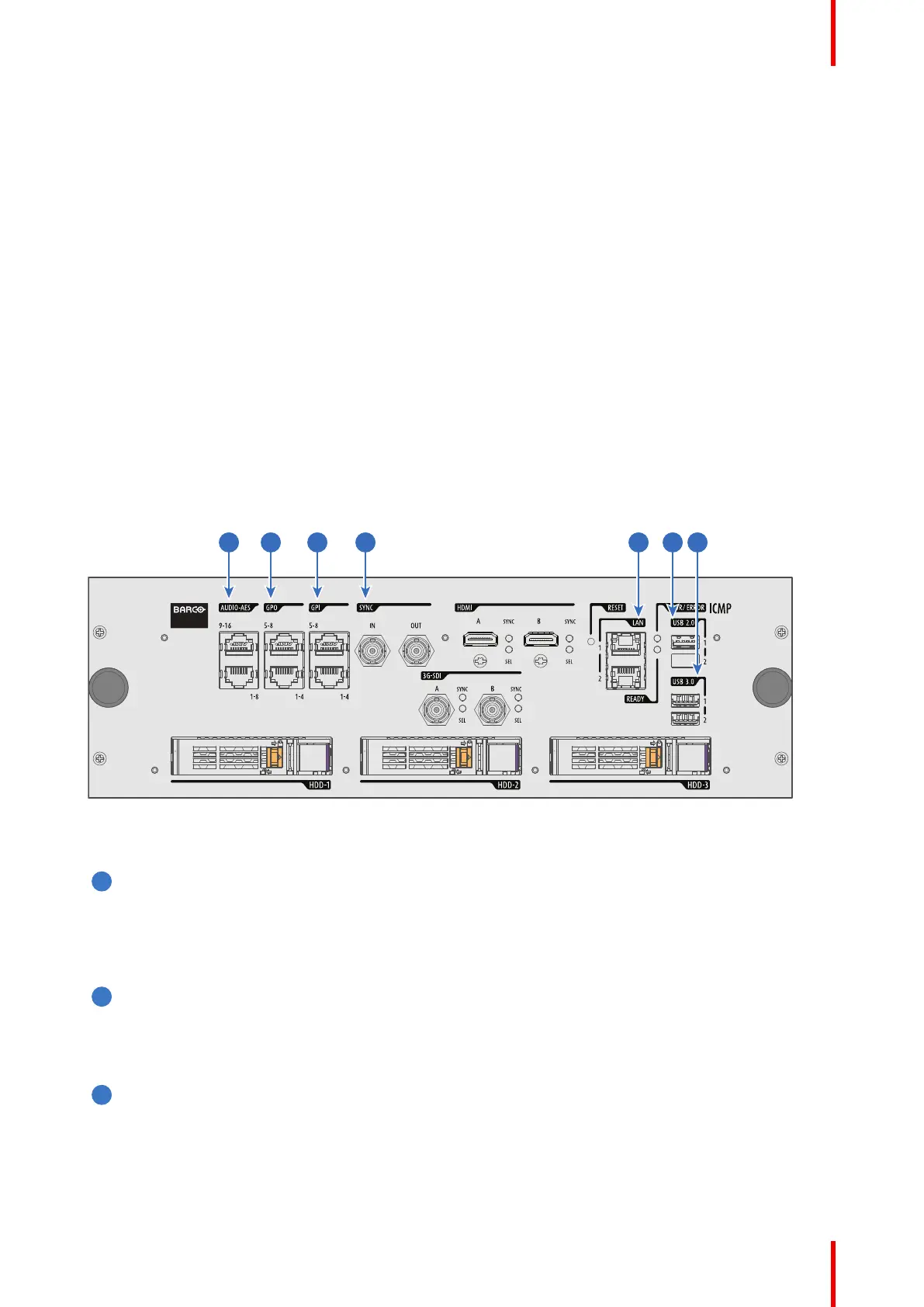
7.11 ICMP-X communication ports
Location of the communication ports
Image 7–19 ICMP-X (with HDMI 2.0).
Functionality
AUDIO-AES 1-8 (9-16)
ICMP-X outputs sixteen audio signals equitably distributed over these two RJ45 connectors, which can
be configured independently. The mapping of audio channels (content) on each audio output (AES
outputs of the ICMP-X) is performed by configuring the ICMP-X via the Communicator software. Please
refer to the Communicator user guide for further information.
GPO 1-4 (5-8)
These RJ45 connectors can be used to send trigger signals to other devices. The mapping of user Cues
(output Cues) on each General Purpose Output (GPO) is configured via the Communicator software.
Please refer to the Communicator user guide for further information.
GPI 1-4 (5-8)
These RJ45 connectors can be used to receive trigger signals from other devices. The mapping of the
General Purpose Input (GPI) on each input Cues is configured via the Communicator software. Please
refer to the Communicator user guide for further information.
ICMP-X



 To Next Page