Manual 2100-719
Page 20 of 25
TROUBLESHOOTING
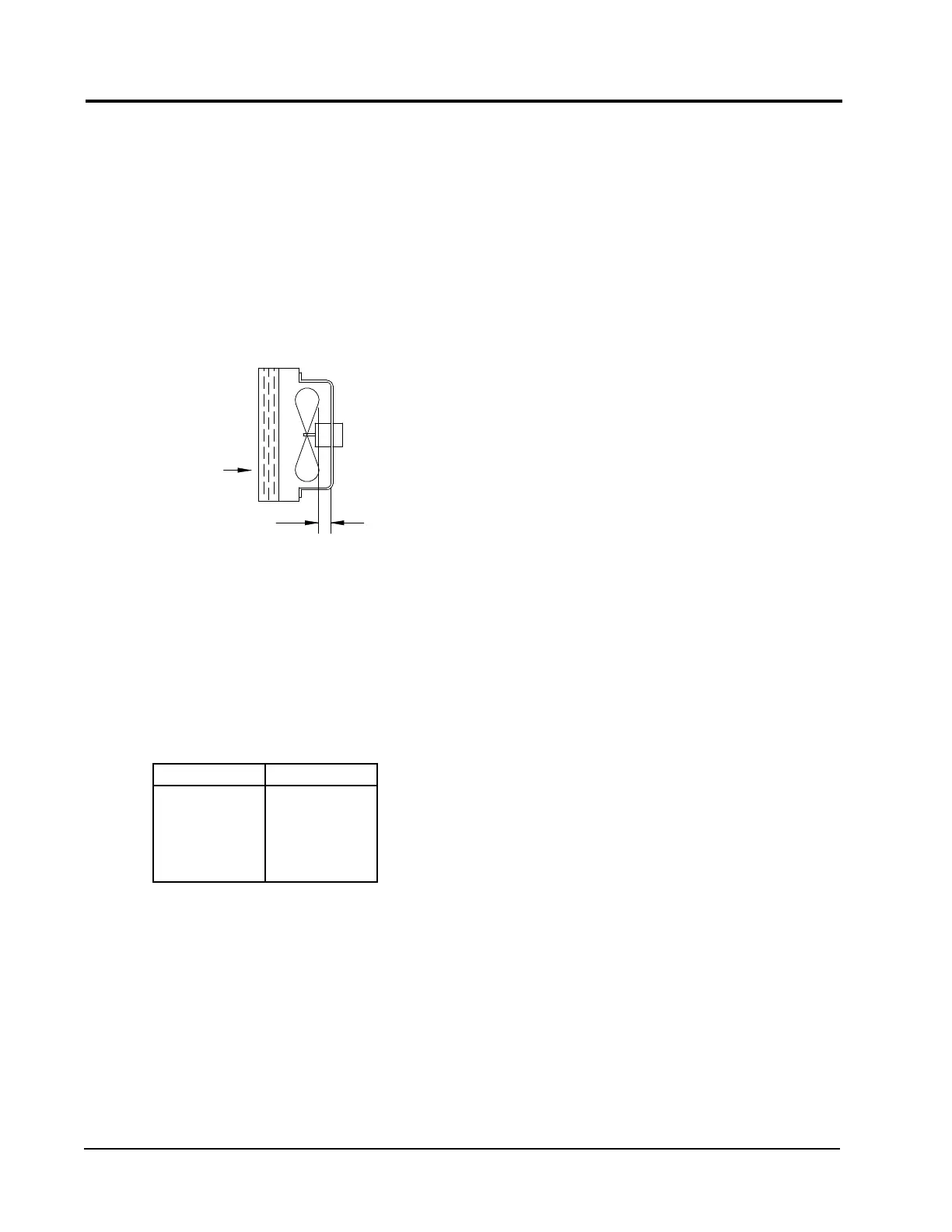
FIGURE 9
FAN BLADE SETTING
TABLE 4
FAN BLADE DIMENSION
REMOVAL OF FAN SHROUD
1. Disconnect all power to the unit.
2. Remove the screws holding both grilles, one on
each side of unit, and remove grilles.
3. Remove screws holding fan shroud to condenser
and bottom. Nine (9) screws.
4. Unwire condenser fan motor.
5. Slide complete motor, fan blade, and shroud
assembly out the left side of the unit.
6. Service motor/fan as needed.
7. Reverse steps to reinstall.
R-410A
REFRIGERANT CHARGE
This unit was charged at the factory with the quantity of
refrigerant listed on the serial plate. AHRI capacity and
efciency ratings were determined by testing with this
refrigerant charge quantity.
The following pressure tables show nominal pressures
for the units. Since many installation specic situations
can affect the pressure readings, this information should
only be used by certied technicians as a guide for
evaluating proper system performance. They shall not
be used to adjust charge. If charge is in doubt, reclaim,
evacuate and recharge the unit to the serial plate charge.
MODEL Dimension A
C24H
C30H
C36H
C42H
C48H
C60H
1.00"
"A"
S**H AIRFLOW
W**H AIRFLOW
MIS-2725 A
FAN BLADE SETTING DIMENSIONS
Shown in Figure 9 is the correct fan blade setting for
proper air delivery across the outdoor coil. Refer to
Table 4 for unit specic dimension.
Any service work requiring removal or adjustment
in the fan and/or motor area will require that the
dimensions below be checked and blade adjusted in or
out on the motor shaft accordingly.
C**H



 To Next Page