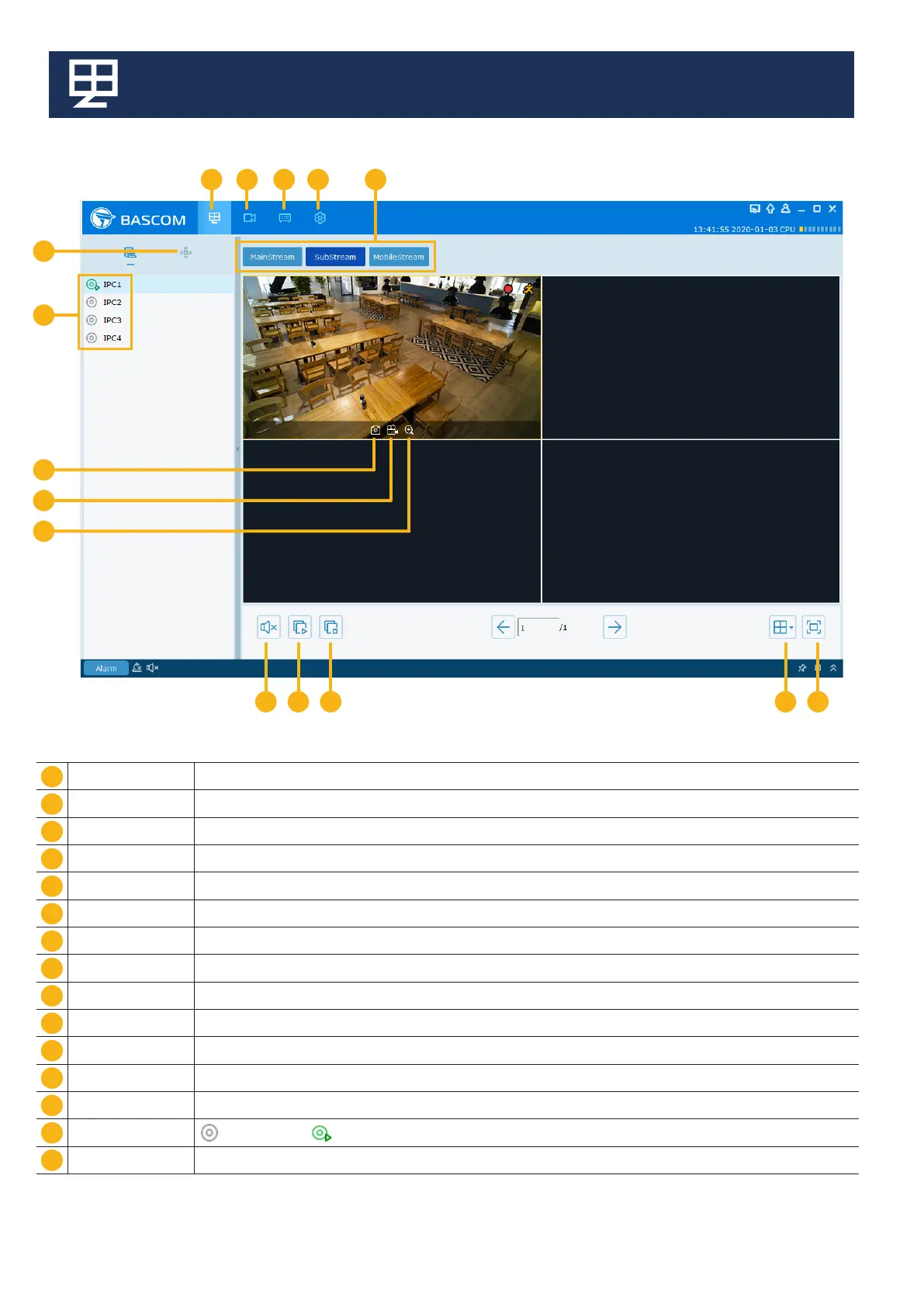
2. Main view Menu
1
11
10
12
13
14
15
2
9
3
8
67
4
5
1
11
10
12
13
14
15
2
9
3
8
6
7
4
5
Main View Access the live view of the cameras
Remote Playback Access camera recordings
Remote Setting Camera and recorder settings
System cong Software settings
Streaming Quality If your internet is fast enough, you can use Main Stream. Otherwise, use Sub Stream or Mobile Stream
Full Screen mode Set the live view to full screen. Menu buttons will be hidden
Layout Display 1/4/8/16 video channels
Stop all channels Stop the playback for all channels
Open all channels Start the playback for all channels
Sound Enable or disable sound (if the camera has the microphone option)
Numerical zoom Click to zoom-in the channel. When the icon appears, press and hold the left button of your mouse to drag the area
Manual record Start/stop manual recording
Manual capture Save a snapshot of the current camera image.
Channels No connection / Connected
Optical zoom Click to enter Zoom lens conguration - Available for PRO and PLUS cameras



 To Next Page